The Best Auto SEO Plugin for WordPress (2026 Buyer's Guide)
By AutoBoost Team · 2026-06-22 · 11 min read
Search for "best auto SEO plugin for WordPress" and you get two completely different kinds of tool dressed up in the same language.
One kind analyses your pages and tells you what is wrong. The other kind actually does the work to fix it.
Both call themselves "auto SEO", and that confusion is exactly why people buy the wrong thing, install it, and three months later still have hundreds of posts with no meta description.
This guide is for WordPress site owners, bloggers and agencies who have more posts than they can optimise by hand. Here is what we will cover:
- What an auto SEO plugin really is, defined plainly.
- The two honest categories the market splits into.
- A comparison table of what to look for.
- A short checklist so you can pick the right tool for your site rather than the one with the loudest homepage.
Key takeaways
- There are two kinds of "auto SEO plugin": analysis tools (Yoast, Rank Math, AIOSEO) that score your SEO, and automation layers that actually fix it in bulk.
- You run both, keep an analysis plugin for scoring and schema, add an automation layer to fill the metadata across every post.
- Must-haves when choosing: bulk editing, writes back into your SEO plugin, finds the gaps for you, and a human approval step.
- No plugin ranks thin content. It removes the on-page bottleneck so good content can compete.
What people actually mean by "auto SEO plugin"
When someone types "auto SEO WordPress plugin" into Google, they usually mean one of two things, and they often do not realise they are two different things:
- "Tell me what to fix." A plugin that scans each page, scores it, and shows a checklist of problems: missing meta description, title too long, keyword not used, no alt text. This is analysis.
- "Just fix it for me." A tool that takes that backlog of problems and resolves them in bulk, writing optimised metadata across hundreds of posts at once. This is automation.
The crucial point is that almost every well-known "SEO plugin" sits firmly in the first camp.
Yoast, Rank Math and All in One SEO are brilliant at telling you what is wrong. None of them will sit down and write 400 meta descriptions for you. They hand you the to-do list, not the finished work.
Watch out: If your real problem is a backlog of unoptimised posts, an analysis plugin alone will not solve it. It will just measure the backlog more precisely.
Understanding which category you actually need is the single most useful thing in this whole guide. Everything else follows from it.
Category 1: Analysis and checklist plugins
These are the household names. They live inside the WordPress editor, add an SEO meta box under each post, and grade your work with a colour: red, orange, green.
They are the foundation of on-page SEO on WordPress and you should run one. We compare them in depth in our Rank Math vs Yoast vs AIOSEO breakdown, but here is the short version of what they are for.
| Plugin | Best known for | What it automates | What it leaves to you |
|---|---|---|---|
| Yoast SEO | The original, readability + green-light scoring | Schema, sitemaps, technical defaults | Writing every title, description and keyword by hand |
| Rank Math | Feature-rich, generous free tier, 1-click presets | Schema, redirects, bulk fields (manually) | Actually filling in the content of each field |
| All in One SEO | Clean setup, good for beginners and WooCommerce | Sitemaps, schema, technical SEO | The per-post copywriting |
Notice the pattern in the last column:
- The technical scaffolding is automated. Schema, sitemaps and defaults are handled for you.
- The slow part is still manual. Writing a unique, keyword-led title and a 155-character description for each individual post is on you.
These plugins are scorekeepers. They are essential, but a scorekeeper does not play the game for you.
For a site with twenty posts that is completely fine. You sit down for an afternoon, fill in the green lights, done.
The trouble starts at scale. On a 500, 2,000 or 7,000-post site, the checklist becomes a wall. You can see every red light, and you have no realistic way to ever turn them all green by hand.
Category 2: Automation layers that fix it in bulk
This is the second, less crowded category, and it is what most people searching for an "auto SEO plugin" actually want without knowing the term for it.
An automation layer does not replace your analysis plugin. It works on top of it. Specifically, it:
- Reads the same metadata fields your analysis plugin already uses.
- Finds every gap across your whole site.
- Generates optimised content to fill those gaps.
- Writes the results straight back into Yoast or Rank Math so your existing setup just gets better.
AutoBoost is built for exactly this job. You connect your WordPress site, it scans every post, flags the ones missing a focus keyword, SEO title or meta description, and lets you generate optimised metadata in bulk. The generators are template-driven, so the output follows consistent rules every time.
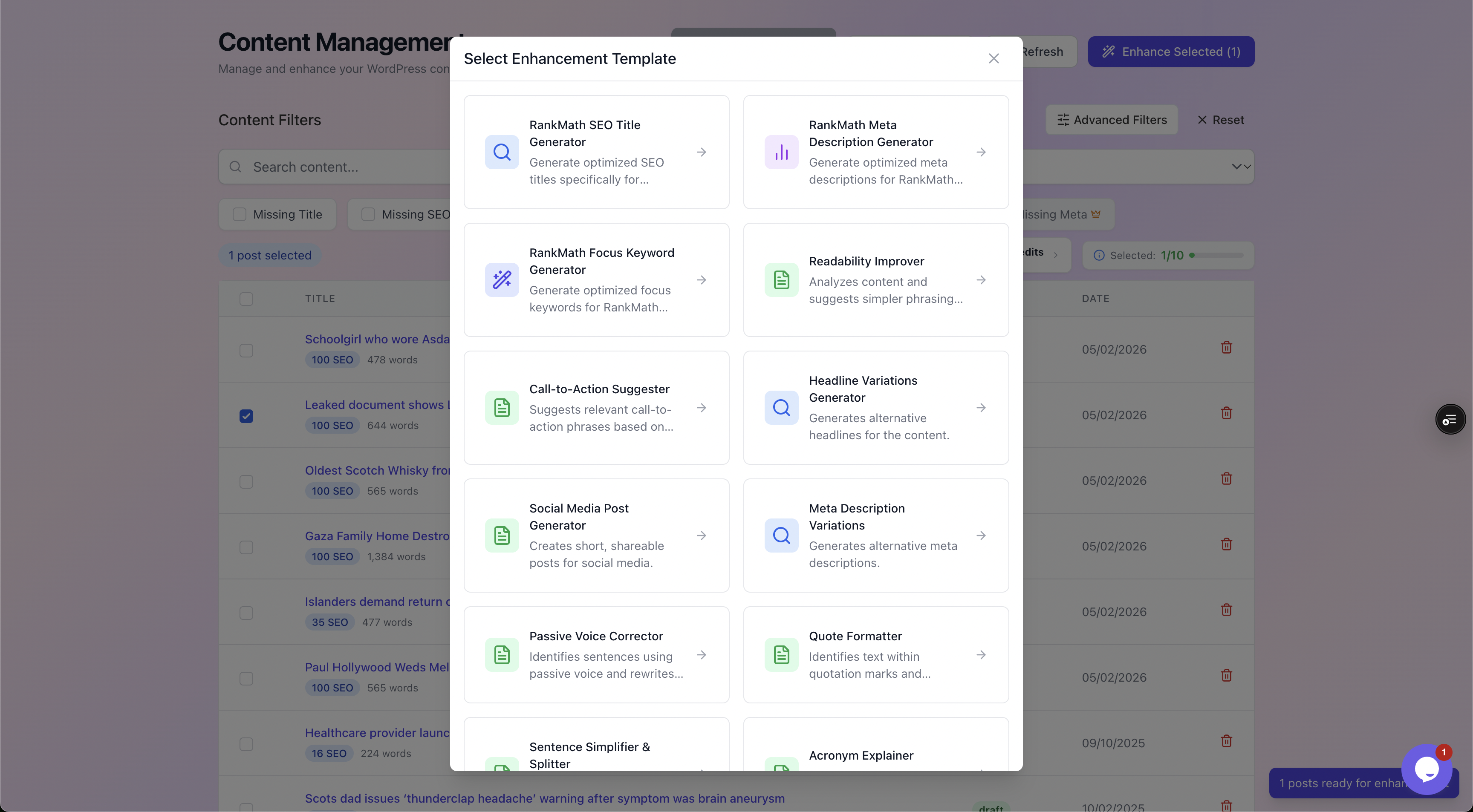
An automation layer is really a library of generators: SEO titles, meta descriptions, focus keywords, readability fixes, CTAs and headline variations, each applied consistently across your whole library.
The "auto" in a good auto SEO tool does not mean "publishes whatever it likes without asking". It means the repetitive drafting is automated while you keep the final say.
That distinction, between automating the busywork and automating the judgement, is what separates a safe tool from a risky one. We walk through the full process in our WordPress SEO automation workflow guide.
Why the two categories work better together
You do not choose between an analysis plugin and an automation layer. You run both, because each does a different job:
- The analysis plugin defines the standard and stores the data.
- The automation layer does the heavy lifting of meeting that standard across every post.
Drop either one and you feel the gap:
- Rip out Yoast or Rank Math and you lose your schema, sitemaps and editor scoring.
- Skip the automation layer and you are back to filling in fields by hand.
Together, the scorekeeper and the player finally get the whole site green.
What to look for in an auto SEO plugin
Whichever category you are shopping in, these are the features that separate a tool that genuinely saves you time from one that just adds another dashboard. Use this as your spec sheet.
| What to look for | Why it matters | Analysis plugins (Yoast etc.) | Automation layer (AutoBoost) |
|---|---|---|---|
| Bulk editing | Fixing one post at a time does not scale past a few dozen | Limited, mostly manual per-post | Yes, hundreds at once |
| AI generation | Writes the actual title, description and keyword text for you | Minimal or add-on | Yes, template-driven |
| Writes back to your plugin | No point generating metadata it cannot save | N/A, it is the plugin | Yes, into Rank Math or Yoast |
| Finds the gaps automatically | You need to know which posts need work first | Per-post scoring only | Yes, scans the whole site |
| Human approval step | Stops robotic, off-brand or wrong text going live | You write it, so yes | Yes, approve or reject each change |
| Post / usage limits | Determines whether it covers your whole library | No limit (you do the work) | Tiered: 5 to 1,000 AI credits a month |
| Works with your existing stack | Avoids ripping out a working setup | It is the stack | Adds on top, no replacement |
Two rows deserve a closer look because they are where tools quietly fail.
Writes back to your plugin
Some tools generate lovely metadata into their own database and never get it into the field WordPress actually serves to Google.
If a tool cannot write directly into your SEO plugin's meta fields, the output is just a report you now have to copy and paste. Confirm it writes back.
AutoBoost writes into rank_math_description, and _yoast_wpseo_metadesc directly, so the metadata is live the moment you approve it.
Human approval
This is non-negotiable. The fastest way to get penalised or embarrassed is to let a tool publish unreviewed text across your whole site.
The right design shows you the suggestion against the original, with a quality check, and changes nothing until you click approve.
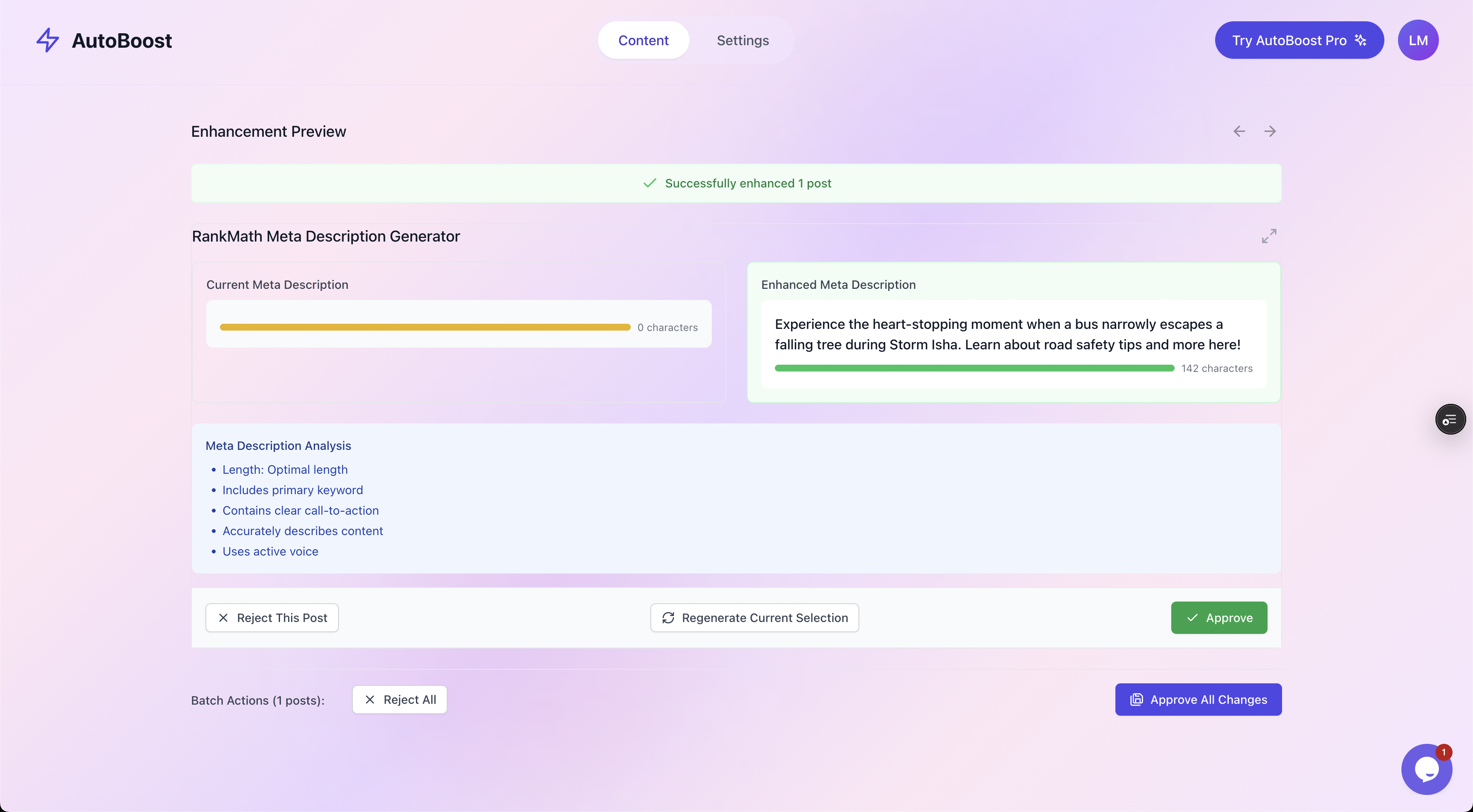
The before-and-after view: the new meta description sits next to the original with a length, keyword, CTA and active-voice check, and nothing changes until you approve it.
A worked example: the same site, three ways
Picture a real situation. You run a 7,500-post WordPress site and a recent audit shows most posts are missing metadata. How do the three approaches handle it?
Option A, analysis plugin only.
Rank Math shows you a red SEO score on each of those posts. Accurate, helpful, and completely demoralising, because you now have 7,000-plus posts to edit by hand.
At a generous three minutes per post that is over 350 hours of work. It will never get done, and the content keeps underperforming.
Option B, by hand with the plugin.
You commit a week to it, optimise maybe 200 of the highest-traffic posts, burn out, and stop. The other 7,000 stay red. This is what actually happens to most sites.
Option C, analysis plugin plus an automation layer.
You filter the library down to just the posts missing a meta description, SEO title or keyword. From there the loop is quick:
- Bulk-generate optimised metadata for a batch.
- Review the suggestions and approve the good ones.
- Regenerate the few that miss the mark.
- Write them all back into Rank Math.
A batch of 125 posts, the biggest bulk run on Pro, takes far less time to review than it would to write by hand.
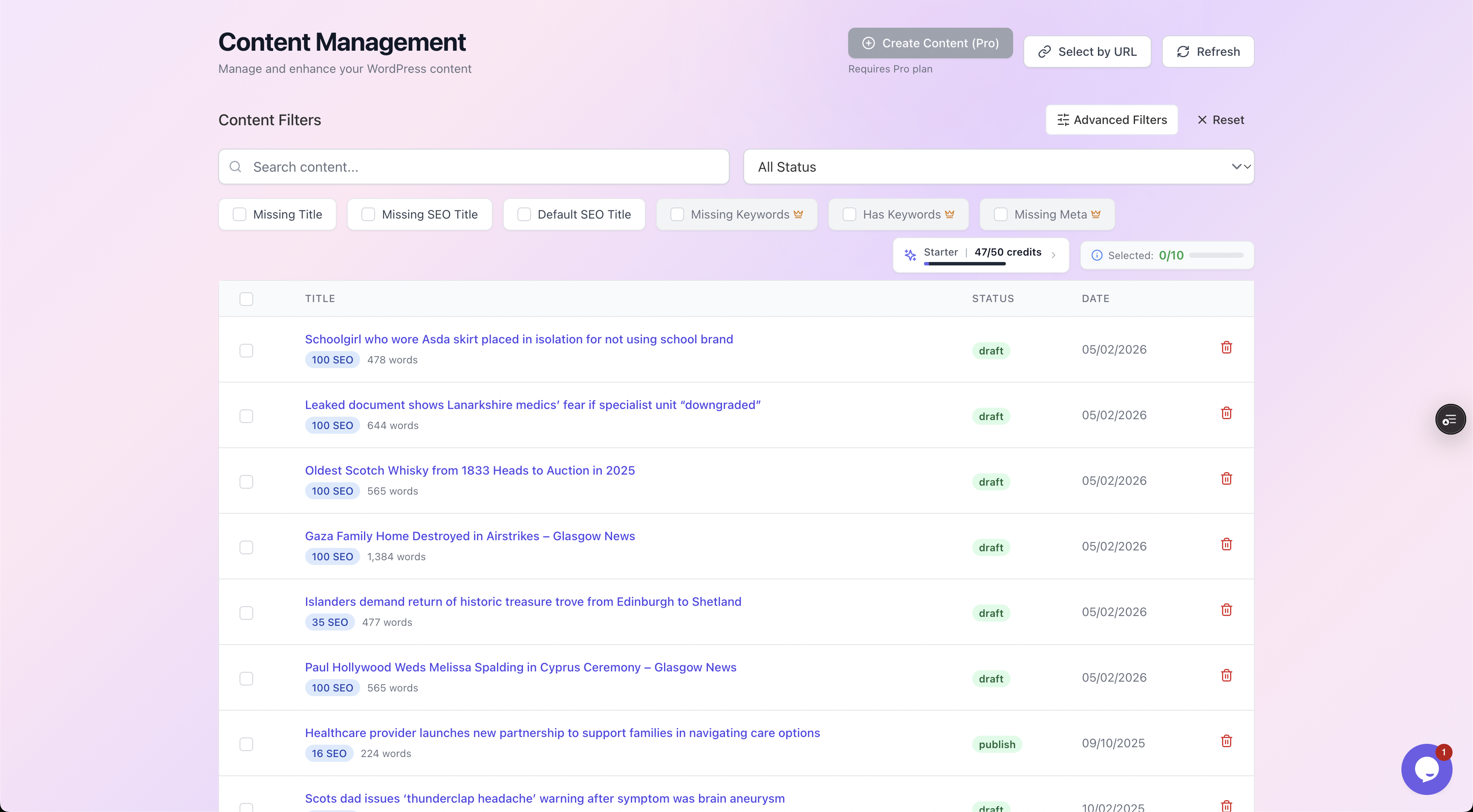
Filtering by what is actually missing, so you optimise the posts that need it instead of re-touching the ones that are already fine.
That is the whole pitch for automation in one example. The job goes from impossible to something you can work through in batches, most important pages first. On a 7,500-post site, the Agency plan's 1,000 credits a month means about eight months to cover everything on credits alone, or sooner if you add your own OpenAI key, which does not use up credits.
The tagline we use internally: fix 250 posts' SEO in under an hour of review, not 10 hours of writing. That many posts is a month of Pro credits or a quarter of Agency's. The analysis plugin still does its job throughout. The automation layer just makes the job finishable.
Be honest about what no auto SEO plugin can do
If a tool promises automatic first-page rankings, close the tab. No plugin, in either category, can do these things, and a fair buyer's guide has to say so plainly.
- It will not make thin content rank. Better metadata raises click-through rate on content that already deserves to be found. It does not turn a weak page into a strong one. If the page does not answer the query, fix the page.
- It will not build backlinks or authority. Those are off-page, earned over time. On-page automation is the other half of the work, not all of it.
- It does not remove the need to review. Generated text is a strong first draft, not gospel. Skim each batch for accuracy and brand voice before you approve. That ten percent human check is what keeps the ninety percent of automation safe.
An auto SEO plugin removes the repetitive on-page bottleneck so your good content can compete.
That is a genuinely large amount of value. It is just not magic, and anyone selling it as magic is selling you something else.
A checklist for choosing your auto SEO plugin
Run a candidate through these questions before you commit:
- Which category do I need? A scorekeeper, an automation layer, or both? If you have a backlog, you need both.
- Does it work with my existing SEO plugin rather than forcing me to replace Rank Math, Yoast or AIOSEO?
- Can it edit in bulk, or am I still fixing one post at a time?
- Does it write metadata straight back into my plugin's fields, or just produce a report?
- Is there a human approval step before anything changes? If not, walk away.
- Do the monthly credits cover my whole library? Check the plan's credits and posts per bulk run against your actual post count.
- Does it find the gaps for me, or do I have to know which posts need work in advance?
- Is the language natural, or does it stuff the keyword into every field and read like spam?
If a tool ticks the automation rows, complements your analysis plugin, and keeps you in control with an approval step, it will save you real time.
AutoBoost is built to tick every one of these:
- Tiered plans from a free plan with 5 AI credits a month up to 1,000 credits a month on Agency.
- Tailored workflows for bloggers and e-commerce stores.
- It integrates with Rank Math and Yoast rather than replacing them, and reads All in One SEO data.
Frequently asked questions
What is the best auto SEO plugin for WordPress? There is no single answer, because "auto SEO plugin" covers two different tools. For analysis and scoring, Rank Math, Yoast and AIOSEO are the leaders. For actually fixing a backlog in bulk, you want an automation layer like AutoBoost that works on top of those plugins. Most sites at scale need one of each, not a choice between them.
Do auto SEO plugins replace Yoast or Rank Math? No, and a good one should not try to. Yoast and Rank Math store your SEO metadata, schema and sitemaps inside WordPress. An automation layer reads and fills those same fields, so it complements your analysis plugin rather than replacing it. Keep the plugin you already use.
Can an auto SEO plugin write meta descriptions automatically? Yes. That is the highest-leverage thing this kind of tool does. A good one generates a 150 to 160 character description with the keyword near the front and a call to action, shows it next to your original with a quality check, and writes it into your SEO plugin once you approve. The approval step is what keeps it safe.
Is automated SEO safe, or will Google penalise it? It is safe when you review changes before they publish and keep the language natural. The risk comes from tools that publish unreviewed, over-optimised text across a whole site. Choose one with human-in-the-loop approval, and treat the generated text as a first draft you sign off, not something that goes live untouched.
How many posts can I optimise with an auto SEO plugin? That depends on the tier. AutoBoost ranges from a free plan with 5 AI credits a month (3 posts per bulk run), through Starter at 50 credits and Pro at 250, up to Agency at 1,000 credits and 500 posts per run. Check the credits against your actual library size so you know how long it takes to reach every page that needs work.
Still deciding which type of tool fits your site? Here is where to go next:
- Start with the fundamentals in our guide to auto SEO for WordPress.
- Compare the analysis plugins in our Rank Math vs Yoast vs AIOSEO breakdown.
- See how the automation side works in the WordPress SEO automation workflow.
When you are ready to fix the backlog rather than just measure it, AutoBoost does the bulk work and lets you approve every change.