Auto SEO for WordPress: How to Automate On-Page SEO Without Losing Control
By AutoBoost Team · 2026-06-22 · 10 min read
If you run a WordPress site of any real size, you have seen this screen in spirit, even if you have never counted the damage.
Dozens or hundreds of published posts, each missing a meta description, a focus keyword, or a title that was ever actually optimised.
In the dashboard above, 7,340 of 7,500 posts, 98%, needed work. Just the top of the list looks like this:
- 11 missing keywords
- 11 missing an SEO title
- 11 missing a meta description
Fixing those by hand is days of mind-numbing copy-paste, so it never gets done. Meanwhile all that content keeps underperforming in search.
That gap is exactly what "auto SEO" is for. This guide covers:
- What auto SEO actually is
- What it can and cannot do for your rankings
- Which tasks are genuinely worth automating
- How to work through a whole site's on-page SEO in reviewed batches, without ending up with robotic, over-optimised pages that Google ignores
Key takeaways
- Auto SEO automates the repetitive metadata work (descriptions, titles, keywords, alt text, schema), not the writing of your actual content.
- The highest-leverage fix on most sites is meta descriptions: they lift click-through rate, and missing ones let Google pick a random snippet.
- Always keep a human approval step. Tools that publish unreviewed text are the ones that get you in trouble.
- It will not rank thin content or build links. It removes the on-page bottleneck so good content can compete.
What is auto SEO?
Auto SEO is the practice of automating the repetitive, rules-based parts of on-page SEO so you do not do them by hand. It does not mean handing your rankings to a black box.
It means letting software do the mechanical work while you keep editorial control over what actually gets published. That mechanical work covers:
- Drafting meta descriptions
- Writing title tags
- Setting focus keywords
- Producing image alt text
- Adding schema
That distinction is the whole game. Search engines reward genuinely useful content, clear structure, and a good experience, and no tool automates "be the best answer to the query."
What a tool can automate is everything around that answer: the metadata, the formatting, and the consistency checks that make your good content legible to search engines and clickable in the results.
So the honest definition is this: auto SEO removes the busywork that stops you optimising your content, not the judgement that makes the optimisation good.
By hand vs auto SEO
The case for automating is really a case about time and consistency at scale.
| Doing it by hand, post by post | Auto SEO (bulk generate, then review) | |
|---|---|---|
| Time for 250 posts | 8 to 15 hours | Under an hour |
| Consistency | Drifts with your mood and the day | The same rules applied every time |
| Finding the gaps | Manual spot-checks, easy to miss | Every post scanned automatically |
| Control over wording | Full | Full, you approve each change |
| Scales to thousands of posts | Painful, never finished | Yes |
The point is not to replace your judgement. It is to stop the metadata backlog from being the reason your content underperforms.
What auto SEO can and cannot do
Being honest about this up front saves a lot of disappointment.
Auto SEO is good at:
- Writing meta descriptions at the right length (150 to 160 characters) with the keyword and a call to action.
- Generating title tag variants that fit Google's pixel limit and lead with the keyword.
- Setting a focus keyword for posts that never had one.
- Producing image alt text for accessibility and image search.
- Adding structured data (Article, FAQ, HowTo) so you are eligible for rich results.
- Finding the posts that need attention in the first place.
Auto SEO cannot:
- Make thin or unhelpful content rank. If the page does not answer the query, better metadata will not save it.
- Build authority or earn backlinks for you.
- Replace a human review. Generated text needs a quick check before it goes live, for accuracy and for brand voice.
Watch out: if a service promises automatic first-page rankings with no content work, treat it with suspicion. Real auto SEO is just the proven on-page fundamentals, done at scale, reliably and fast.
The on-page tasks worth automating
Not everything should be automated. The tasks worth automating share three traits:
- They are repetitive.
- They are rules-based.
- They benefit hugely from consistency across a whole site.
That is exactly where automation shines.
| On-page task | What it does | Worth automating? |
|---|---|---|
| Meta description | Lifts click-through rate from search | Yes, highest-leverage fix |
| Title tag | Strongest on-page signal you fully control | Yes |
| Focus keyword | Powers your SEO plugin's own analysis | Yes |
| Image alt text | Accessibility and image search | Yes |
| Schema markup | Eligibility for rich snippets | Yes |
| The article itself | Answers the searcher's question | No, write and edit by hand |
| Earning backlinks | Builds domain authority | No, off-page work |
Step 1: Find the gaps first
Before you generate anything, find out which posts actually need work. Optimising the 500 posts that are missing metadata beats re-touching the 50 that are already fine.
A good workflow lets you filter your whole library down to just the posts missing a meta description, an SEO title, or a focus keyword.
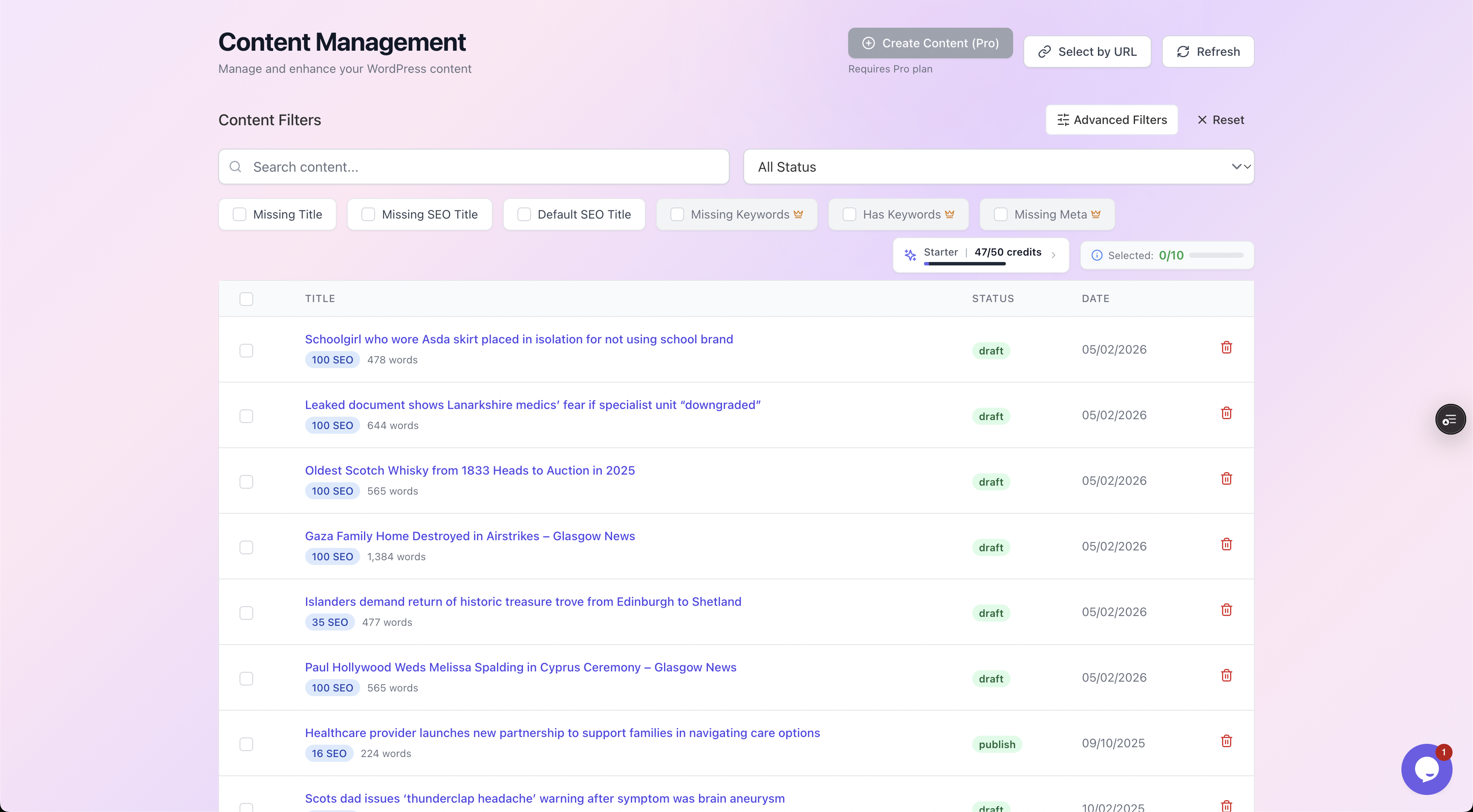
Filter the whole library down to just the posts that are missing a meta description, SEO title or focus keyword, so you work on what actually moves the needle.
Step 2: What a good fix actually looks like
The skill auto SEO replaces is writing a meta description that earns the click. Below are three real-world fixes, the kind applied across hundreds of posts at once.
Each optimised version sits at 150 to 160 characters, leads with the keyword, and gives a concrete reason to click.
| Weak or missing | Optimised (about 155 characters) | Why it wins |
|---|---|---|
| (none, so Google grabs a stray line of body text) | Storm Isha forced a dramatic bus rescue near Loch Lomond. Here is what happened, why it mattered, and the road-safety lessons for UK drivers. | Front-loads the topic, adds specifics, gives a reason to read on |
| "Read our guide to kitchen renovations." | Kitchen renovation costs in 2026: real price ranges by size, where the money goes, and five ways to cut the bill without cutting corners. | Promises numbers and a benefit, and matches buyer intent |
| "Bathroom fitting services and information." | How much does a new bathroom cost in the UK? A full 2026 breakdown of labour, tiling and fittings, plus the surprises that blow the budget. | Turns a vague label into a specific, clickable answer |
The pattern is always the same:
- Say what the page is about.
- Add one specific detail.
- Give a reason to click, all inside the character limit.
Doing that once is easy. Doing it consistently across 500 posts is where automation earns its place.
Crucially, every suggestion is shown next to the original with a quality check (length, keyword, call to action and tone), and nothing changes until you approve it.
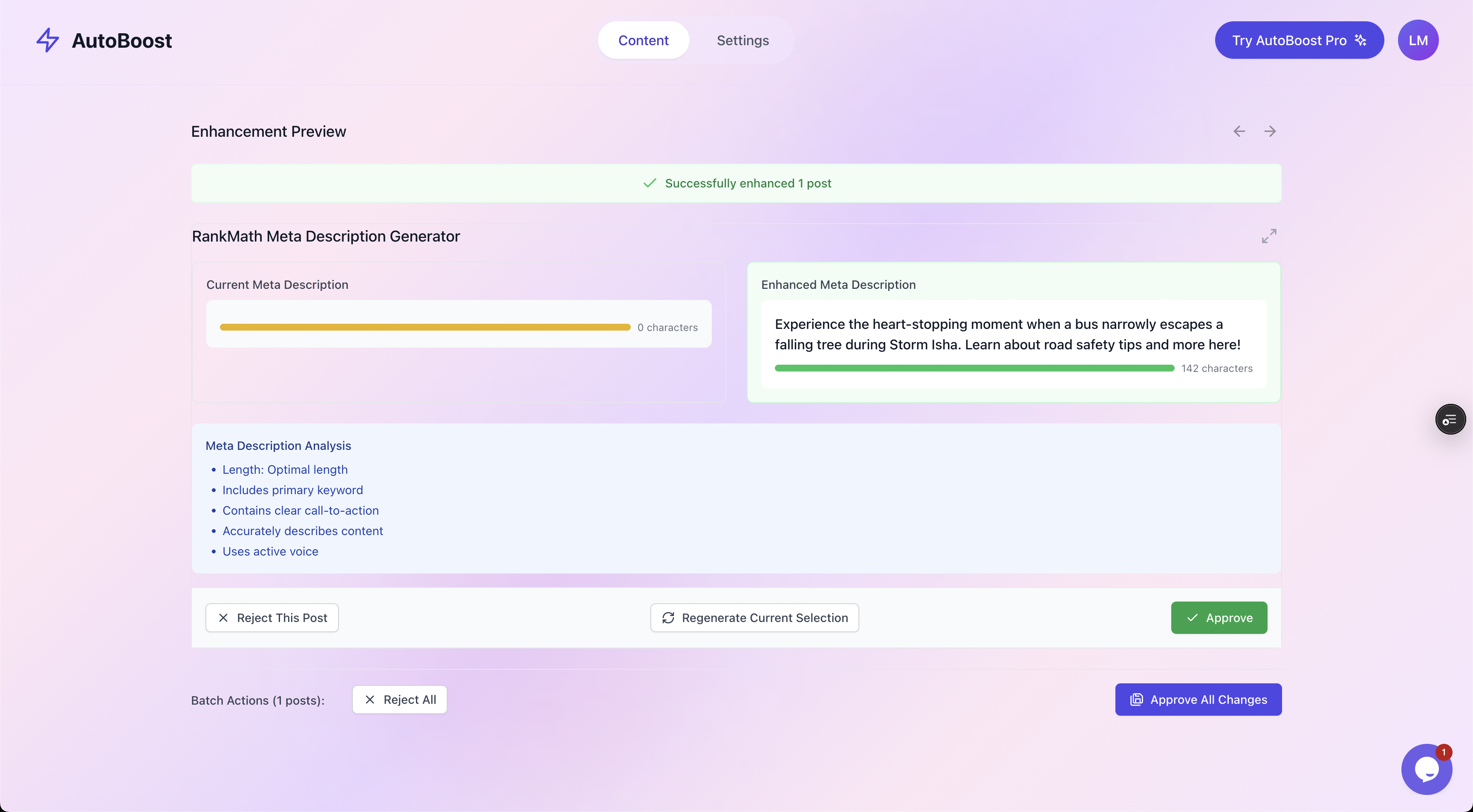
Generated metadata is shown against the original with a quick quality check, and you approve or reject each one. That review step is what keeps automation safe.
How to automate WordPress SEO in practice
You do not need to rip out your current setup. The most reliable approach works with the SEO plugin you already use.
- Keep your existing SEO plugin. Yoast, Rank Math and All in One SEO all store SEO metadata in WordPress. The goal is to fill that metadata in, not replace the plugin.
- Find the gaps. Identify the posts genuinely missing a description, title or keyword (Step 1 above).
- Generate in bulk, review before publishing. Produce metadata for many posts at once, then approve it in batches. Human-in-the-loop review keeps the output accurate and on-brand.
- Write back to the plugin. The optimised meta descriptions, titles and keywords should land directly in Rank Math or Yoast, so the rest of your stack just works.
- Re-measure. Watch impressions and click-through rate in Search Console over the following weeks. Consistent metadata across a large site compounds.
Where AutoBoost fits
This is the exact workflow AutoBoost is built for. You connect your WordPress site, and it handles the heavy lifting:
- Scans every post and flags the ones missing a focus keyword, SEO title or meta description.
- Generates optimised metadata in bulk.
- Writes it straight back into Rank Math or Yoast.
Nothing publishes until you approve it, so you keep the final say on every page.
The result is speed without losing oversight: fixing the on-page SEO of hundreds of posts in minutes instead of the weeks it would take by hand.
You can see how the plans and AI credits work on the pricing page. There are also tailored workflows for bloggers and e-commerce stores with large catalogues.
A quick auto SEO checklist
- Automate the repetitive fields: meta descriptions, titles, focus keywords, alt text, schema.
- Always keep a human approval step before anything publishes.
- Fix the posts that already get impressions but no clicks first, that is where better titles and descriptions pay off immediately.
- Keep the language natural, never stuff the keyword into every field.
- Re-run it every time you publish a batch of new posts, the gaps always come back.
- Do not automate the article itself, or your link building. Those need a human.
Best practices and pitfalls
- Always review generated text. Skim each batch. Automation gets you 90% of the way; the human check catches the 10% that would have read oddly or stated something inaccurate.
- Keep it natural. Resist stuffing the keyword into every field. Over-optimisation reads as spam to both Google and your visitors.
- Do not automate around bad content. If a page is not useful, rewrite the page. Metadata is the frame, not the picture.
- Prioritise by impact. Fix the impressions-but-no-clicks posts first.
- Make it a habit, not a one-off. New posts create the same gaps next month.
Tip: treat auto SEO as a recurring chore rather than a single cleanup. The fastest sites run it after every publishing batch so the backlog never builds up again.
Frequently asked questions
What is an auto SEO service? An auto SEO service automates the repetitive on-page SEO tasks, meta descriptions, title tags, focus keywords, alt text and schema, so you can optimise an entire site quickly instead of editing each post by hand. The good ones keep a human approval step so you control what goes live.
Is auto SEO safe for my WordPress site? Yes, when it works with your existing SEO plugin and lets you review changes before they publish. The risk comes from tools that publish unreviewed, over-optimised text automatically. Choose one with human-in-the-loop approval.
Will an auto SEO plugin get me to page one? On its own, no. It removes the on-page bottlenecks, consistent titles, descriptions, keywords and schema, so your genuinely useful content can compete. Rankings still depend on content quality and authority.
What is the best way to automate WordPress SEO? Keep your current SEO plugin, find the posts missing metadata, generate optimised metadata in bulk, review it, and write it back into the plugin. Then track impressions and click-through rate in Search Console.
How long does it take to optimise a whole site? By hand, a 250-post site is one to two full working days. With bulk auto SEO and a review pass, the same job is usually under an hour, most of which is you approving batches.
Related reading
- WordPress SEO Automation: The Complete Workflow, the full end-to-end process.
- The Best Auto SEO Plugin for WordPress, how to choose the right tool.
- How to Bulk Edit Meta Descriptions in WordPress, three ways, compared.
- Rank Math vs Yoast vs AIOSEO, which SEO plugin to run.
Ready to stop editing posts one at a time? See how AutoBoost fixes the on-page SEO of your WordPress site in reviewed batches, with you approving every change, or read our beginner's guide to using AutoBoost to get started.