WordPress SEO Automation: The Complete 2026 Workflow
By AutoBoost Team · 2026-06-22 · 12 min read
Most WordPress sites do not have an SEO problem so much as a throughput problem. The on-page fundamentals are well understood. The trouble is that nobody has time to apply them to 500, 2,000 or 7,500 posts by hand.
So the metadata backlog grows, old content keeps underperforming, and "we should sort out SEO" stays on the to-do list forever.
WordPress SEO automation fixes that throughput problem. It does not replace your judgement or your SEO plugin, and it will not invent rankings out of thin air.
What it does is take the repetitive, rules-based on-page work off your plate so you can work through an entire library in reviewed batches instead of typing every field by hand.
This is the pillar guide. It covers:
- What can and cannot be automated, so you know where to point software.
- The full end-to-end workflow, step by step.
- How to turn it into a habit that compounds over time.
Key takeaways
- Automate the repetitive metadata (titles, descriptions, keywords, alt text, schema). Keep humans for the actual content and link building.
- The workflow: audit, find the gaps, bulk-generate, review, write back to your plugin, measure, then repeat.
- Always keep a human approval step before anything publishes.
- Track impressions and click-through in Search Console, and re-run as you publish new posts, the gaps always return.
What WordPress SEO automation actually means
Automating WordPress SEO means letting software handle the mechanical parts of on-page optimisation. In practice that covers:
- Finding posts that are missing metadata.
- Drafting meta descriptions and title tags.
- Setting focus keywords.
- Generating alt text and schema.
- Writing it all back into the SEO plugin you already use.
It is the busywork that gets skipped, done reliably and at scale.
It does not mean handing your rankings to a black box. Search engines reward genuinely useful content, clear structure and a good experience, and no tool automates "be the best answer to the query."
A tool can only automate everything around that answer: the metadata and the consistency checks that make your good content legible to search engines and clickable in the results.
That is a big deal precisely because it is the part that never gets done, not because it is the part that wins rankings on its own.
Tip: If you want the deeper definition and the philosophy behind keeping a human in the loop, the companion guide on auto SEO for WordPress covers it in full. This guide is about the workflow.
What to automate and what to keep human
The honest dividing line is simple:
- Automate the tasks that are repetitive, rules-based and benefit from consistency across the whole site.
- Keep human the tasks that require judgement, originality or off-site effort.
Get that split wrong and you either burn time on things software should do, or you let software near things it should never touch.
| SEO task | Repetitive and rules-based? | Automate it? | Why |
|---|---|---|---|
| Find posts missing metadata | Yes | Automate | A scan beats manual spot-checks every time |
| Meta descriptions | Yes | Automate | Right length, keyword and CTA, applied consistently |
| SEO title tags | Yes | Automate | Fits the pixel limit, leads with the keyword |
| Focus keywords | Yes | Automate | Powers your plugin's own on-page analysis |
| Image alt text | Yes | Automate | Accessibility and image search at scale |
| Schema markup | Yes | Automate | Eligibility for rich results, hard to do by hand |
| Readability and CTA fixes | Partly | Automate, then review | Good draft, human polish |
| The article itself | No | Keep human | Genuine expertise and accuracy can't be faked |
| Internal linking strategy | No | Keep human | Needs editorial judgement about relevance |
| Earning backlinks | No | Keep human | Off-page relationship and outreach work |
The pattern is clear: automation owns the metadata layer, you own the content and the strategy. Everything below assumes that split.
The complete WordPress SEO automation workflow
Here is the full loop, start to finish. It is six steps:
- Steps 1 to 4 you can run on your entire site today.
- Step 5 is for new content.
- Step 6 makes sure it is all actually working.
Each step gets its own section, and several link out to a dedicated deep-dive guide if you want to go further.
Step 1: Audit and find the gaps
Never start by generating. Start by measuring.
The single most useful number on any large site is how many posts are missing a meta description, an SEO title or a focus keyword. That tells you the size of the job and where the leverage is.
Optimising the 500 posts that have no metadata beats re-touching the 50 that are already fine.
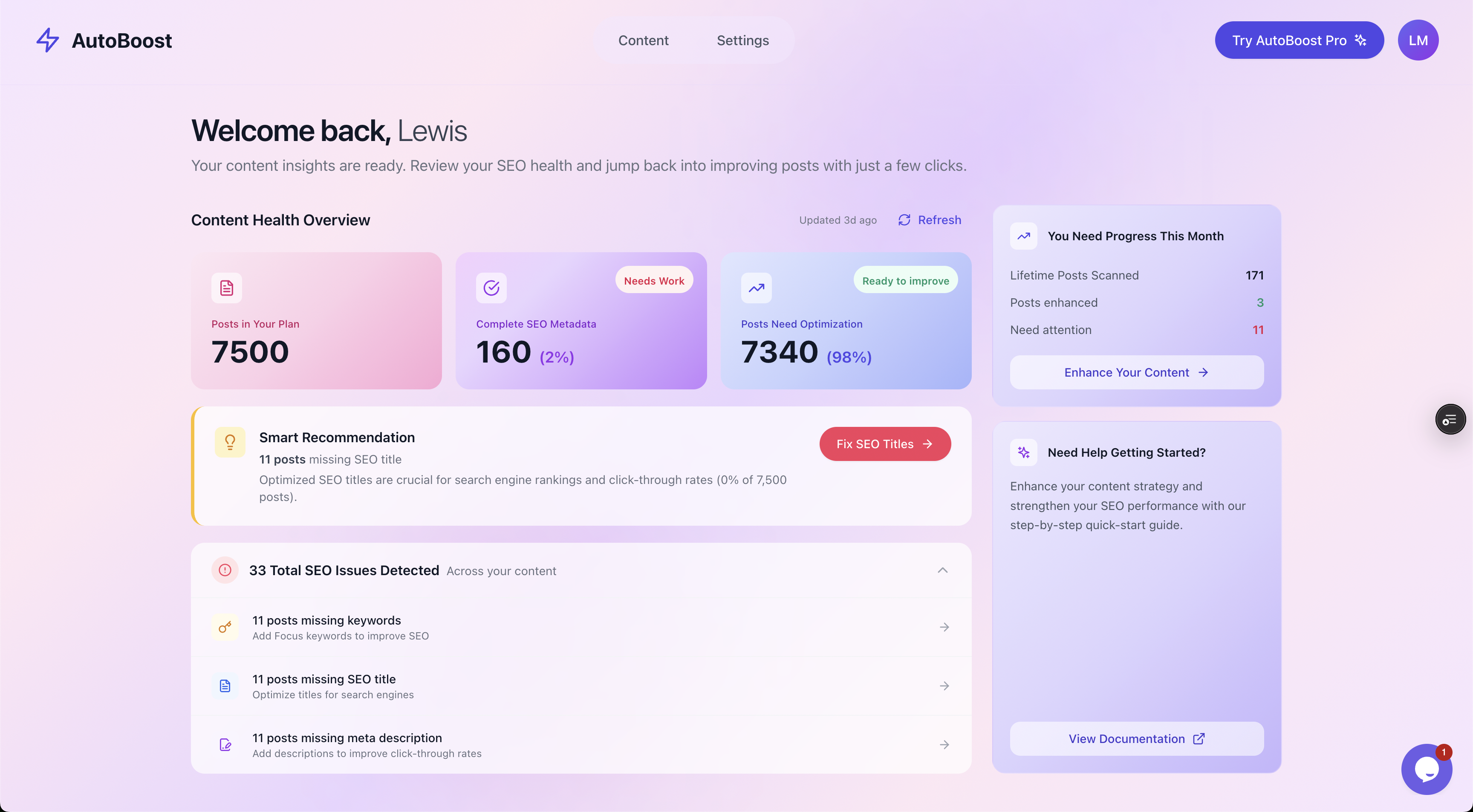
A content health audit makes the backlog impossible to ignore: 7,340 of 7,500 posts (98%) need work, with 33 SEO issues detected across missing keywords, titles and descriptions.
A scan like the one above reframes the whole task. "Sort out SEO someday" becomes "98% of posts need attention and here is the exact list."
That is the difference between a vague intention and a workable plan. Once you can see the gaps, you can filter your library down to just the posts that need work.
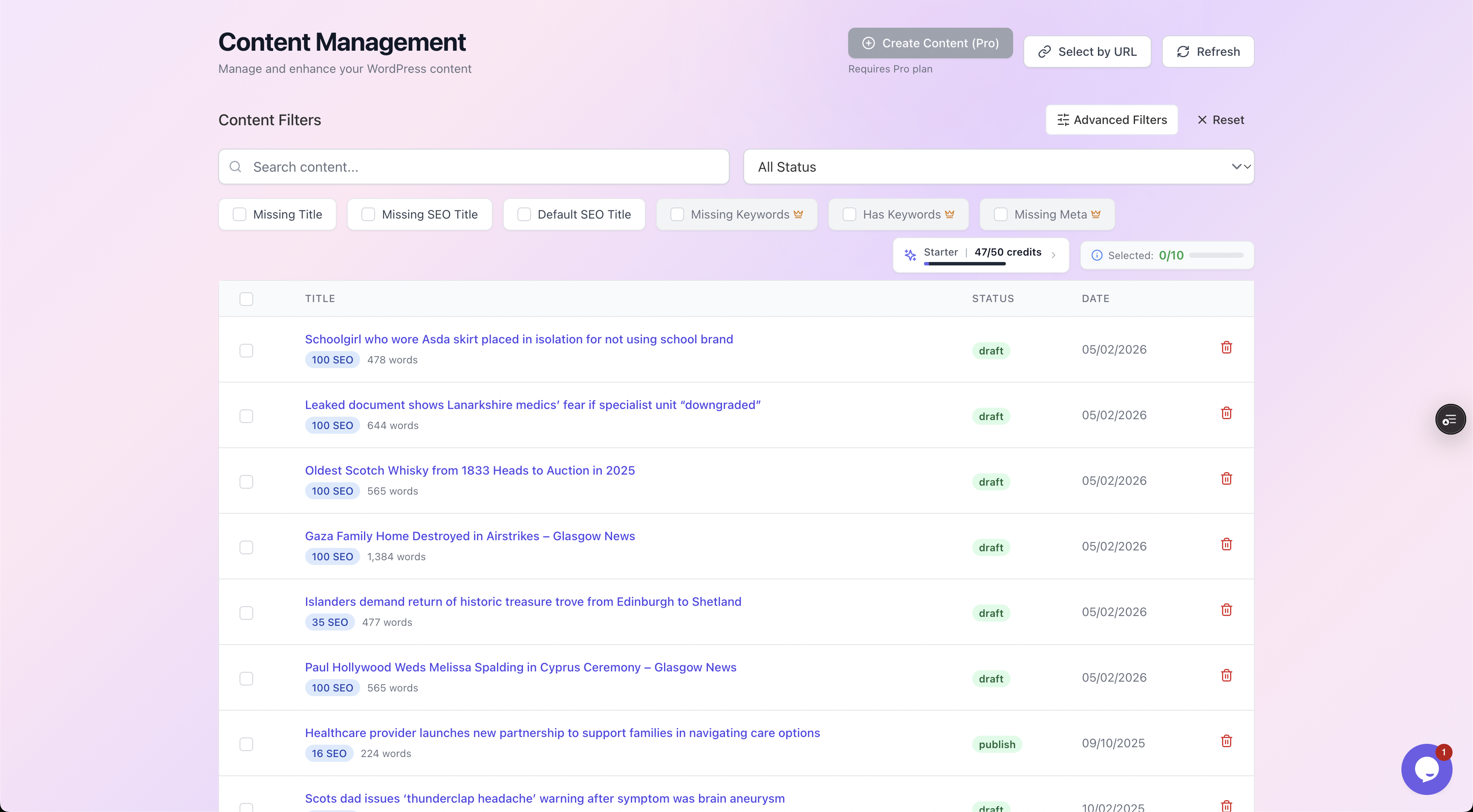
Filter chips isolate exactly the posts missing a meta description, SEO title or focus keyword, each with its current SEO score, so you work on what moves the needle and ignore the rest.
Step 2: Bulk-generate the metadata
Once you know which posts need work, generate the missing pieces in bulk rather than typing them one post at a time. This is where the time saving lives.
The fields worth generating are the same ones from the table above:
- Meta descriptions
- SEO titles
- Focus keywords
- Alt text and schema
- Optional readability and call-to-action improvements
Good automation does this from a library of purpose-built templates rather than one generic prompt. Specialist templates produce better, more consistent output than a single catch-all:
- A meta description generator knows the 150 to 160 character target.
- A title generator knows the pixel limit and to lead with the keyword.
- A focus keyword generator picks one term that the rest of the page can support.
The set of generators typically includes:
- A RankMath SEO Title Generator
- A RankMath Meta Description Generator
- A RankMath Focus Keyword Generator
- A Readability Improver
- A Call-to-Action Suggester
- Variation tools for headlines and meta descriptions when you want options to choose from
For the specific job of fixing descriptions across a whole site, see the deep dive on bulk editing meta descriptions in WordPress.
Step 3: Review and approve before anything publishes
This is the step that separates responsible automation from the spammy kind, and it is non-negotiable. Nothing should go live until a human approves it.
Automation gets you about 90% of the way. The review catches the 10% that would have read oddly, stated something slightly off, or drifted from your brand voice.
A proper review shows each generated suggestion against the original, with a quick quality check so you are not reading blind. You should be able to see:
- Length
- Whether the keyword is present
- Whether there is a call to action
- Whether it is in active voice
Then approve, reject or regenerate each one.
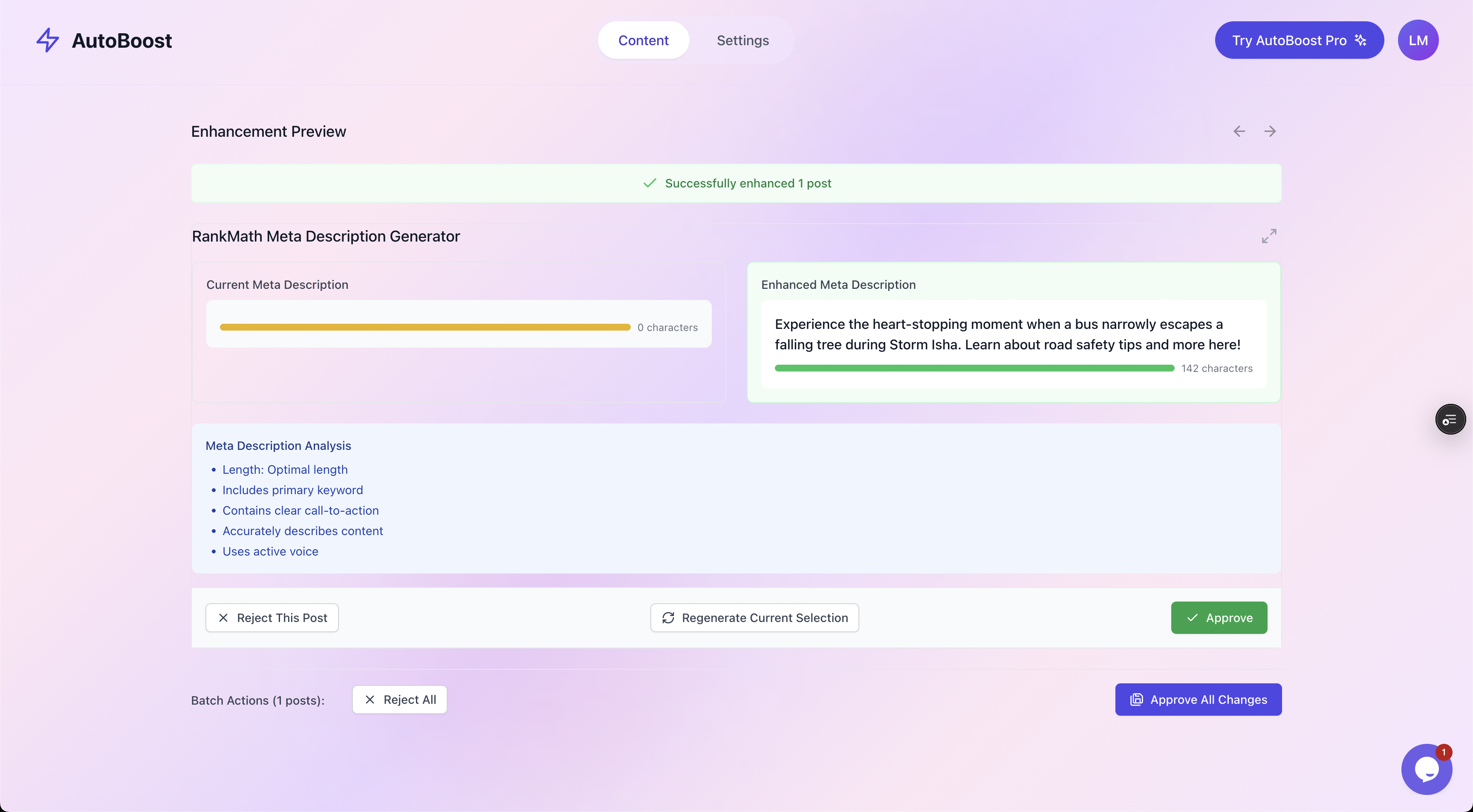
Every suggestion is shown against the current value with a length, keyword, CTA and active-voice checklist, then approved, rejected or regenerated. That review step is what keeps automation safe.
Tip: Reviewing in batches keeps this fast. You are not writing from scratch, you are sense-checking good drafts, which is an order of magnitude quicker. Most people find they approve the large majority and only regenerate the odd one.
Step 4: Write back to your existing SEO plugin
Approved metadata has to land somewhere useful, and that somewhere is the SEO plugin you already run. WordPress SEO automation should work with RankMath, Yoast or All in One SEO, not replace them.
Those plugins already store the metadata, render the tags, manage your sitemap and handle a dozen other things. The job of automation is to fill in the fields they expose, not to compete with them.
| SEO plugin | Where the data lands | AutoBoost writes to it? |
|---|---|---|
| RankMath | rank_math_title, rank_math_description, rank_math_focus_keyword | Yes |
| Yoast SEO | _yoast_wpseo_title, _yoast_wpseo_metadesc, _yoast_wpseo_focuskw | Yes |
| All in One SEO | AIOSEO title, description and keyphrase fields | No, read only |
Because the approved values write straight into the plugin's own fields, the rest of your stack just works. Your sitemap, your social previews and your schema output are all driven by the plugin as normal.
There is no migration and nothing to rip out. If you are still deciding between the three, the comparison guide on RankMath vs Yoast vs AIOSEO covers the trade-offs, and the integrations page lists what connects.
Step 5: Generate new SEO-optimised content (optional)
Steps 1 to 4 fix what you already have. Step 5 is about what comes next.
Beyond optimising existing posts, automation can help draft brand-new SEO-optimised content from:
- A topic
- A set of keywords
- A chosen template
- A tone of voice
- A target word count and audience
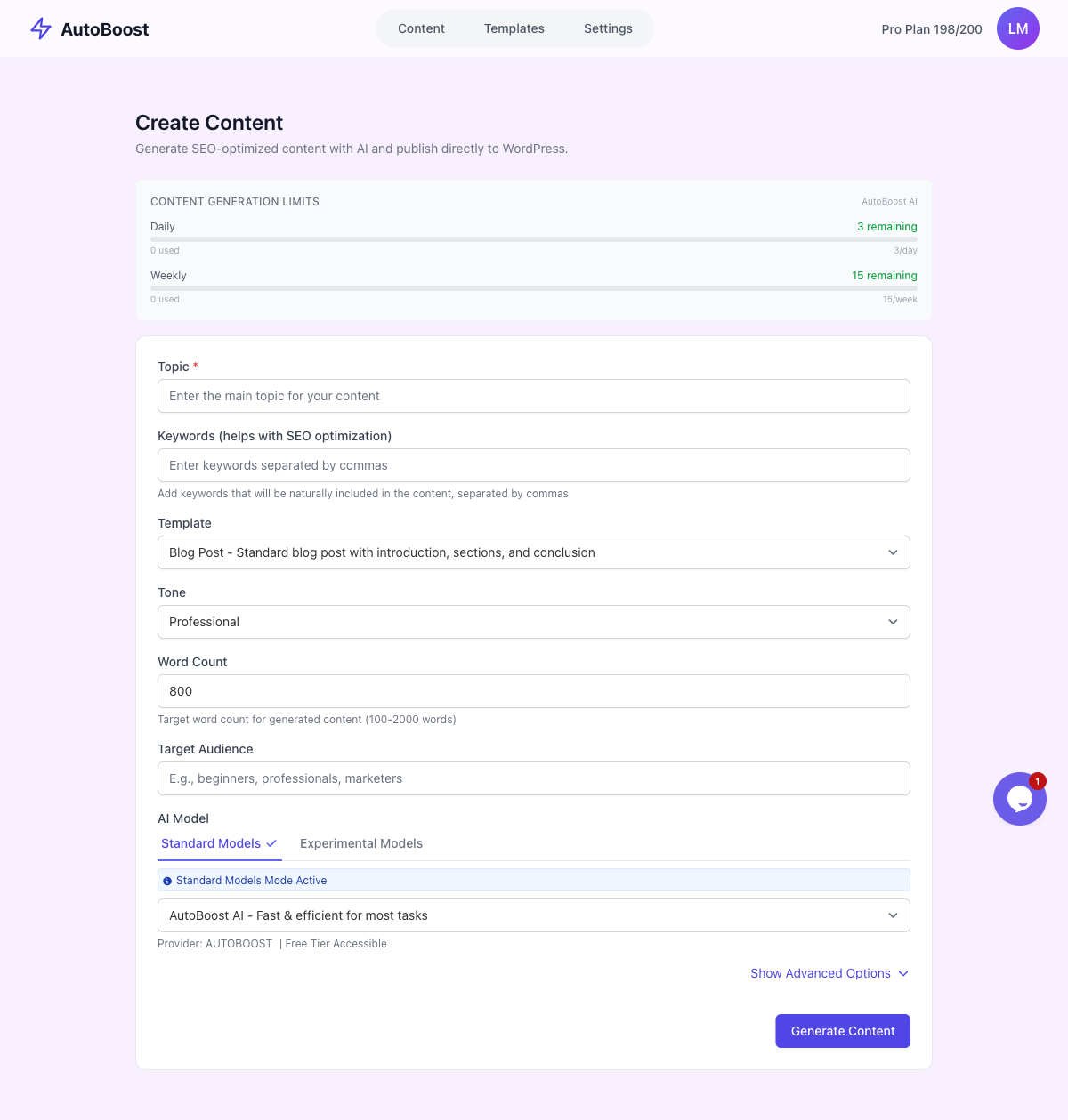
The Create Content screen drafts new SEO-optimised content from a topic, keywords, template, tone, word count and audience, ready for you to edit and approve.
Treat generated drafts the same way you treat generated metadata: as a starting point, not a finished product.
A draft saves you the blank-page problem, but the expertise, the accuracy and the genuine point of view still come from you.
Watch out: Publishing raw AI output without editing is exactly the thin-content trap that no amount of metadata will rescue. Content generation sits on the Pro tier and above.
Step 6: Measure in Search Console, then re-run
Automation is not done when the metadata is written, it is done when you can see it working.
Open Google Search Console and watch the posts you optimised over the following two to six weeks. The two numbers that move first are impressions and click-through rate, because better titles and descriptions make existing rankings more clickable before they make new rankings appear.
| Metric in Search Console | What a better result tells you | Typical time to show |
|---|---|---|
| Impressions | Pages are surfacing for more queries | 2 to 6 weeks |
| Click-through rate | Titles and descriptions are earning the click | 1 to 4 weeks |
| Average position | Content and relevance, not just metadata | Slower, varies |
Tip: Prioritise the posts that already get impressions but no clicks. Those are pages Google is showing but nobody is clicking, which is almost always a weak title or a missing description, and they are the fastest wins.
Then re-run the whole loop on the next batch, because new posts and edits create the same gaps all over again.
A worked example: 250 posts, before and after
Numbers make the case better than adjectives. Take a typical content site with 250 published posts missing meta descriptions, the kind of backlog that quietly costs clicks every single day.
Before, by hand. Writing a decent meta description, checking the keyword, fitting the length and pasting it into the plugin takes two to four minutes per post once you account for context-switching.
Across 250 posts that is roughly 8 to 15 hours of grinding, mechanical work. In practice it never gets finished, so the descriptions stay blank and Google keeps grabbing a random sentence of body text for the snippet.
After, with the workflow above. The same job collapses into a single sitting:
- The audit surfaces the 250 posts in seconds.
- Bulk generation drafts all 250 descriptions (two runs on Pro, its whole month of credits, or one run on Agency).
- You review them in batches, approving most and regenerating a handful, in well under an hour.
- They write straight into RankMath or Yoast.
A few weeks later, Search Console shows the click-through rate ticking up on pages that were previously invisible in the results.
| By hand, post by post | Automated workflow | |
|---|---|---|
| Time for 250 posts | 8 to 15 hours | Under 1 hour |
| Consistency | Drifts with mood and energy | Same rules every time |
| Finding the gaps | Manual, easy to miss | Whole library scanned |
| Control over wording | Full | Full, you approve each one |
| Likely to actually finish | Rarely | Yes |
That is the whole promise in one line: fix 250 posts' SEO in under an hour, not 10 hours. The judgement stays with you; only the busywork goes.
Where AutoBoost fits in this workflow
Every step above is the workflow AutoBoost is built around. Here is the loop it runs for you:
- You connect your WordPress site through the official AutoBoost connector plugin and a WordPress Application Password.
- It scans every post and flags the ones missing a focus keyword, SEO title or meta description.
- It generates optimised metadata in bulk from its template library.
- It writes the approved results straight back into RankMath or Yoast.
Nothing publishes until you say so.
The plans are organised by AI credits a month and posts per bulk run:
- Free ($0): 5 credits, 3 posts per run, 1 site.
- Starter (
9/mo): 50 credits, 25 per run, 1 site. - Pro ($49/mo): 250 credits, 125 per run, 3 sites, with content generation.
- Agency ($99/mo): 1,000 credits, 500 per run, 10 sites, for multi-site work.
The pricing page has the detail, and there are tailored workflows for bloggers with large archives and e-commerce stores with sprawling product catalogues.
If you are weighing options, the rundown of the best auto SEO plugins for WordPress puts the category in context.
Make it a cadence, not a one-off
The single biggest mistake with WordPress SEO automation is treating it as a project with an end date. It is not.
Every batch of new posts recreates the same gaps, every site edit can drop a description, and the backlog quietly rebuilds itself. The sites that win are the ones that bake the loop into a routine.
A simple cadence works for almost everyone:
- After every publishing push, run the audit so new posts never sit without metadata.
- Once a month, re-scan the whole library and clear whatever has crept back in.
- Once a quarter, pull a Search Console report and re-optimise the posts with impressions but stubbornly low click-through.
None of this is glamorous, which is exactly why it pays off.
The competition that treats SEO as an occasional spring-clean leaves a permanent backlog. You, running the same five-step loop on a schedule, keep the whole site optimised by default.
Frequently asked questions
Can you fully automate WordPress SEO? No, and you should be wary of anything that claims you can. You can fully automate the repetitive on-page metadata: meta descriptions, title tags, focus keywords, alt text and schema. You cannot automate content quality, genuine expertise, internal linking strategy or backlinks. The realistic goal is to automate the busywork and keep a human reviewing and approving everything before it publishes.
Does WordPress SEO automation replace RankMath or Yoast? No. It works alongside them. RankMath, Yoast and All in One SEO store and render your SEO data; automation fills in the fields they expose. Approved metadata writes straight into RankMath or Yoast, so your sitemap, social previews and schema keep working exactly as before. There is no migration involved.
How long until I see results in Search Console? Click-through rate usually moves first, often within one to four weeks, because better titles and descriptions make your existing rankings more clickable. Impressions tend to follow over two to six weeks. Average position improves more slowly and depends on content and relevance, not metadata alone. Always optimise the posts that already get impressions but few clicks first, as those are the fastest wins.
Is automated SEO content safe to publish? Generated metadata is safe to publish once you have reviewed and approved it, which is why a human-in-the-loop step matters. Generated full-length articles are a starting draft, not a finished page. Publishing raw, unedited AI articles is the thin-content trap that better metadata cannot rescue, so always add real expertise, check the facts and edit for your voice before going live.
How many posts can I optimise at once? That depends on your plan. Free gives 5 AI credits a month and 3 posts per bulk run, rising to 1,000 credits and 500 posts per run on Agency. Because the workflow scans, generates and writes back in bulk, a large library is handled in batches, limited by your monthly credits, rather than the weeks it would take by hand. See the pricing page for the exact limits.