How to Fix Missing or Default SEO Titles in WordPress (Bulk)
By AutoBoost Team · 2026-06-22 · 9 min read
The title tag is the single line of text Google shows as the clickable headline in search results. On most WordPress sites, a big chunk of posts have never had a real one written.
They fall back to the raw post title, or worse, to a generic template. That one default line quietly caps how many people click through.
This guide shows you three things:
- How to find every post with a missing or default SEO title
- The formula a good title actually follows
- Three ways to fix them in bulk, without writing each one by hand
Key takeaways
- The SEO title is the strongest on-page element you fully control. It is your ad headline in the search results, separate from the on-page H1.
- "Missing" rarely means blank. It usually means WordPress is auto-generating a default from the post title, which is almost never optimised.
- A good title leads with the keyword, fits roughly 60 characters or 600 pixels, and puts the brand at the end.
- You can fix titles three ways: a plugin's bulk fields, manually post by post, or AI-assisted generation with a human review step before anything is written back.
What an SEO title actually is (and is not)
Your SEO title is the <title> tag of the page. It is what shows as the blue headline in Google, what becomes the browser tab label, and what gets used when someone shares the URL.
It is not:
- The same as your post's H1 heading on the page
- The same as the slug
That distinction matters because WordPress, on its own, treats them as the same thing. By default it uses your post title for the <title> tag and bolts your site name on the end.
So a post titled "Our 2024 Update" ends up with a title tag of "Our 2024 Update - Your Site Name". That tells a searcher nothing and contains no keyword anyone is searching for.
SEO plugins like RankMath, Yoast and AIOSEO add a dedicated SEO title field precisely so you can override that. The problem is that the field starts empty, and the plugin falls back to a template you set once and forgot.
The result: most posts are running on autopilot titles that were never written for search.
Why this is the highest-leverage fix: unlike meta descriptions, the title tag genuinely influences rankings, and it has an outsized effect on click-through rate. It is the one on-page element where a few minutes of work per page reliably moves the needle.
Missing vs default: two different problems
When people say "missing SEO title" they usually mean one of two things, and it helps to separate them.
| Problem | What you see | Why it hurts |
|---|---|---|
| Truly missing | The SEO title field is blank in RankMath, Yoast or AIOSEO | The plugin falls back to a site-wide template, so the title is generic |
| Default / auto-generated | The title matches the post title verbatim, or follows a %title% %sep% %sitename% template | No keyword strategy, often too long, often duplicated across similar posts |
Both end up in the same place: a title tag that was never written with the search query in mind.
The default case is sneakier. The field looks "filled in" when you skim the page, so these posts hide in plain sight. A proper audit catches both.
Step one: find every post that needs a title
Before you fix anything, get an honest count. Guessing at which posts are weak is how this job never gets finished.
You want a single view that flags every post with a blank or template-default SEO title across your whole library.
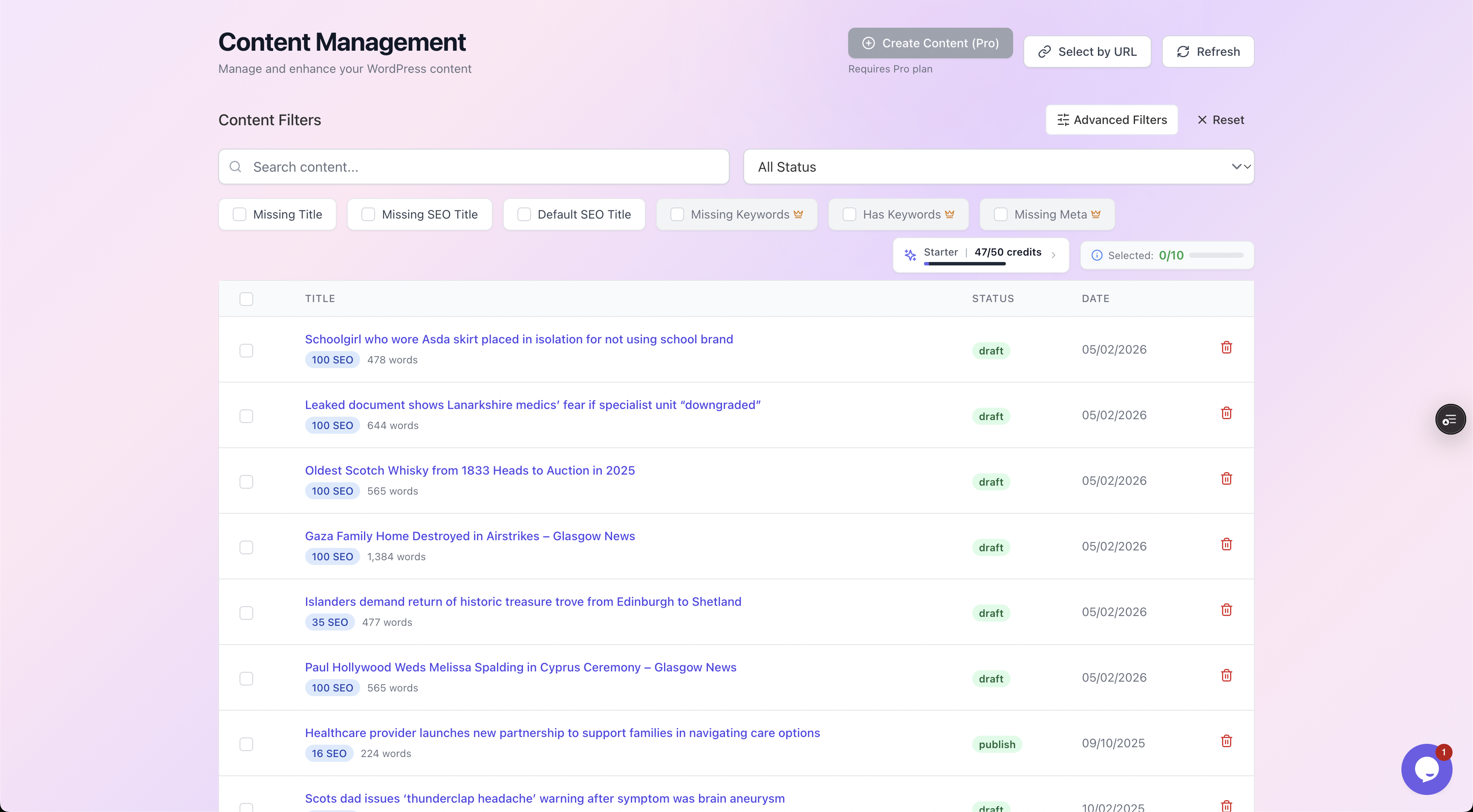
Filter chips isolate the exact problem. Click "Missing SEO Title" and you get only the posts that need one, each with its current SEO score, so you can work through a clean list instead of scrolling your whole archive.
How the scan works
AutoBoost connects to your site through the AutoBoost connector plugin and a WordPress Application Password, then:
- Scans every post
- Reads the SEO title field straight from RankMath, Yoast or AIOSEO
- Flags posts with an empty field, or one that is just echoing the post title
That scan is the difference between "I think a lot of posts need titles" and "423 posts need a title, here they are."
For the full audit walkthrough, see our guide on running a WordPress SEO audit for missing fields.
The title formula that works
You do not need to be clever here. A reliable SEO title follows four rules.
- Lead with the keyword. Put the term people actually search as close to the front as you can. Google weights early words more, and a front-loaded keyword survives truncation if the title gets cut.
- Stay within the limit. Aim for around 60 characters, or about 600 pixels, which is where Google truncates desktop titles. Pixels matter more than characters because wide letters like W and M eat space faster than i and l, but 60 characters is a safe working rule.
- Brand at the end. Append your site name last, ideally with a separator like a pipe or dash. If a title runs long, the brand is the part you can afford to lose to truncation.
- Write for the click, not the algorithm. Once the keyword is in, the rest of the title is ad copy. A number, a benefit, a year, or a "how to" framing all lift click-through rate. Avoid stuffing the same keyword twice.
A simple, dependable pattern is Primary Keyword: Benefit or Modifier | Brand. It satisfies all four rules and reads naturally.
Worked example: before and after
Here is what the formula does to real-world default titles. The "before" column is what WordPress generates on its own; the "after" is a title written for search.
| Before (default / auto-generated) | After (optimised SEO title) | What changed |
|---|---|---|
| Our 2024 Update - Acme Blog | WordPress Backup Plugins: 7 Tested in 2024 | Acme | Added the real keyword, a number, a year, brand at end |
| Page not found, page 3 - Acme | Sourdough Starter Troubleshooting: Fix a Flat Loaf | Acme | Replaced a junk default with keyword plus a clear benefit |
| How we think about pricing for our service | SaaS Pricing Strategy: A Simple 5-Step Framework | Acme | Front-loaded the keyword, trimmed to fit, added a hook |
| The Complete and Ultimate Definitive Guide to Email Marketing for Beginners in 2024 | Email Marketing for Beginners: A 2024 Starter Guide | Acme | Cut from 80+ to under 60 chars so it stops truncating |
Notice the pattern. Every "after" leads with the searchable term, lands near 60 characters, and ends with the brand.
None of them required deep creativity, just the formula applied consistently. That consistency is exactly what is hard to maintain by hand across hundreds of posts, and exactly what bulk tooling is for.
Three ways to fix titles at scale
1. Your SEO plugin's bulk fields
RankMath and Yoast both let you edit the SEO title from the post list, and on RankMath, from a bulk-edit view. This is the no-new-tools route and gives you total control over every word.
The catch is that you are still writing each title by hand.
- For 20 or 30 posts: that is fine, and arguably the right call.
- For a few hundred: it is the same grind that left the titles missing in the first place, so realistically it never gets finished.
2. Manual, post by post
Open each post, write the SEO title into the plugin's snippet editor, watch the live pixel preview, save.
This is the gold standard for your handful of money pages, the ones where every character earns its place.
But it does not scale. If your problem is a 400-post backlog, doing it manually is how you spend three weekends and still have a backlog.
3. AI-assisted generation with review
This is the route built for a real backlog. AutoBoost:
- Generates an optimised SEO title for each flagged post using a template from its library
- Applies the formula automatically
- Waits for you to approve before anything is written back into your existing SEO plugin
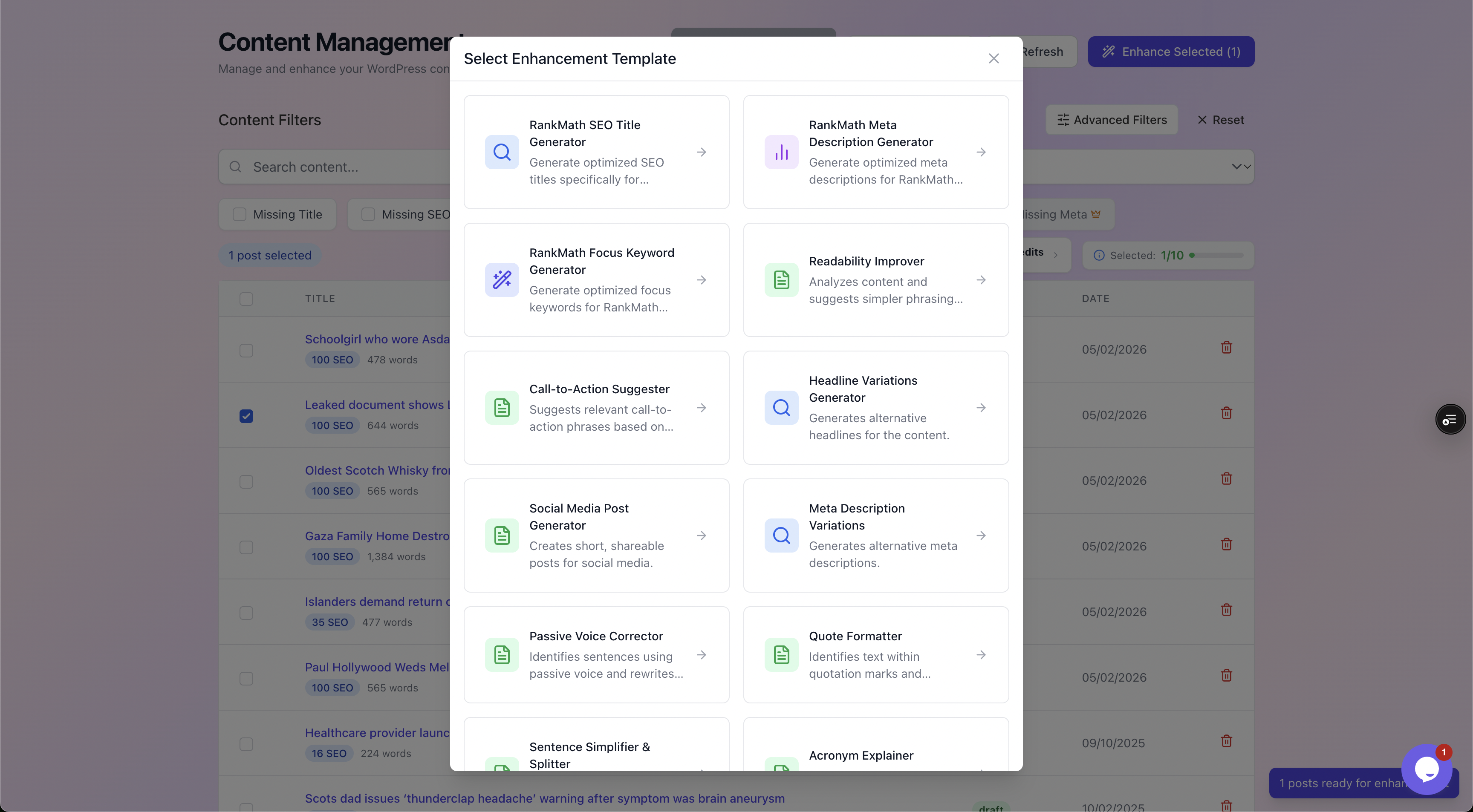
Pick the RankMath SEO Title template (or the Yoast equivalent) and AutoBoost drafts a title per post that leads with the keyword and fits the pixel limit. The same library handles meta descriptions, focus keywords, alt text and more.
Crucially, generation is not publishing. Every drafted title lands in a review screen where you see the current title beside the proposed one, with a quality checklist. You approve, reject or regenerate each one.
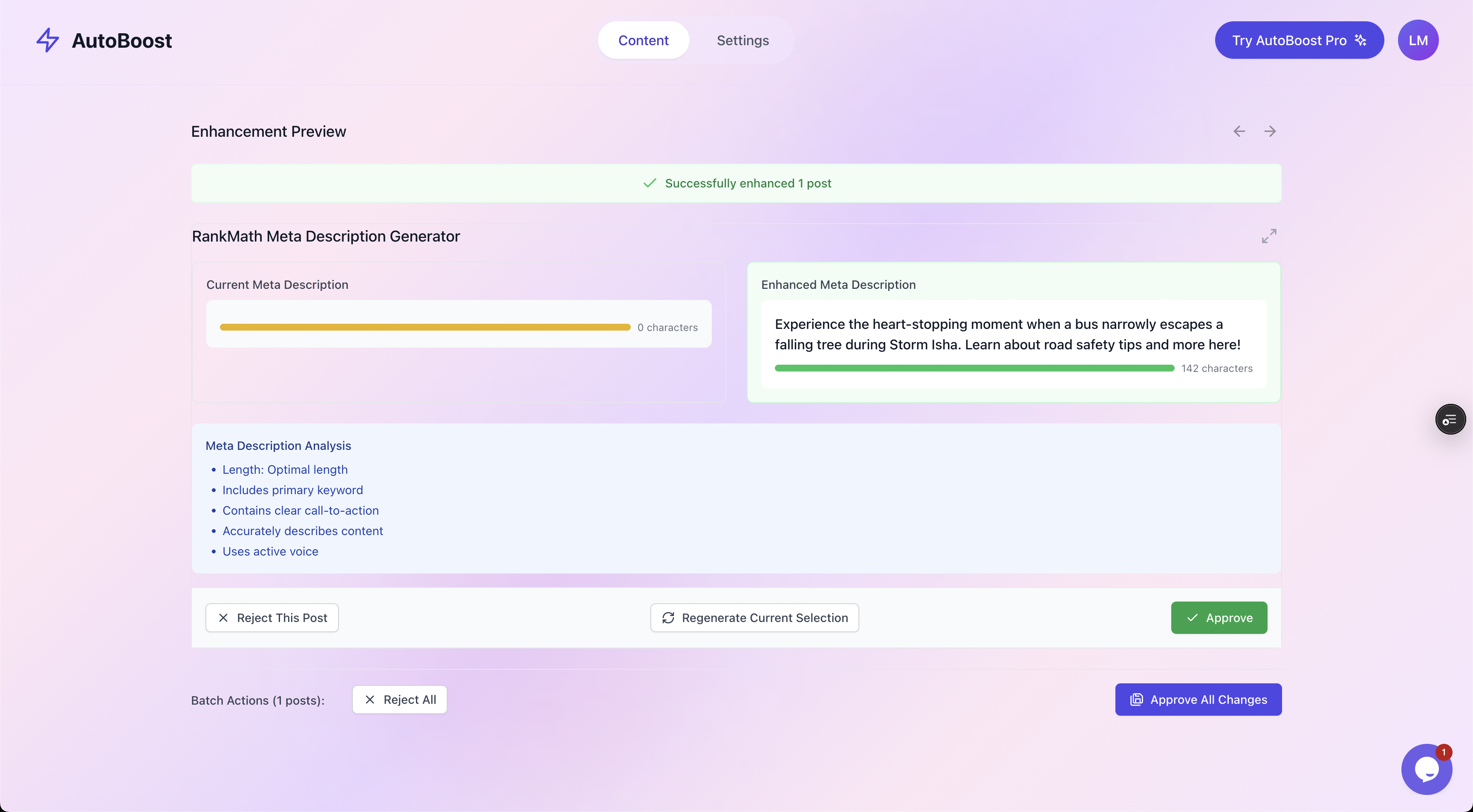
The human-in-the-loop step. Current versus enhanced side by side, a checklist scoring length, keyword placement and structure, and you decide what gets written back. Nothing touches your live site until you click Approve.
Approved titles are written into the correct field of whichever plugin you already run. So RankMath stays RankMath, and your schema, sitemaps and settings are untouched.
You are reviewing at reading speed, a couple of seconds per title, instead of composing at writing speed. That is how a 400-post backlog clears in an afternoon rather than a month.
The broader version of this loop is in our auto SEO for WordPress guide.
Watch out: a good SEO title needs a focus keyword to lead with. If a post has no keyword set, fix that first, otherwise the title generator is guessing at intent. See how to add focus keywords in WordPress for the companion step, then come back and run the titles.
Which method should you pick?
A quick decision guide:
- Under about 30 posts, or your top money pages: edit manually in the plugin's snippet editor. Full control, live pixel preview, no new tools.
- A medium batch where you trust a template: the plugin's bulk fields work, but you are still typing each one.
- A real backlog, hundreds or thousands of posts, or an agency across many sites: AI-assisted generation with review is the only option that removes the actual bottleneck.
Stores feel this hardest, where every product and category needs a title. That is why our ecommerce solutions and blogger solutions pages exist.
The AI credits and posts per bulk run for each plan, from Free (5 credits a month) up, are on the pricing page, and the integrations page lists supported SEO plugins.
Tip: whatever you choose, the rule holds: read every title before it goes live. None of these methods should write a title you have not seen.
An honest caveat
Fixing titles is high leverage, but it is not magic. A perfect title tag on thin, unhelpful content will not rank, because the title only earns the click after Google decides the page deserves to appear at all.
What title optimisation does do:
- Lifts click-through on pages that are already competitive
- Stops you leaking traffic on pages that already rank
What it does not do:
- Substitute for genuinely useful content
- Replace the links that build authority
AutoBoost automates the repetitive metadata, the titles, descriptions, keywords, alt text and schema, so your good content can compete. It does not write the content or build the backlinks, and we would rather tell you that up front.
Frequently asked questions
What is the difference between an SEO title and a post title in WordPress?
The post title is the H1 heading shown on the page and used in your post list. The SEO title is the <title> tag, the clickable blue headline in Google's results and the browser tab label. WordPress uses your post title for both by default, but RankMath, Yoast and AIOSEO add a separate SEO title field so you can write a search-optimised version without changing the heading readers see on the page.
How long should a WordPress SEO title be?
Aim for around 60 characters, or roughly 600 pixels, which is where Google truncates desktop titles. Pixels are the truer measure because wide characters take more room, so a 58-character title full of capital W and M can still get cut. Lead with your keyword so that even if the end is truncated, the important part survives, and keep the brand name last where it can be safely dropped.
Why does Google show a different title than the one I set?
Google sometimes rewrites titles when it thinks yours is unclear, keyword-stuffed, much too long, or a poor match for the query. The fix is to write a concise, accurate title that leads with the keyword and reflects the page content. Clean, honest, well-sized titles get rewritten far less often, which is another reason the formula in this guide matters.
Can I bulk edit SEO titles without writing each one manually?
Yes. RankMath offers a bulk-edit view, and AI-assisted tools like AutoBoost generate a title per post from a template, then let you approve each one before it is written back into your SEO plugin. The manual snippet editor is best reserved for your highest-value pages where every word counts. For a large backlog, generate-then-review is the only approach that actually finishes.
Does AutoBoost replace RankMath or Yoast?
No, it works with them. AutoBoost connects through its connector plugin and an Application Password, generates the SEO titles, and writes the approved ones into RankMath or Yoast, whichever you already use. You keep your existing plugin and all its settings, schema and sitemaps. AutoBoost just fills the gaps at scale, with your sign-off on every change.