How to Add Missing Focus Keywords Across WordPress Posts
By AutoBoost Team · 2026-06-22 · 11 min read
A focus keyword is the single phrase you tell your SEO plugin a post is meant to rank for.
It is not a ranking factor in itself. But without it your plugin has nothing to grade against, so every on-page check it offers quietly does nothing.
On most sites we connect to, a large share of published posts have no focus keyword at all. That means their RankMath or Yoast analysis has been switched off without anyone realising.
Key takeaways
- A focus keyword powers your SEO plugin's own analysis. No keyword means the title, heading, density and meta checks have nothing to score, so the post is effectively invisible to the plugin.
- Set exactly one focus keyword per post. Multiple keywords dilute the analysis and tempt you to over-optimise for two things at once.
- Pick the realistic phrase a reader would actually type, matched to what the page already covers, not the most ambitious term on the site.
- A focus keyword does not rank you on its own. It turns the analysis back on so you can see what to fix; the fixing still has to happen.
What a focus keyword actually does
Here is the part that trips people up. Setting a focus keyword does not tell Google anything.
Google never sees it. The field lives in your post's metadata and is read only by your SEO plugin. Its job is to give RankMath, Yoast or AIOSEO a target to measure the page against.
Once a keyword is set, the plugin runs its checks against that one phrase:
- Is it in the SEO title?
- Is it in the first paragraph?
- Does it appear in a subheading?
- Is it in the URL?
- Is it in the meta description?
- Is it in an image alt tag?
- And how often does it appear in the body?
That green or orange traffic light you see in the editor is the plugin comparing your page to that one phrase. No phrase, no comparison, and the light stays grey. The analysis is not failing, it simply has nothing to do.
So a post with no focus keyword is not penalised by Google. It is penalised by you, because you have turned off the one tool that would tell you:
- the title is weak,
- the keyword never appears in a heading,
- or the intro buries the topic three paragraphs down.
Multiply that across a few hundred posts and you have a whole library of content nobody is grading.
Tip: for the wider context on how the missing-field problem builds up across a site, our WordPress SEO audit for missing fields guide covers the full health check. This post is specifically about the keyword field.
Find the posts that are missing one
You cannot fix what you cannot see, and the WordPress editor only shows you the keyword field one post at a time.
The first job is to surface every post where the field is empty, so you know the real size of the backlog instead of guessing.
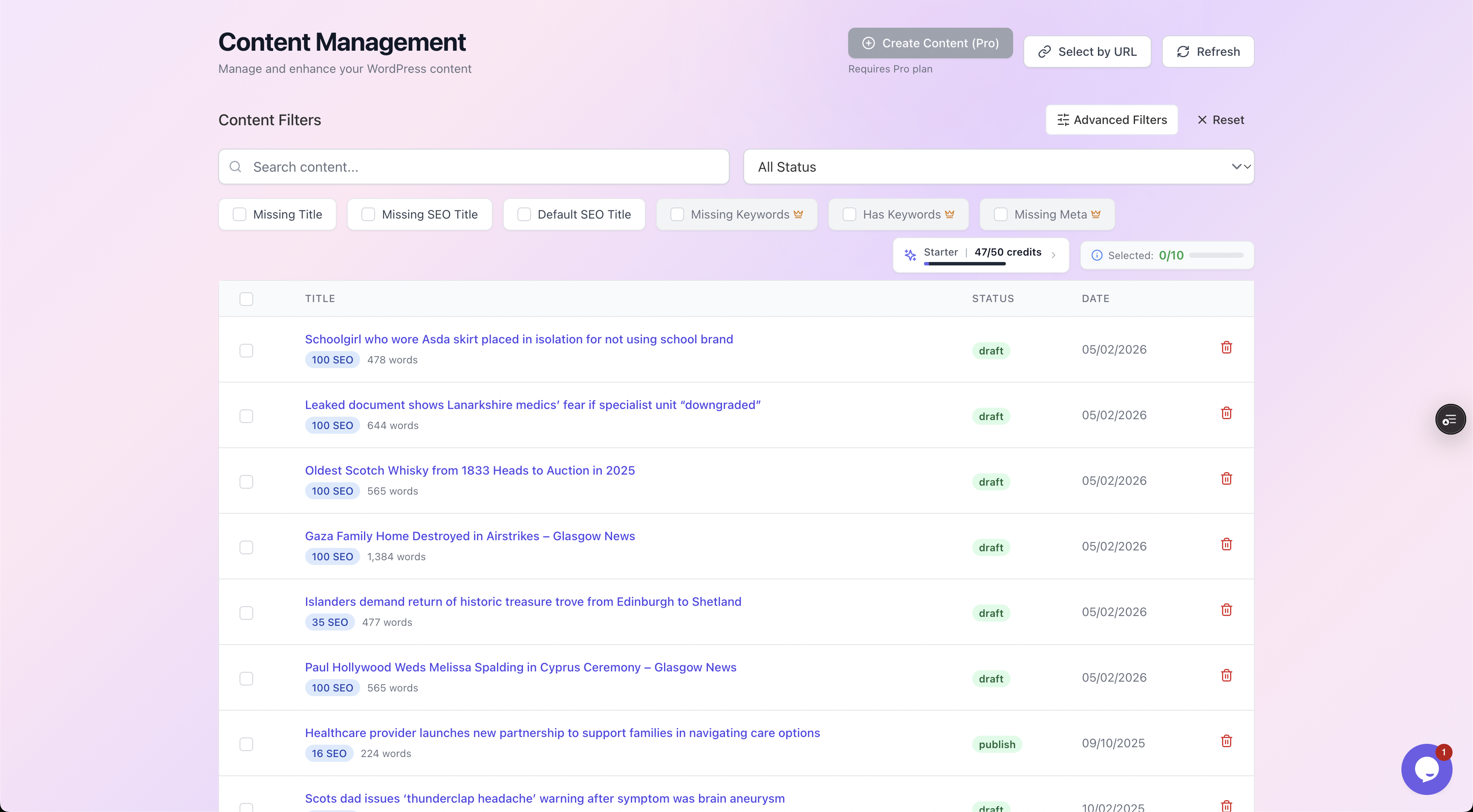
Filtering by "Missing Keywords" lists exactly which posts have no focus keyword set, each with its current SEO score, so you can see the scale before you commit to a method.
This is also where the honesty starts. A site can show a respectable average SEO score while half its posts have a grey, ungraded analysis underneath.
The filter strips that comfort away and shows you the count. On a 500-post blog it is common to find 200 or more posts with no keyword, every one of them coasting on an analysis that was never running.
Choose one keyword per post (and only one)
The single most common mistake is treating the field as a tag dump. Some plugins let you add several keywords, and the temptation is to throw in three or four "to be safe."
Do not. The analysis can only grade against the primary phrase properly, and a page written to satisfy two competing keywords usually serves neither well. One post, one job, one keyword.
The right keyword is the realistic phrase a reader would type to find the thing this page already covers:
- Not your dream term.
- Not the highest-volume phrase in your niche.
- The one that matches the content already on the page.
Match intent to what exists, then improve the page around it.
Weak versus good choices
Here is the difference between weak and good choices in practice.
| Post topic | Weak focus keyword | Why it is weak | Better focus keyword |
|---|---|---|---|
| A 1,200-word how-to on pruning roses | gardening | Far too broad, the page cannot realistically rank, and the analysis grades against a phrase the post barely uses | how to prune roses |
| A review of one specific coffee grinder | coffee | Single generic word, enormous competition, no match to the page's actual intent | baratza encore review |
| A guide to small-business tax deadlines in the UK | tax | One word, ambiguous, ignores the specific angle the page owns | uk small business tax deadlines |
| A recipe post for a vegan lasagne | best food recipes | Vague, plural, not what anyone searches, no relation to the dish | vegan lasagne recipe |
| A comparison of two project tools | productivity | Abstract category, not a query, gives the analysis nothing concrete | asana vs trello |
The pattern is consistent:
- Weak keywords are short, broad and aspirational.
- Good ones are specific, two to five words, and describe the page as it actually is.
A useful test: would you expect this exact page to be a satisfying answer for someone typing that phrase into Google? If not, the keyword is wrong, and no amount of optimisation will fix that mismatch.
Watch out: do not pick the same focus keyword for ten different posts. When several pages target one phrase you create internal competition (often called keyword cannibalisation), and your own posts fight each other in the results. Each page should own a distinct phrase.
Assigning keywords at scale
Choosing one keyword by hand is quick. Doing it 200 times is the part that never gets finished, because each post means:
- opening it,
- reading it,
- deciding on a phrase,
- typing it into the right field for the right plugin,
- then saving.
This is the repetitive, mechanical work worth automating, and it is exactly the metadata layer AutoBoost handles.
The approach is straightforward. AutoBoost:
- connects to your site through the AutoBoost connector plugin and a WordPress Application Password,
- reads each post's actual content,
- and suggests a sensible primary keyword based on what the page is genuinely about.
It writes nothing on its own. Every suggestion goes into a review queue first.
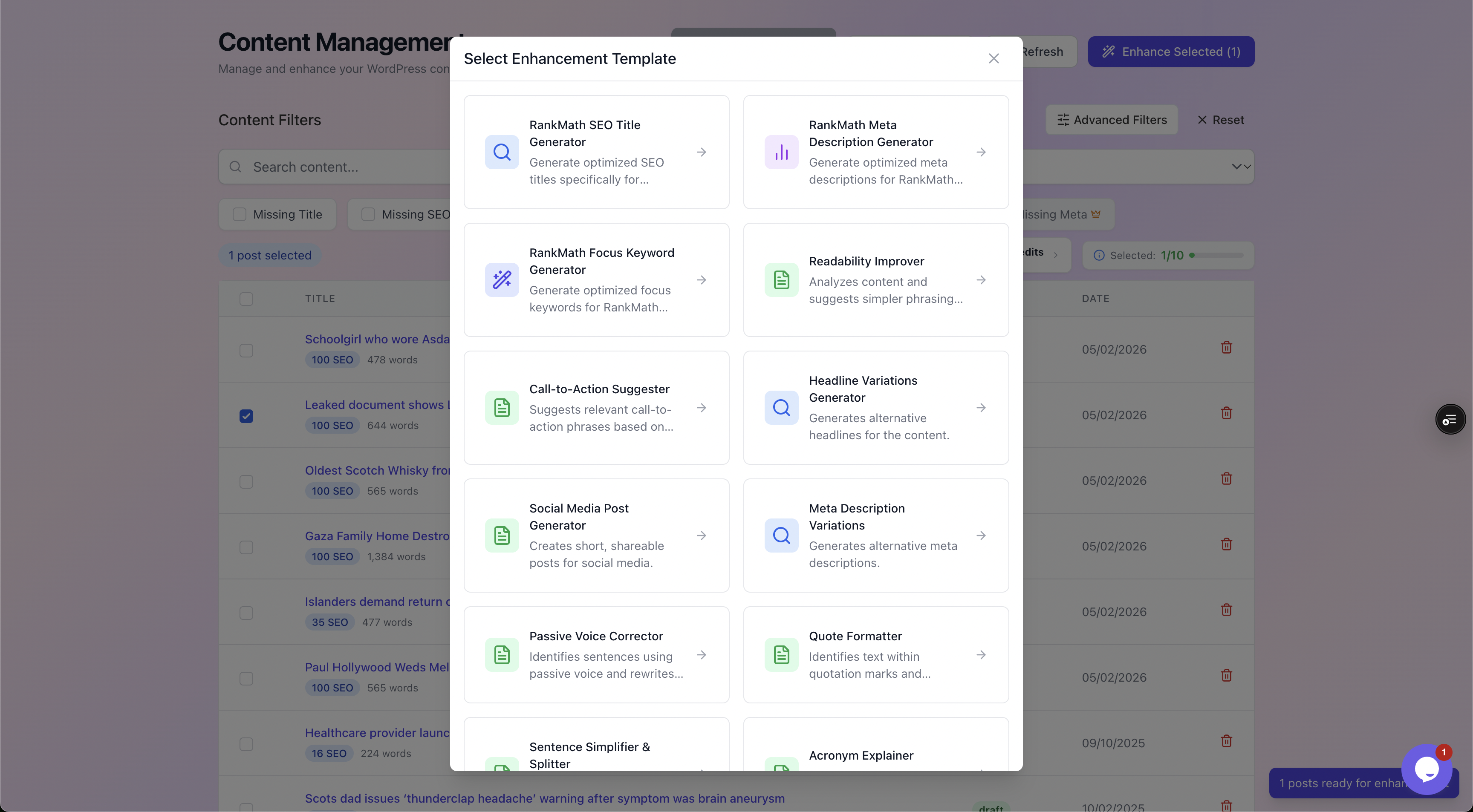
You pick the job explicitly. The Focus Keyword template targets only the keyword field and writes straight into your existing RankMath or Yoast setup, leaving the rest of your metadata untouched.
Two things matter here:
- It works with your existing plugin, it does not replace it. The suggested keyword is written into the same
rank_math_focus_keywordor_yoast_wpseo_focuskwfield your plugin already reads, so the moment it lands, your plugin's analysis switches back on for that post. - Nothing publishes until you approve it. You stay the editor.
If you are weighing up which SEO plugin to keep underneath all this, our RankMath vs Yoast vs AIOSEO comparison breaks down the differences. AutoBoost writes into RankMath or Yoast, whichever you run.
Worked example: turning a grey analysis green
Take a real-world shaped post. A small kitchenware blog has a 1,400-word article titled "We Tried the Most Popular Knife Sharpeners."
It gets a trickle of search traffic but the author never set a focus keyword, so the RankMath panel sits grey and unhelpful.
Before. The keyword field is empty and the analysis is dormant:
- RankMath shows no score, just a prompt to set a focus keyword.
- The SEO title is the default post title.
- The meta description is auto-pulled from the first sentence.
- There is no signal anywhere about what the page is meant to rank for.
Step one, pick the keyword. The page actually compares electric and manual sharpeners and recommends one. The realistic query is best knife sharpener, or more honestly knife sharpener review given the content is a hands-on test.
We choose knife sharpener review because it matches the page's true intent, a comparison, rather than overpromising a definitive buyer's guide the post is not.
Step two, assign it. In AutoBoost you select the post, choose the RankMath Focus Keyword template, and review the suggestion. It proposes knife sharpener review, which matches your own read, so you approve it. It writes to the rank_math_focus_keyword field.
After. Reload the editor and RankMath's analysis is alive. It now tells you:
- the keyword is missing from the SEO title,
- it appears only once in the body,
- and it is absent from every subheading.
None of that was visible before, because there was nothing to grade. The score might be a mediocre 62 out of 100, and that is the point: the number is honest now, and the orange checklist is a to-do list.
You can then run the same review pass for the SEO title and meta description, or do them by hand, knowing exactly what each one needs.
That is the whole value of the field. It did not move you up the rankings by being filled in. It turned the diagnostics back on so you can finally see, and fix, the on-page gaps that were there all along.
For the title side of that work, see how to fix missing SEO titles in WordPress.
How many posts can you process
AutoBoost scans your whole library, and how many posts you can fix depends on your plan's AI credits a month and posts per bulk run.
| Plan | Credits a month | Posts per run | Typical fit |
|---|---|---|---|
| Free ($0) | 5 | 3 | Trying it out on one site |
| Starter ( | 50 | 25 | Growing blogs with a deeper archive |
| Pro ($49/mo) | 250 | 125 | Established sites and busy publishers |
| Agency ($99/mo) | 1,000 | 500 | Several client sites or one very large library |
Where to go next:
- For a blog-led site, the bloggers solution walks through the typical workflow.
- Stores can see the ecommerce solution for product and category pages.
- Full plan detail is on the pricing page.
- The complete feature set is on the features page.
The honest limits
Filling in focus keywords is high-value housekeeping, not a growth hack. It is worth being clear about what it will and will not do.
It will not rank you on its own. The keyword field is a label for your plugin, not a signal to Google. Setting it correctly turns the analysis on; acting on that analysis is what moves anything.
It will not fix thin content. If a post is 200 words of nothing, the right keyword just gives you a more accurate low score. Automation handles the repetitive metadata, not the quality of the writing or the backlinks pointing at it.
It will not pick a perfect keyword every time. A suggestion based on page content is a strong starting point, but you know your audience and your competitors. That is exactly why the review step exists, and why it is not optional. Approve the ones that fit, change the ones that do not.
What it does do is remove the bottleneck. The mechanical work of deciding, typing and saving one keyword per post, at scale, across whichever SEO plugin you run, stops being the reason your analysis sits grey.
For the broader automated workflow this fits into, see our WordPress SEO automation workflow guide.
Frequently asked questions
Does a focus keyword help me rank on Google?
Not directly. Google never reads the focus keyword field; only your SEO plugin does. Its value is that it switches your plugin's on-page analysis back on, so you can see and fix the things that do influence rankings, like the title, headings and content relevance.
Can I set more than one focus keyword per post?
Some plugins allow it, but you should not. The analysis grades cleanly against one primary phrase, and a page written for two competing keywords tends to serve neither well. Use one keyword per post, and give each post a distinct phrase to avoid your own pages competing.
What happens if two posts share the same focus keyword?
You create internal competition, sometimes called keyword cannibalisation, where your own pages fight each other in the search results. Give each post its own specific phrase. If two posts genuinely cover the same query, consider merging them into one stronger page.
Will AutoBoost overwrite focus keywords I have already set?
No. AutoBoost surfaces the posts that are missing a keyword and suggests one for those. Nothing is written until you approve it in the review queue, and it writes into your existing RankMath or Yoast field rather than replacing your plugin.
How do I choose a good focus keyword quickly?
Read what the page actually covers, then write down the realistic phrase a reader would type to find exactly that. Keep it two to five words, specific rather than broad, and ask yourself whether this page would genuinely satisfy that search. If yes, use it; if no, the keyword is wrong for the page.