WordPress SEO Audit: Find and Fix Every Missing Field (2026)
By AutoBoost Team · 2026-06-22 · 11 min read
A WordPress SEO audit usually conjures images of a 60-page PDF full of warnings nobody ever actions.
The version that actually moves rankings is much narrower: find every post that is missing the on-page basics, then fix them. Missing meta descriptions, blank SEO titles, no focus keyword, images with no alt text.
These are not opinions, they are gaps. And gaps can be counted and closed.
This is the hub guide for that work. We will cover:
- What a practical on-page audit actually checks
- How to find each missing field at scale
- How to clear the whole backlog without editing 2,000 posts by hand
The detailed fixes link out to their own walkthroughs, so treat this as the map.
Key takeaways
- An on-page audit is mostly counting gaps: posts missing a meta description, SEO title, focus keyword or image alt text.
- You can find every gap with a filtered view, then fix in bulk rather than post by post.
- Automation handles the repetitive metadata. It does not write your content or build your links, and it will not rank thin pages.
- Keep a human approval step before anything is written back, and re-audit on a cadence because gaps return as you publish.
What a practical on-page SEO audit actually checks
Strip out the noise and an on-page audit comes down to a short list of fields that should exist on every indexable post and frequently do not.
Each one is binary: it is either set or it is missing.
- Meta description. The snippet under your title in search results. Missing means Google writes its own from page text, often badly, and your click-through suffers.
- SEO title (title tag). What shows as the clickable headline in the SERP. Many sites default to the raw post title, which is rarely the best version for search.
- Focus keyword. The single query a post is built to answer. Without one set, RankMath and Yoast cannot score the page and you have no on-page target.
- Image alt text. Describes images for screen readers and image search. Empty alt attributes are an accessibility miss and a wasted ranking signal.
- Thin or duplicate titles. Posts where the title is generic, truncated, or shared with other pages.
That is the whole core audit. Schema, internal links and content depth matter too, but the five above are where the biggest, most fixable backlog lives on a typical WordPress site.
Tip: Run the audit on published posts first. Drafts and trashed content inflate the numbers and distract from the pages actually competing in search.
Why each missing field costs you
It is worth being precise about what a gap actually loses you, because not every field carries the same weight.
| Field | Why it matters | How to find it at scale | How to fix in bulk |
|---|---|---|---|
| Meta description | Controls the SERP snippet and click-through. Missing means Google auto-generates it. | Filter posts where the description field is empty | Generate per-post descriptions from the content, review, write back. See bulk meta descriptions |
| SEO title | The clickable headline in results. Defaults are rarely optimal. | Filter posts using the default or a blank SEO title | Generate keyword-led titles within length limits. See fix missing SEO titles |
| Focus keyword | The on-page target your plugin scores against. No keyword, no score. | Filter posts with no focus keyword set | Derive a keyword from the post topic and set it. See add focus keywords |
| Image alt text | Accessibility and image search visibility. | Scan post images for empty alt attributes | Generate descriptive alt text per image. See add alt text in bulk |
| Thin or duplicate titles | Hurts relevance and can cannibalise rankings. | Sort by SEO score and review low scorers | Rewrite headlines, set distinct focus keywords |
The pattern is the same for every row:
- Find the gap with a filter.
- Generate a fix.
- Review it.
- Write it back.
The only thing that changes is which field you are targeting.
Step one: get a content health overview
Before you fix anything, you need to know the size of the problem.
A content health overview counts how many posts you have and how many are missing each field, so you are working from numbers rather than a hunch.
In AutoBoost this is the first screen after you connect WordPress. The connector plugin plus an Application Password gives read access to your posts, and the dashboard scans them and reports the totals.
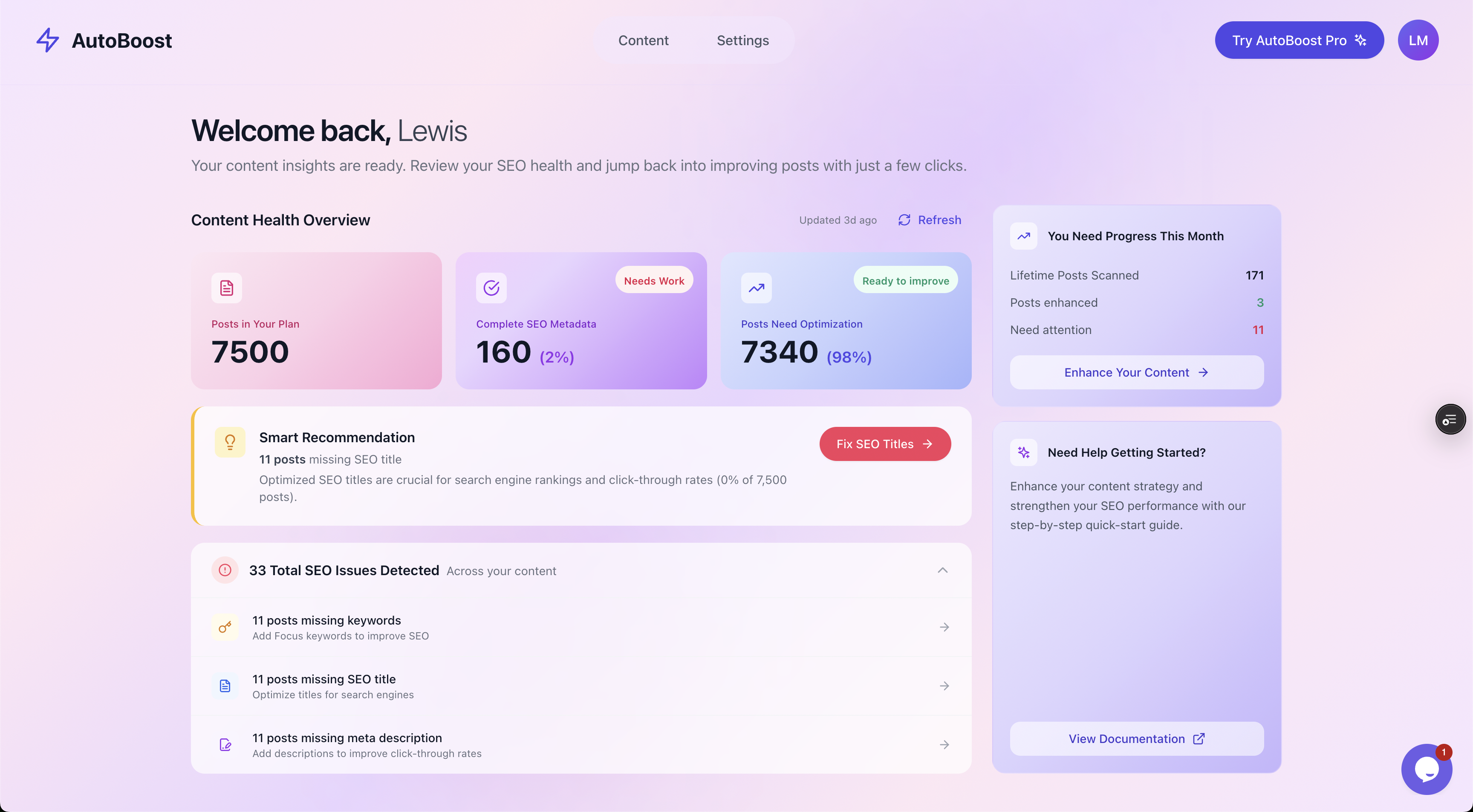
The Content Health Overview counts your library and surfaces the backlog: 7,500 posts, 98 percent needing optimisation, and the specific SEO issues detected.
The number that matters here is not the headline percentage, it is the breakdown by issue type.
Knowing that 1,200 posts have no meta description but only 80 lack a focus keyword tells you where the hour you have today is best spent. Audit first, then prioritise by volume and by page value.
Watch out: A high "needs optimisation" percentage on a fresh connection is normal, not alarming. Most sites have never touched metadata on older posts. The point of the audit is to make the backlog visible so you can clear it, not to make you feel behind.
Step two: isolate each gap with filters
A total is useful, but to fix anything you need the actual list of affected posts. This is where filtering turns the audit from a report into a worklist.
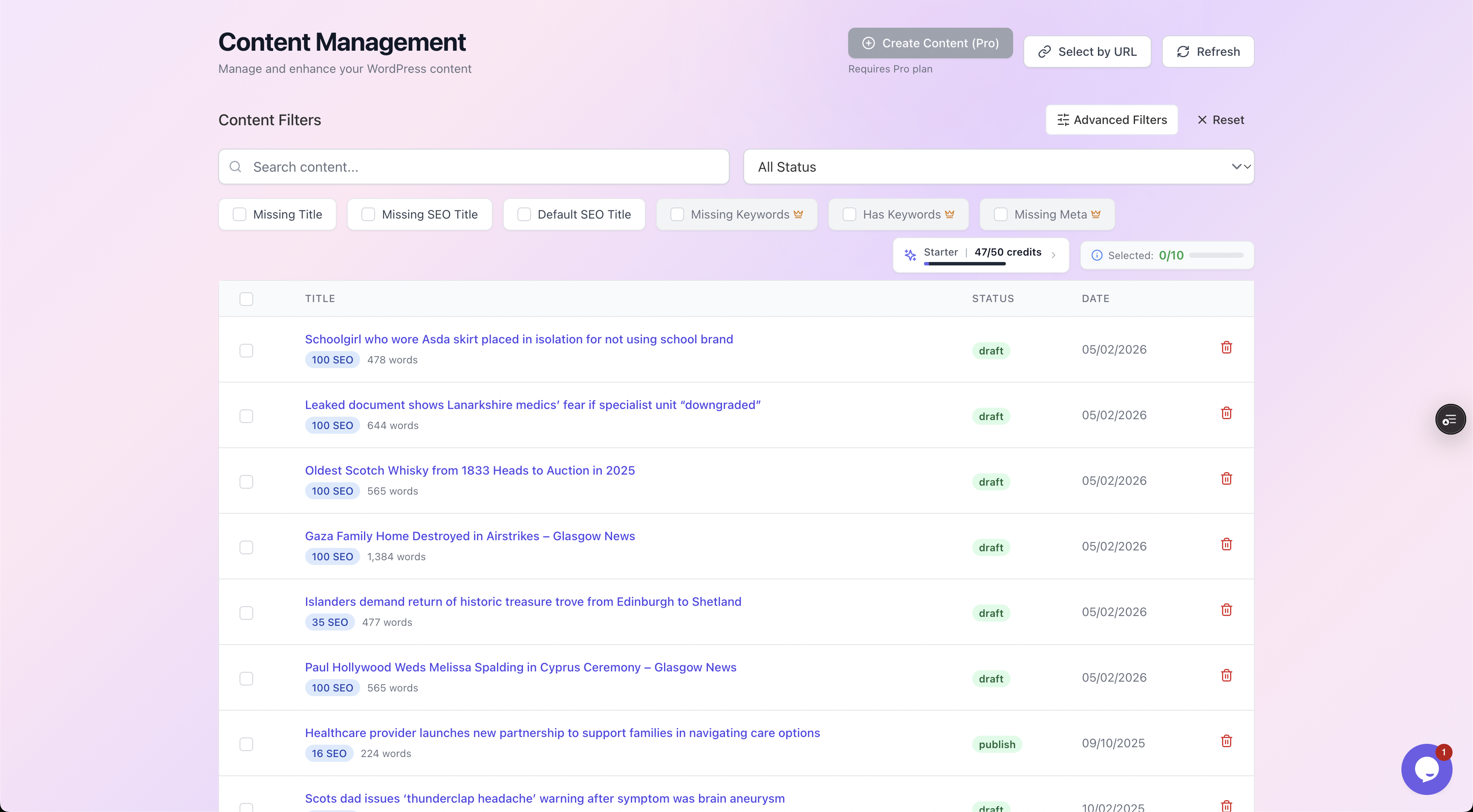
Filter chips isolate exactly the posts missing each field, so you work one gap at a time against a clean list with visible SEO scores.
Work one filter at a time:
- Click "Missing Meta" and you get only the posts with no meta description.
- Click "Missing Keywords" and you get the posts with no focus keyword.
Each filtered list becomes a discrete job you can work through in batches, rather than an amorphous "do SEO" task that never ends.
This matters for accuracy too. AutoBoost reads the real meta fields your SEO plugin uses, so the filters reflect what is genuinely set, not a guess.
A post counts as "missing meta" only when the description field your plugin stores is actually empty.
Step three: generate, review, write back
With a filtered list in front of you, the fix is the same loop for every field:
- Select the posts.
- Choose what to generate.
- Review each result.
- Write the approved version back into your existing SEO plugin.
AutoBoost works with RankMath and Yoast rather than replacing them, so the data lands in the same fields you already use.
Nothing publishes automatically. Every generated value goes through an approval step first.
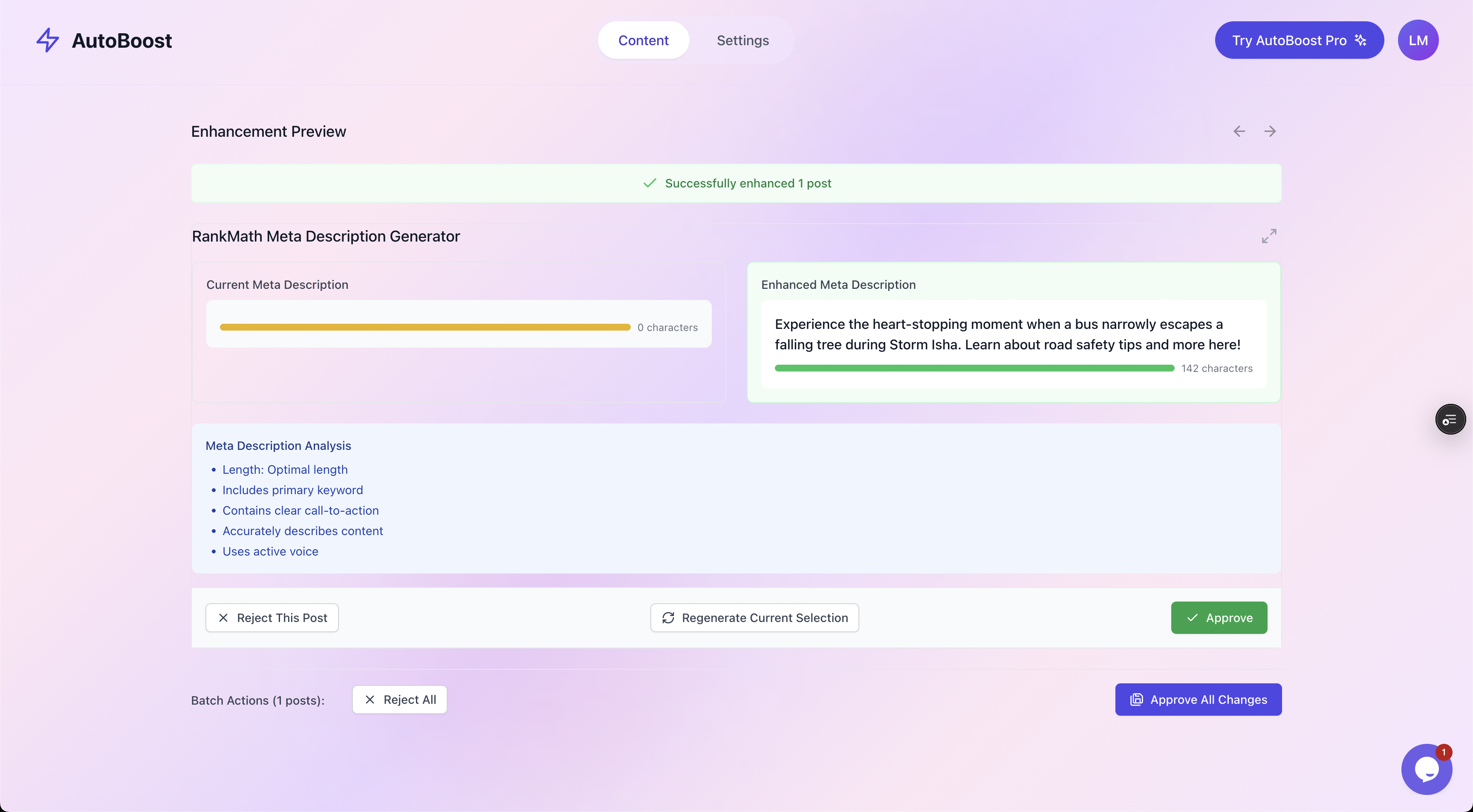
Before and after, side by side: the current value against the generated one, a quality checklist, and explicit Approve or Reject controls. You are always the last step.
The generation itself comes from a template library, so you control the style of output rather than getting whatever a black box decides.
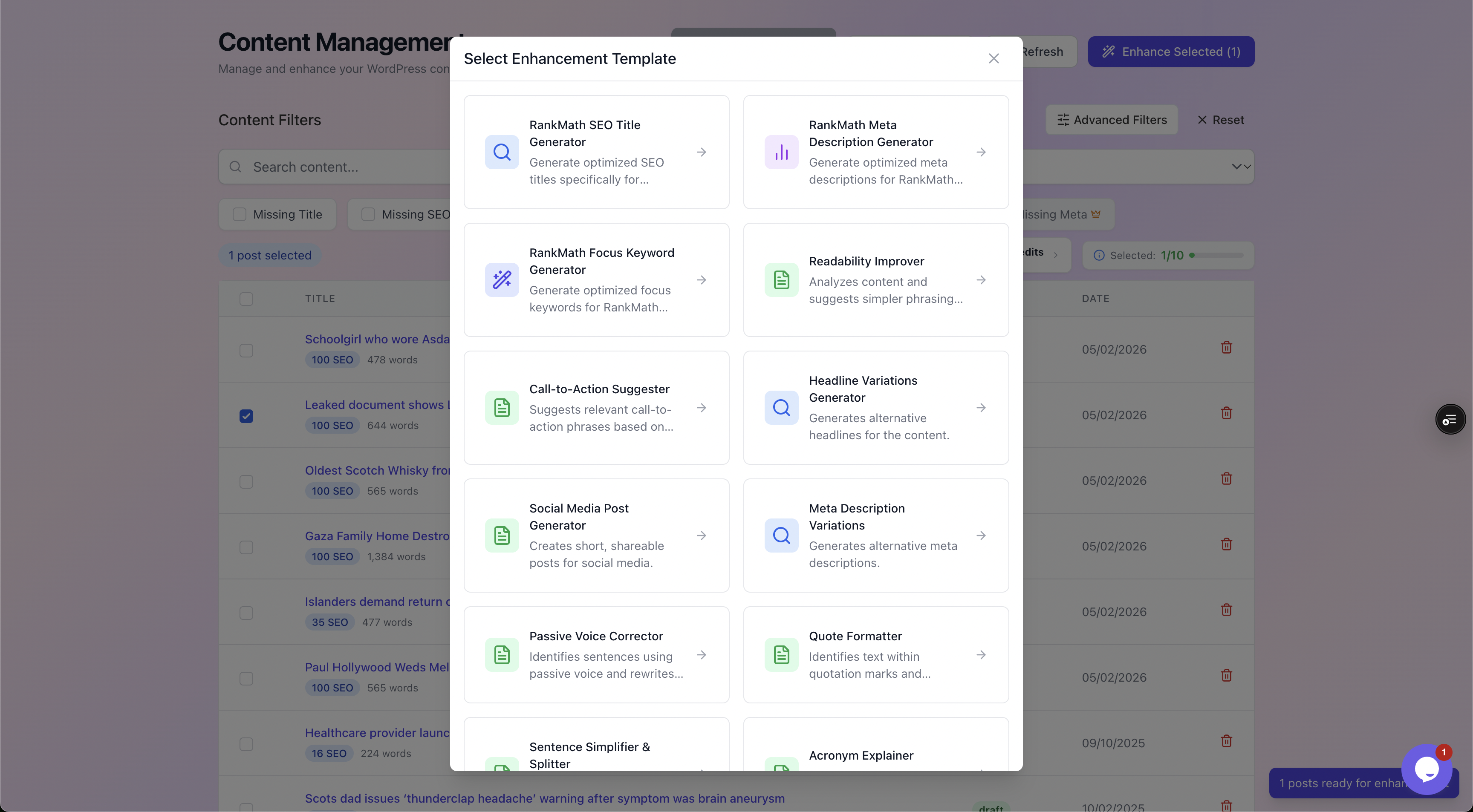
The template library covers each field type plus readability, CTA and headline variations, so the output matches the field you are fixing and your house style.
Worked example: working through a 7,500-post backlog
Here is the audit run end to end on a realistic site. Numbers are illustrative but the sequence is exactly what you would do.
The starting position
A blog with 7,500 published posts built up over eight years.
The Content Health Overview reports that the vast majority need work, with the detected issues breaking down roughly as follows.
| Issue | Posts affected |
|---|---|
| Missing meta description | 4,100 |
| Missing or default SEO title | 2,600 |
| No focus keyword set | 1,900 |
| Images with no alt text | 3,300 |
The plan
Rather than tackle everything at once, prioritise by impact:
- Meta descriptions first. They affect click-through on pages that already rank.
- Then focus keywords. Without them nothing can be scored.
- Then SEO titles.
- Then alt text.
The run
- Filter to "Missing Meta". Select the first batch. Generate descriptions, which pull from each post's actual content so they are specific rather than templated.
- Work down the review queue. For most, Approve. For the handful where the generated line misses the angle, Reject and regenerate or edit. Roughly nine in ten pass on the first look.
- Write the approved batch back into RankMath. Move to the next batch and repeat until "Missing Meta" reads zero.
- Switch the filter to "Missing Keywords" and run the same loop with the Focus Keyword template.
- Repeat for SEO titles, then alt text.
The before and after
One post in the set started as:
- Title tag set to the raw headline "10 Tips"
- No meta description
- No focus keyword
After the run it had:
- The SEO title "10 Practical Tips to Cut Your Energy Bill in 2026"
- A meta description that summarised the actual advice and ended with a reason to click
- The focus keyword "cut energy bill" set so RankMath could finally score it
Same content, now legible to search and clickable in the results.
The result
A backlog this size is not cleared in one sitting. The biggest bulk run is 500 posts, and the Agency plan includes 1,000 credits a month (one credit per post for each AI tool you run), so on credits alone 7,500 posts take about eight months on that plan. Pro and Agency users can add their own OpenAI key, and runs on your own key do not use up credits, but the 500-post cap per run still applies. Start with the posts that matter most, such as the ones that already rank, and work through the rest in reviewed batches over the following months.
Crucially, you reviewed every change, so nothing went live that you had not seen. For the full step-by-step version of this loop across a whole site, see the WordPress SEO automation workflow.
Watch out: Automation closes metadata gaps, it does not improve weak content. If a post is thin, duplicative or out of date, a perfect meta description will not rank it. Flag those during review and rewrite the content itself. The audit tells you where to look.
What an audit will not fix
Being honest about the boundary is what keeps expectations sane.
The audit and the bulk fixes handle the repetitive, rules-based on-page layer. They do not touch the things that need genuine editorial or off-site work.
- Content quality. No tool makes a shallow post deep. That is writing.
- Backlinks and authority. Off-page signals are earned, not generated.
- Search intent mismatch. If a page targets the wrong query, new metadata will not save it. That is a content decision.
- Technical issues. Crawl errors, slow pages and indexing problems sit outside an on-page metadata audit.
What you get is the part that almost never gets done by hand: every post correctly titled, described, keyworded and alt-tagged, consistently, at scale.
That is a real win precisely because it is the boring work everyone skips.
Measurement and cadence
An audit is not a one-off. As you publish, new posts arrive with empty fields and the backlog quietly rebuilds. Treat it as a recurring habit.
- Measure in Search Console. Watch impressions and click-through rate on the pages you fixed. Better meta descriptions and titles tend to move CTR first, often within a few weeks of recrawl.
- Re-audit monthly. Reconnect, look at the Content Health Overview, and clear whatever has accumulated. A monthly pass keeps the number near zero instead of letting it balloon.
- Tie it to publishing. If you publish weekly, audit weekly. The fix takes minutes when the backlog is small.
How much you can process depends on your plan:
- Free ($0): 5 AI credits a month, 3 posts per bulk run, 1 site
- Starter (
9/mo): 50 credits, 25 per run, 1 site - Pro ($49/mo): 250 credits, 125 per run, 3 sites
- Agency ($99/mo): 1,000 credits, 500 per run, 10 sites
See pricing for the full breakdown, or the features page for what each tier unlocks.
If you run a content site, the bloggers solution is the relevant fit, and for stores it is ecommerce. AutoBoost connects through the connector plugin and works alongside RankMath or Yoast, which you can read about on integrations.
Frequently asked questions
How do I find all posts missing a meta description in WordPress?
Use a filtered view that reads your SEO plugin's description field directly. In AutoBoost, connect WordPress via the connector plugin and an Application Password, then click the "Missing Meta" filter. You get a clean list of only the posts where the description is genuinely empty, with SEO scores shown, ready to fix in bulk.
Will an SEO audit change my live site automatically?
No, and that is deliberate. AutoBoost scans and generates, but nothing is written back to WordPress until you approve it. Every meta description, title, keyword and alt text passes through a before-and-after review with Approve and Reject controls. You are always the last step before anything goes live.
Does this replace RankMath, Yoast or AIOSEO?
No. It works with them. AutoBoost writes optimised values into the same meta fields RankMath or Yoast already use (it reads All in One SEO, SEOPress and The SEO Framework but does not write to them), so your plugin keeps scoring pages and rendering tags as normal. Think of it as the bulk-editing layer on top of the plugin you already run, not a replacement for it.
Can a metadata audit actually improve rankings?
It improves the on-page foundation that rankings depend on, particularly click-through from better titles and descriptions. What it cannot do is rank thin content or manufacture authority. The honest version: fixing metadata removes a ceiling, it does not lift a page that has nothing worth ranking. Pair the audit with good content and it pays off.
How often should I run a WordPress SEO audit?
Monthly is a sensible default for most sites, or align it with your publishing schedule. New posts keep arriving with empty fields, so a regular pass keeps the backlog near zero rather than letting it grow back into a weeks-long job. The more often you run it, the less there is to do each time.