Internal Linking at Scale for WordPress Blogs (2026)
By AutoBoost Team · 2026-06-22 · 10 min read
Internal links are the quietest, cheapest SEO lever a blogger has, and the one most large sites leave half-finished.
You write a post, drop in a couple of links to whatever you happen to remember, and move on. Then a year and 400 posts later you have an archive full of orphan pages that Google barely understands.
This guide covers the parts that actually matter:
- The rules that change rankings in practice
- How many links to use per post
- What good anchor text looks like
- How to fix internal linking across a whole blog without editing every post by hand
Key takeaways
- Internal links spread authority, show Google how your topics relate, and keep readers moving through your site.
- Link in both directions: from new posts to old ones, and crucially back from old posts to new ones.
- Use descriptive anchor text that describes the destination. Never "click here" or a bare URL.
- Build topic clusters (a pillar page plus supporting "spoke" posts that all link to it and each other).
- On a large blog you cannot do this manually. Tools like AutoBoost surface descriptive link suggestions you approve before they go live.
Why internal links matter
An internal link is any link from one page on your site to another page on the same site.
Search engines treat them as three signals at once, and readers treat them as a fourth.
They spread authority. When a page earns backlinks, that authority does not stay locked on that one URL. It flows through the internal links pointing out of it.
A well-linked archive lets your strongest pages pass some of their equity to deeper posts that would otherwise never rank. A poorly linked archive lets it pool uselessly on the homepage.
They help Google understand topics. Google reads your links to work out what relates to what, and which pages you consider most important.
If twelve posts about sourdough all link to one "complete sourdough guide", Google gets a strong hint that the guide is your authority page on the subject. The anchor text you use adds context about what the destination is about.
They aid crawling and discovery. Googlebot follows links to find pages. A post with no internal links pointing to it is an "orphan", and orphans get crawled rarely and indexed slowly, if at all.
On a 5,000-post blog, orphans are usually the silent majority.
They keep readers on your site. A relevant link at the right moment is the difference between a reader bouncing and a reader going three posts deep.
More pages per session, more time on site, more chances to convert. Internal links are the only "related content" that you fully control.
The practical rules
Theory is easy. Here are the rules that change rankings in practice.
Link in both directions
This is the rule almost everyone half-does. When you publish a new post, you naturally link out to older relevant posts, because they are top of mind.
What you forget is the reverse: going back to your older, higher-authority posts and adding a link forward to the new one.
That backward link is the valuable one:
- Your old posts have age, backlinks and ranking power. A fresh post linked from three strong older posts gets discovered and trusted far faster than one sitting in isolation.
- The "old to new" discipline falls apart at scale. Nobody remembers which old posts are relevant.
Tip: Every time you publish, ask "which five existing posts should mention this?" then go and add the links. That single habit outperforms most on-page tweaks.
Use descriptive anchor text
Anchor text is the clickable words in a link. It tells both readers and Google what the destination is about.
- "Click here" and "read more" tell them nothing.
- A bare pasted URL is worse.
- Descriptive anchors that name the topic of the target page are the gold standard.
Keep anchors natural and varied. Do not stuff the exact same keyword into every link to a page, because identical over-optimised anchors look manipulative.
Describe the destination the way you would in conversation.
| Bad anchor text | Why it is weak | Better version |
|---|---|---|
| click here | No context for readers or Google | our guide to keto meal prep |
| read this post | Generic, wastes the signal | how to optimise old blog posts |
| https://site.com/p/123 | Ugly, zero keyword value | the full sourdough starter guide |
| more | Too short to mean anything | more on choosing camera lenses |
| best plugin (on every link) | Over-optimised, looks spammy | best auto SEO plugin for WordPress |
| amazing tips you need | Clickbait, mismatched to target | seven internal linking tips |
Use a sensible number of links per post
There is no magic number, and anyone who quotes one as gospel is guessing. Google's own guidance is to keep links to a "reasonable number".
As a working rule for a normal blog post:
- Aim for roughly 3 to 8 internal links in a standard 1,000 to 2,000 word post.
- Scale with length. A 4,000-word pillar can comfortably carry 10 to 15. A 600-word news post might only justify 2 or 3.
- Relevance over quota. A link only counts if it genuinely helps the reader. Five relevant links beat fifteen forced ones.
- Avoid linking the same target twice in close proximity with different anchors. Pick the strongest spot.
The goal is a post where every link feels earned, not a footer dump of twenty "related" URLs that nobody clicks.
Build topic clusters (pillar and spoke)
The single most effective internal linking pattern for blogs is the topic cluster, sometimes called pillar and spoke.
It works like this:
- A pillar page covers a broad topic in depth ("WordPress SEO for bloggers").
- Multiple spoke posts each cover one narrow sub-topic in detail ("how many internal links per post", "writing meta descriptions", "alt text at scale").
- Every spoke links up to the pillar. The pillar links down to every spoke. Relevant spokes link sideways to each other.
This structure does three things at once:
- Tells Google you have genuine depth on a subject.
- Concentrates authority on the pillar so it can rank for the competitive head term.
- Gives readers a clear path through the whole topic.
If you only adopt one idea from this guide, make it clusters. For more on organising a large archive this way, see our guide on blog SEO at scale.
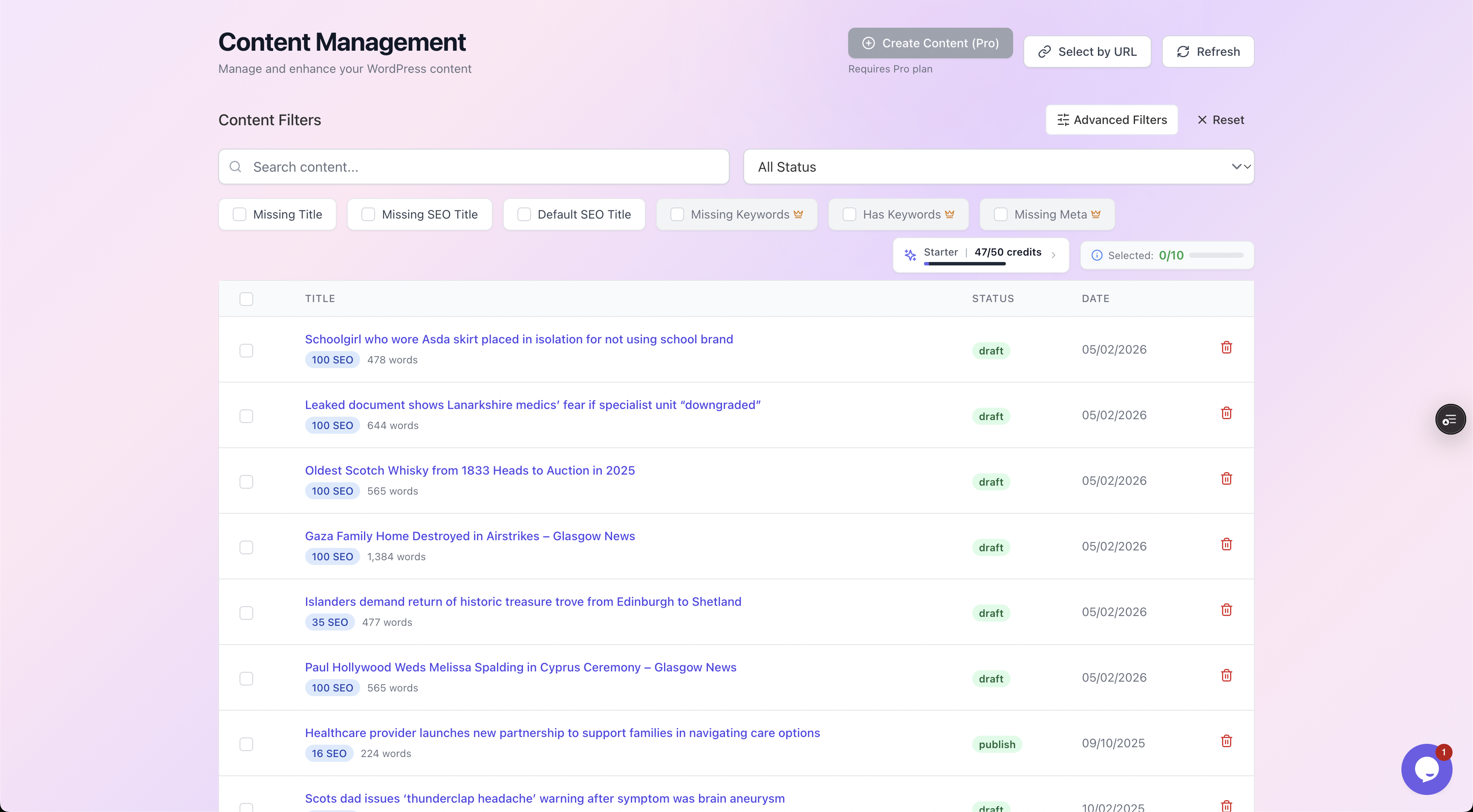
Filtering a large blog by what each post is missing makes it obvious which posts are orphaned or under-linked before you start fixing anything.
The hard part: doing this across a big blog
Every rule above is straightforward for one post. The problem is that internal linking is a whole-site job, not a per-post job.
To do it properly you face two scaling problems:
- To link a new post in, you need to know which of your existing 3,000 posts are relevant.
- To fix orphans, you need to find them first.
Human memory does not scale past a few hundred posts.
This is where most blogs quietly give up. They link the last few months of content to each other and let the back catalogue rot.
The fix is to treat internal linking as a recurring audit rather than a one-off act of writing.
A few approaches that work at scale
- Map your clusters once. List your pillar topics and tag every post to one. This alone reveals orphans and over-linked pages.
- Audit on a schedule. Quarterly, sweep for posts with zero or one inbound internal link and fix them.
- Use suggestions, not memory. A tool that reads your whole archive can propose relevant link targets you would never recall, then let you approve each one.
AutoBoost connects to your WordPress site through the AutoBoost connector plugin and an Application Password, scans every post, and as part of its enhancement work it generates internal-link suggestions: relevant target pages with descriptive anchor text, drawn from your own archive.
Nothing is inserted automatically. Every suggestion is human-in-the-loop, so you review and approve each link before it touches your live content.
It works alongside your existing RankMath or Yoast setup rather than replacing it, and writes approved changes back into them.
Worth saying plainly: automation handles the repetitive discovery and metadata work. It surfaces relevant targets and writes clean anchors. It does not judge whether a link genuinely improves a reader's experience. That judgement stays with you, which is exactly why the approval step exists.
A worked example
Say you run a food blog with 1,200 posts. You have just published a new recipe, "No-knead overnight sourdough".
Here is the linking job done properly.
Step 1: link out from the new post
Inside the new recipe you add 4 internal links to relevant existing posts:
- "...if your starter is sluggish, see our [sourdough starter troubleshooting guide]" (descriptive anchor, helps the reader).
- A link to your flour comparison post where you mention flour choice.
- A link to your pillar page, "The complete guide to baking sourdough at home".
- A link to a related recipe, "Sourdough discard crackers".
Step 2: link in from old posts
This is the step normally skipped. You find 5 older, well-ranking posts that should now mention the new recipe and add a forward link from each.
Good candidates here:
- Your starter guide
- The pillar
- Two other bread recipes
- A "weekend baking projects" roundup
Use anchors like "our easy no-knead overnight sourdough" rather than "click here".
Step 3: connect it to the cluster
The pillar page gets the new recipe added to its list of spokes, closing the loop so authority flows both ways.
Watch out: done manually, step 2 is the bottleneck. You have to remember which of 1,200 posts are relevant, open each one, find the right paragraph and write a fresh anchor.
For one post it is tedious. Across a year of publishing it never happens.
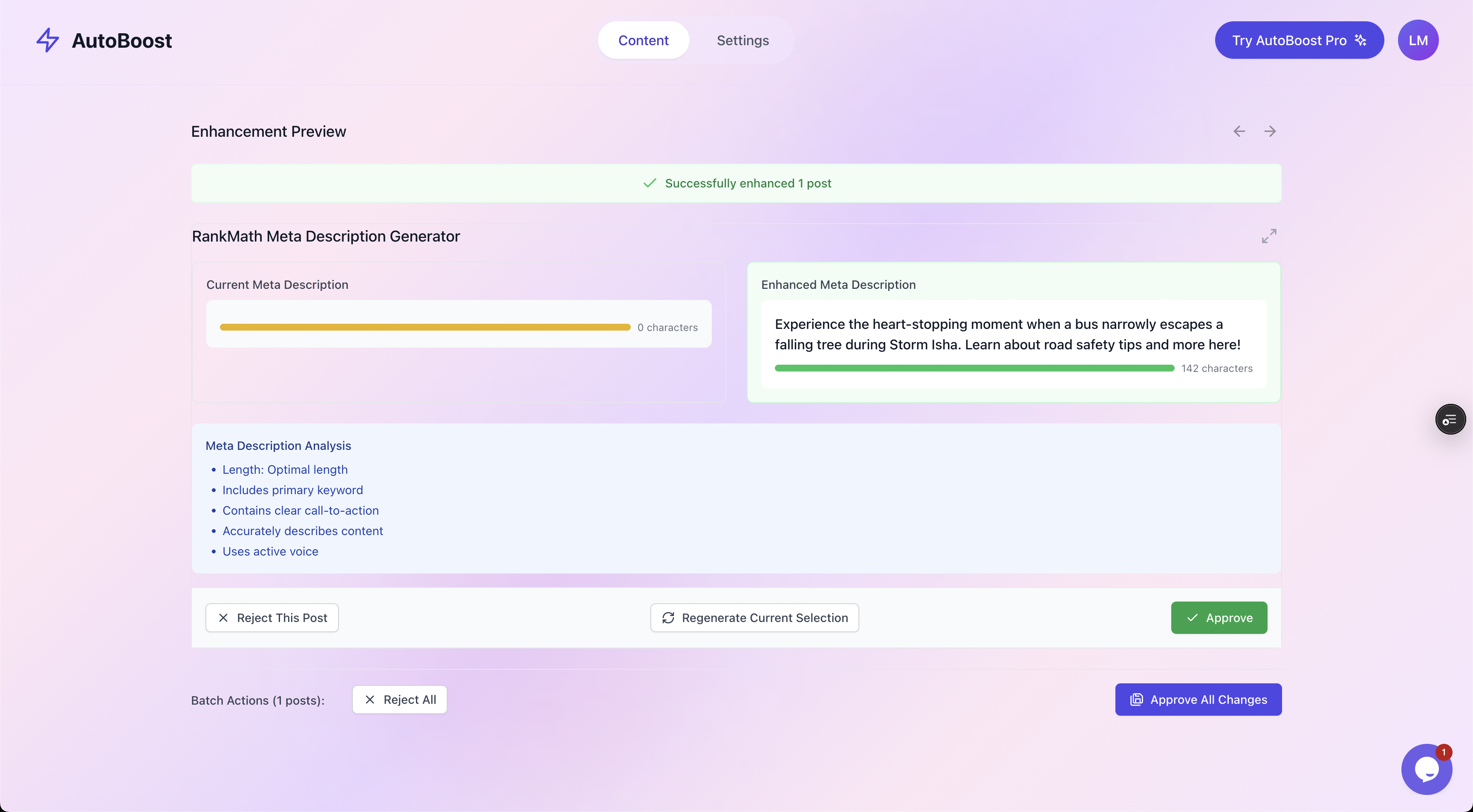
Every change is shown as current versus proposed with an approve or reject choice, so an internal-link suggestion or a new anchor is something you accept on purpose, never an automatic edit.
With AutoBoost, step 2 becomes a review queue. The tool reads your archive, proposes the older posts that should link to the new recipe along with suggested anchor text, and you approve the ones that fit.
It is the same approval flow you would use for auto SEO across WordPress and the metadata work covered in optimising old blog posts. The judgement stays yours; the donkey work does not.
Common internal linking mistakes
A quick list of what to stop doing:
- Orphan pages. Posts with no inbound internal links. Find and fix them first; they are pure wasted potential.
- One mega-anchor everywhere. The exact same keyword anchor on every link to a page looks engineered. Vary it.
- Footer link dumps. Twenty "related posts" links nobody reads do less than three contextual links inside the body.
- Linking only the homepage. Deep posts need links too. Authority that never leaves the homepage helps nothing.
- Linking irrelevant pages for the sake of a quota. A link the reader would never want hurts more than a missing one.
- Never revisiting old posts. Internal linking is a maintenance job, not a publish-day job.
Frequently asked questions
How many internal links should I have per blog post?
There is no fixed rule, but 3 to 8 internal links works well for a typical 1,000 to 2,000 word post. Scale up for long pillar pages and down for short ones. Prioritise relevance over hitting a number; a forced link is worse than a missing one. Google asks only that you keep the total "reasonable".
Do internal links actually help SEO, or just navigation?
Both, and they are genuinely a ranking factor. Internal links spread authority between your pages, help Google understand which pages are most important and how your topics relate, and aid crawling so deeper posts get indexed. They also improve engagement, which feeds back into how well your site performs. Few on-page changes give as much return for as little effort.
What is the best anchor text for an internal link?
Descriptive text that names the topic of the destination page, written naturally. "Our guide to keto meal prep" beats "click here" every time. Avoid bare URLs, generic words like "read more", and using the exact same keyword anchor on every single link to a page. Variety and relevance are what you want.
How do I fix internal links across hundreds of old posts without editing each one?
Treat it as an audit, not manual editing. Map your posts into topic clusters, find orphan pages with zero inbound links, and use a tool that reads your whole archive and suggests relevant targets with anchor text. AutoBoost does this and shows each suggestion for approval, so you fix the archive in a review queue rather than opening every post. See pricing for the AI credits and posts per bulk run on each plan.
Will adding internal links make thin content rank?
No, and it is worth being honest about. Internal links help Google find, understand and distribute authority to pages that deserve it. They will not rescue thin, low-value content, and they are not a substitute for earning backlinks. Automation handles the repetitive linking and metadata work; the quality of the writing is still on you.
Where to start
If you do nothing else this week, run this short plan:
- Pick your three biggest topics.
- Make sure each has a clear pillar page, and link every related post up to it and back down.
- Find your orphans and give each one at least two inbound links from relevant older posts.
That alone moves the needle on most blogs.
When the manual version stops scaling, which it will somewhere past a few hundred posts, let a tool surface the suggestions and keep the approval in your hands.
You can start free with AutoBoost: the Free plan includes 5 AI credits a month for one site. See the features and the bloggers solution for how it fits a high-volume content site, and pair it with the wider blog SEO at scale workflow.
Internal linking is the work that compounds. The sites that do it consistently quietly pull ahead of the ones that do it once.