How to Optimise Old Blog Posts for SEO at Scale
By AutoBoost Team · 2026-06-22 · 10 min read
Your oldest posts are probably your best untapped asset. They already carry age, the occasional backlink, and a search history Google can read.
Most of them are slowly losing rankings while you pour effort into brand new content that starts from zero. This guide shows you how to:
- Find the old posts worth refreshing.
- Decide what to actually change.
- Run the metadata side of the refresh across dozens of posts at once.
Key takeaways
- The best refresh candidates are posts with impressions but few clicks, decayed rankings, or missing metadata, not your worst posts.
- Refreshing splits into two jobs: fast repetitive metadata fixes, and the slow human work of rewriting weak content. Do the fast wins first.
- AutoBoost finds posts missing a focus keyword, SEO title or meta description, then bulk-generates fixes you approve before anything is written back.
- Refreshing metadata is quick. Refreshing thin or genuinely outdated content is not, and no tool can shortcut it.
Why old posts decay (and why that is good news)
Content decay is normal. A post that ranked well two years ago slips for predictable reasons:
- Fresher competition. Someone else published something newer on the same topic.
- Shifting intent. What searchers want from the query has changed.
- A reweighted SERP. Google reshuffled what it rewards.
- Thin metadata from the start. It was weak on day one and never got fixed.
The page did not get worse. The world moved around it.
That is good news, because a decayed post is a known quantity. It has a track record in Search Console, and Google already understands what it is about.
You are not gambling on whether a topic can rank, you are recovering ground you already won. A refresh that takes 20 minutes can move a post that took a full day to write back up the page.
Tip: The mistake most bloggers make is treating "refresh" as a vague chore and starting with whatever post they happen to remember. The posts worth your time are specific and findable.
How to find posts worth refreshing
There are three signals that flag a post as a strong candidate. Work through them in order.
1. Impressions but few clicks
Open Google Search Console, go to the Performance report, and sort your pages by impressions.
- Any page getting thousands of impressions but a click-through rate under 2% is showing up in search and being ignored.
- That is almost always a metadata problem: a weak title or a missing meta description that does not earn the click.
- These are the highest-value, fastest fixes you have.
2. Decayed rankings
Compare the last three months against the previous three in Search Console.
- Pages that have dropped several positions, especially from page one to the bottom of page one or onto page two, are losing ground but still close enough to recover.
- A position 8 to 4 move can double traffic.
- These usually need a content freshness pass, not just metadata.
3. Missing or broken metadata
Plenty of older posts never had a focus keyword, a hand-written SEO title or a meta description at all.
- WordPress falls back to truncating the first lines of the post, which rarely reads as a compelling search snippet.
- These are pure repetitive fixes and the easiest to do in bulk.
Tip: Start with signal 1. Posts that already rank and already get impressions give you the fastest return because Google is doing the hard part already. You are only fixing the snippet that wins the click.
AutoBoost handles the third signal automatically. It connects to your WordPress site through the AutoBoost connector plugin and an Application Password, scans every post, and surfaces the ones missing a focus keyword, SEO title or meta description.
Instead of clicking through hundreds of posts to find the gaps, you get a filtered list. For the wider audit process, see our WordPress SEO audit guide.
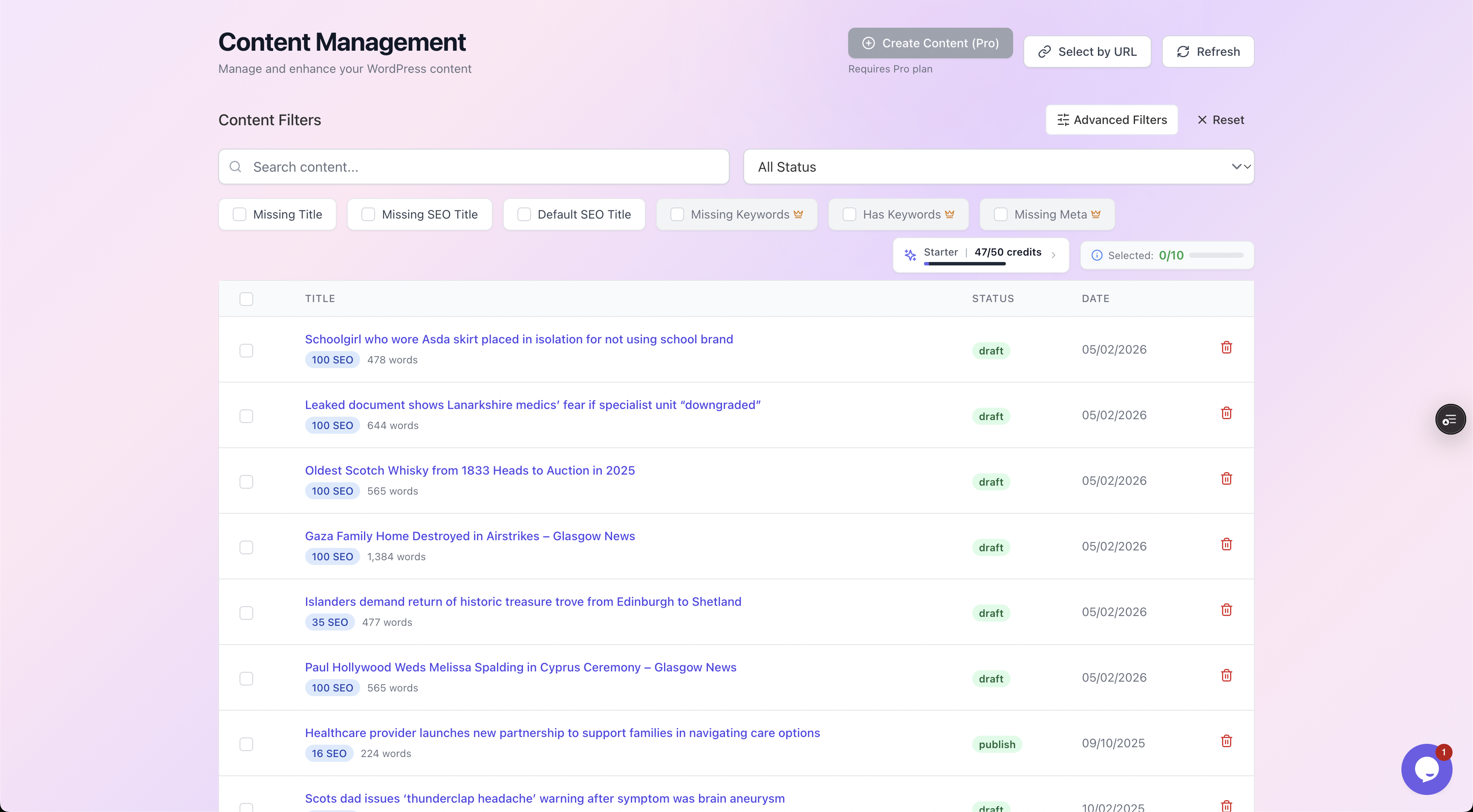
Filter your back catalogue by exactly what each post is missing, then work through the gaps in batches.
What to refresh, and what to leave alone
Not everything in a refresh is equal. Here is what actually moves the needle, ordered from fastest to slowest.
| Element | Effort | Impact | Notes |
|---|---|---|---|
| Meta description | Low | High on CTR | Rewrite to match current intent and earn the click |
| SEO title | Low | High on CTR | Front-load the keyword, keep it under ~60 characters |
| Focus keyword | Low | Medium | Set it so the rest of your SEO checks have a target |
| Internal links | Low to medium | Medium to high | Link the old post to and from newer relevant posts |
| Image alt text | Low | Low to medium | Helps image search and accessibility |
| Intro and freshness | Medium | High | Update the first 100 words, dates, stats, screenshots |
| Body rewrite | High | High | Only when the content is genuinely thin or wrong |
The first five rows are the repetitive metadata work that scales. You can do them across dozens of posts in an afternoon.
The last two are the human jobs that no tool should pretend to automate.
Update the intro and freshness signals
- Rewrite the opening so it reflects what is true today.
- Refresh any dates.
- Swap out screenshots that show old interfaces.
- Correct stats that have aged.
This is where "is this still accurate" lives, and it matters more than people assume.
Leave good content alone
If a post still ranks well, still reads correctly, and still gets clicks, do not touch the body.
Refresh its metadata and internal links if they are weak, then move on. Rewriting a page that is already working risks throwing away rankings for no reason.
Watch out: A refresh will not save thin content. If a 300-word post is competing against thorough 2,000-word guides, no amount of metadata polish will rank it. That one needs real expansion or a merge, which is human work. Automation cannot manufacture depth that was never there.
The fast win: refresh metadata across dozens of posts
Once you have your list of candidates, the metadata refresh is where you get the most output for the least time.
- Doing it one post at a time in the WordPress editor is what stops most people from ever finishing.
- Doing it in batches is what makes a back-catalogue refresh realistic.
AutoBoost works directly with whichever SEO plugin you already use. It does not replace RankMath or Yoast, it writes optimised values back into them.
So your existing setup, schema and settings stay exactly as they are. If you are weighing those plugins up, we cover the differences in RankMath vs Yoast vs AIOSEO.
From the candidate list you pick what to generate. The template library covers:
- SEO titles, meta descriptions and focus keywords.
- Image alt text and schema.
- Internal-link suggestions.
- Readability, headline and CTA improvers.
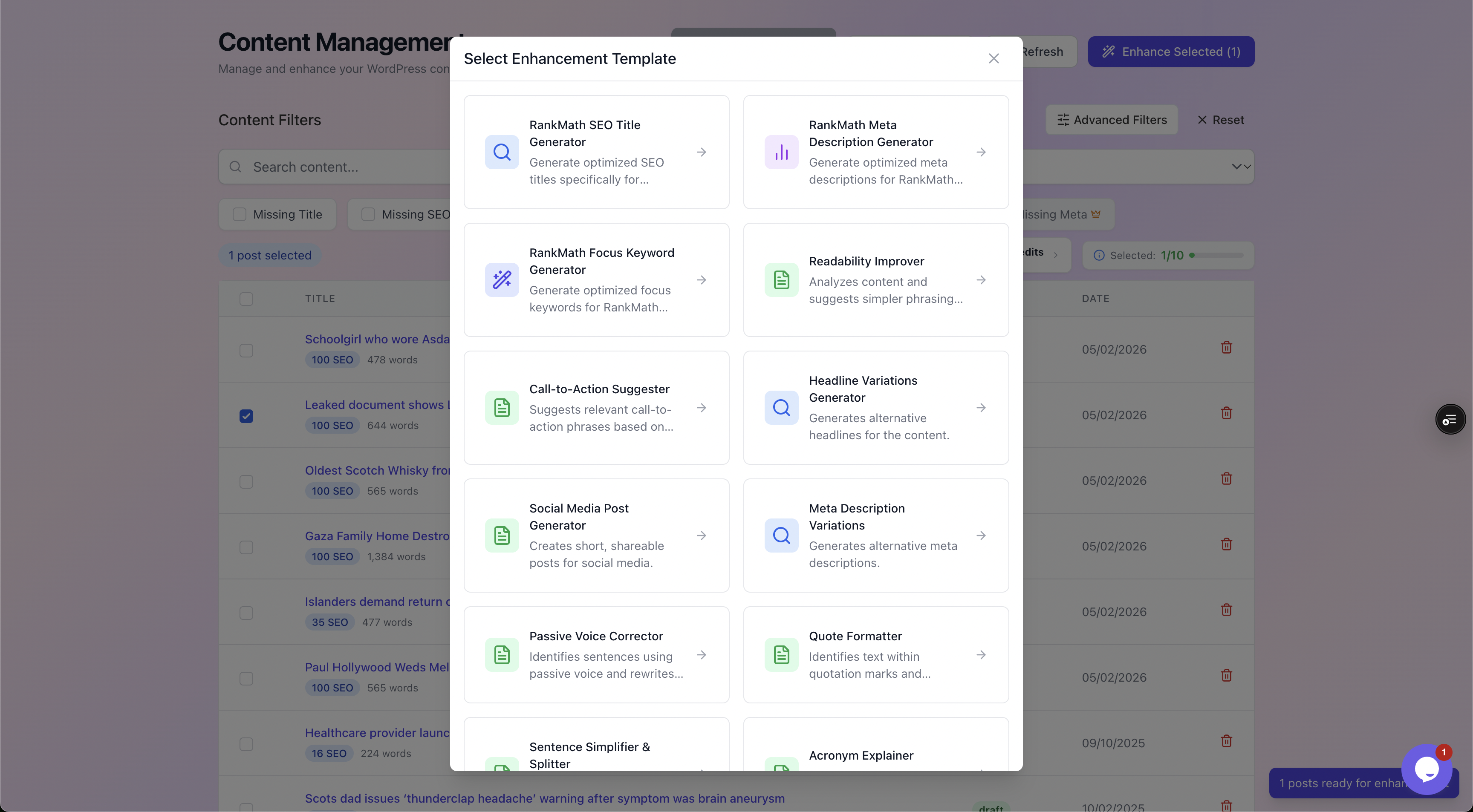
Pick the enhancement to run across your selected old posts. Each one maps to a field your SEO plugin already uses.
The part that matters most: nothing publishes automatically.
- Every generated value goes into a review queue.
- You approve or reject each one before it touches your site.
- The before-and-after preview shows your current value against the proposed one, with a quality checklist.
So you are reviewing real output, not blindly trusting a black box.
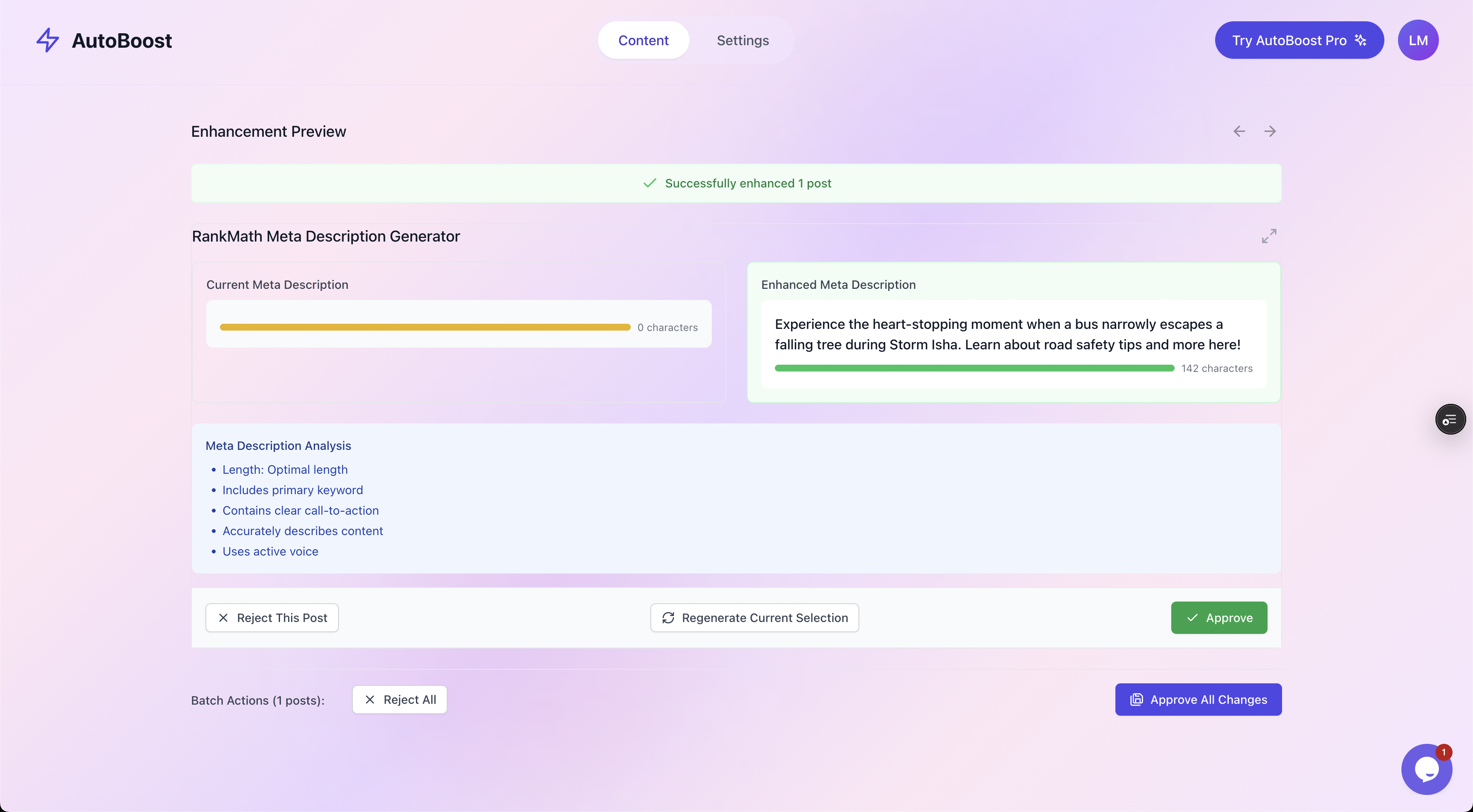
Current versus enhanced, side by side, with Approve and Reject. You stay in control of every change.
This human-in-the-loop step is what separates a sensible bulk refresh from the spammy auto-generation that gets sites penalised.
The machine does the repetitive drafting. You make the editorial call. For more on writing snippets that actually earn clicks, see meta descriptions for bloggers.
Don't forget internal links
Old posts are the perfect place to fix internal linking, and it is the most overlooked part of a refresh.
When you published that post two years ago, half the content you would now link to did not exist yet. Those posts are orphaned from each other.
Go through your refreshed posts and:
- Add links to newer, relevant content.
- Add links back from the new posts to the old one.
This passes authority around your site, keeps readers moving, and helps Google understand how your topics relate.
AutoBoost can suggest internal links during the refresh, which you approve like any other change. We go deeper on this in our internal linking for WordPress blogs guide.
Worked example: refreshing a decayed how-to post
Here is the full loop on a single realistic post so you can see where the time goes.
The post
"How to Start a Sourdough Starter", published 2023, around 1,400 words. Search Console over the last 28 days shows:
- 4,200 impressions.
- 38 clicks.
- A 0.9% click-through rate.
- An average position of 6.4.
It ranks. It just does not get clicked.
The diagnosis
- Position 6.4 with that many impressions is a CTR problem first, a freshness problem second.
- The SEO title is the default "How to Start a Sourdough Starter - My Kitchen Blog".
- There is no meta description, so Google is pulling a flat first sentence.
- The body is solid and still accurate, so no rewrite needed.
The metadata fix (about 10 minutes)
In AutoBoost, the post already shows up under "Missing Meta". Generate a new SEO title and meta description.
- SEO title before: How to Start a Sourdough Starter - My Kitchen Blog
- SEO title after: How to Start a Sourdough Starter (Beginner Guide, 7 Days)
- Meta description after: Make a bubbly sourdough starter from scratch in 7 days. A simple day-by-day guide with feeding ratios, troubleshooting and exactly what to look for.
Both appear in the before-and-after preview. The title front-loads the keyword and adds a specific hook, and the description promises a clear payoff.
Approve both, and AutoBoost writes them straight into RankMath.
The freshness pass (about 15 minutes, human)
- Update the intro to mention the current year.
- Add one new troubleshooting tip readers have asked about in comments.
- Reshoot the one photo that shows a discontinued jar.
The internal links (about 5 minutes)
- Add a link to the newer "Best Flour for Sourdough" post.
- Add a link back from that post to this one.
- Approve the suggestions.
The result you are aiming for
No guarantees, because rankings move for many reasons. But a CTR lift from 0.9% toward the 3 to 5% you would expect at that position roughly triples clicks on existing impressions, with zero new content created.
That is the leverage in refreshing old posts: you are unlocking traffic that is already being offered to you.
Total time: around 30 minutes, of which only 10 was repetitive metadata.
Tip: Multiply that across 40 candidate posts and the metadata portion is where bulk tooling saves you days. If you want to systematise this across a whole site, read blog SEO at scale on WordPress.
How this fits a regular workflow
A content refresh is not a one-off project, it is a recurring habit. The sites that win treat it as a quarterly pass:
- Pull the Search Console data.
- Run the AutoBoost scan for missing fields.
- Clear the metadata gaps in a batch.
- Spend the saved time on the handful of posts that genuinely need rewriting.
What scales with the plan is AI credits a month and posts per bulk run:
- Free ($0): 5 credits a month, 3 posts per bulk run, 1 site.
- Starter (
9/mo): 50 credits, 25 per run, 1 site. - Pro ($49/mo): 250 credits, 125 per run, 3 sites.
- Agency ($99/mo): 1,000 credits, 500 per run, 10 sites.
A typical blogger with a few hundred posts sits comfortably in the lower tiers. See pricing for the full breakdown, or solutions for bloggers for how the workflow maps to a content site.
Frequently asked questions
How often should I refresh old blog posts?
A quarterly pass works for most blogs. Use Search Console to spot decay between cycles, and refresh sooner for posts on fast-moving topics where accuracy slips quickly. The metadata-only fixes are cheap enough to do whenever the scan flags a gap.
Will updating the publish date help SEO?
Only if the content genuinely changed. Changing the date on a post you did not actually update is a hollow signal that can backfire when readers see stale content under a fresh date. Update the content first, then let the date reflect real work. Freshness is about substance, not a timestamp.
Does AutoBoost rewrite the body of my old posts automatically?
No, and that is deliberate. AutoBoost handles the repetitive metadata: SEO titles, meta descriptions, focus keywords, alt text, schema and internal-link suggestions, all of which you approve before anything is written back. Rewriting thin or outdated content is human work, and it is the slow part of any honest refresh.
Can refreshing old posts actually lose me rankings?
It can if you rewrite content that was already working, or strip out sections Google was rewarding. That is why the safe order is metadata and internal links first, content changes only where the post is genuinely weak. Leave good content alone, and keep the before-and-after preview open so you can see exactly what is changing.
What if my old post is too thin to rank no matter what?
Then metadata will not save it. Either expand it into a thorough piece, or merge it into a stronger related post and redirect the old URL. Automation makes the fast fixes faster, but it cannot manufacture depth or earn backlinks. Those remain the human side of SEO.
Start with the gaps you can see
Old posts are the cheapest traffic you will ever buy, because you already paid for them once. To get started:
- Pull your Search Console data.
- Find the posts with impressions and no clicks.
- Start with metadata because it is fast and high impact.
- Then put your scarce human time into the few posts that need real rewriting.
AutoBoost connects to your existing RankMath or Yoast setup, finds every post missing a focus keyword, SEO title or meta description, and lets you fix them in batches with a human approval step on every change.
Browse the features or see how it integrates with the plugin you already run.