Blog SEO at Scale: Optimising a High-Volume WordPress Blog (2026)
By AutoBoost Team · 2026-06-22 · 11 min read
Most blog SEO advice is written for one post at a time. The loop is always the same:
- Pick a keyword.
- Write the article.
- Fill in the title and description.
- Publish, then repeat.
That works fine when you have ten posts. It quietly falls apart when you have a thousand, because the advice assumes you start from scratch on every piece and never looks back at the pile of content already sitting behind you.
A real blog is mostly back catalogue. The post you publish today is one tile in a mosaic of hundreds that almost never get touched again.
Those old posts are doing more than you think:
- They still pull traffic.
- They still rank for things you have forgotten about.
- They still carry missing titles, thin descriptions and broken internal links nobody has audited in years.
Blog SEO at scale is the discipline of treating that whole library as the asset it is, not just the next thing you write.
Key takeaways
- Your back catalogue is the real SEO opportunity, not just new posts. Most sites leave hundreds of old articles half-optimised.
- The scale workflow has four moves: audit the whole library, fix metadata in bulk, refresh the posts worth refreshing, and wire up internal links.
- Every blog SEO task has a "new posts" version and a "back catalogue" version. The back catalogue version is the one everyone skips.
- Automation handles the repetitive metadata across thousands of posts. It does not write good content or earn links, and it will not rank thin pages.
Why the back catalogue is the whole game
Think about where a high-volume blog's traffic actually comes from. It is rarely the post you shipped this morning.
It is the long tail of older articles, dozens or hundreds of them, each picking up a trickle of search traffic for queries you may not even remember targeting. Multiply a small trickle by several hundred posts and that back catalogue is your single biggest organic asset.
Now think about how those posts were optimised. If you are honest, many of them were not.
Here is what tends to be wrong with the older ones:
- They predate your current plugin. The early posts were written before whatever SEO plugin you use now.
- No focus keyword is set. Your plugin's on-page analysis has nothing to score against.
- Default title templates. Plenty have the template instead of a written SEO title.
- Broken meta descriptions. The description is either blank or the first 155 characters of the intro, truncated mid-sentence.
None of that is a content problem. It is a metadata problem, and it sits on hundreds of pages at once.
This is the gap between blog SEO in theory and blog SEO at scale:
- The theory is about doing one post well.
- The reality is about doing the whole library consistently, including the part you have not looked at in two years.
Our WordPress SEO automation workflow covers the full loop in depth; this guide is the bloggers' view of it.
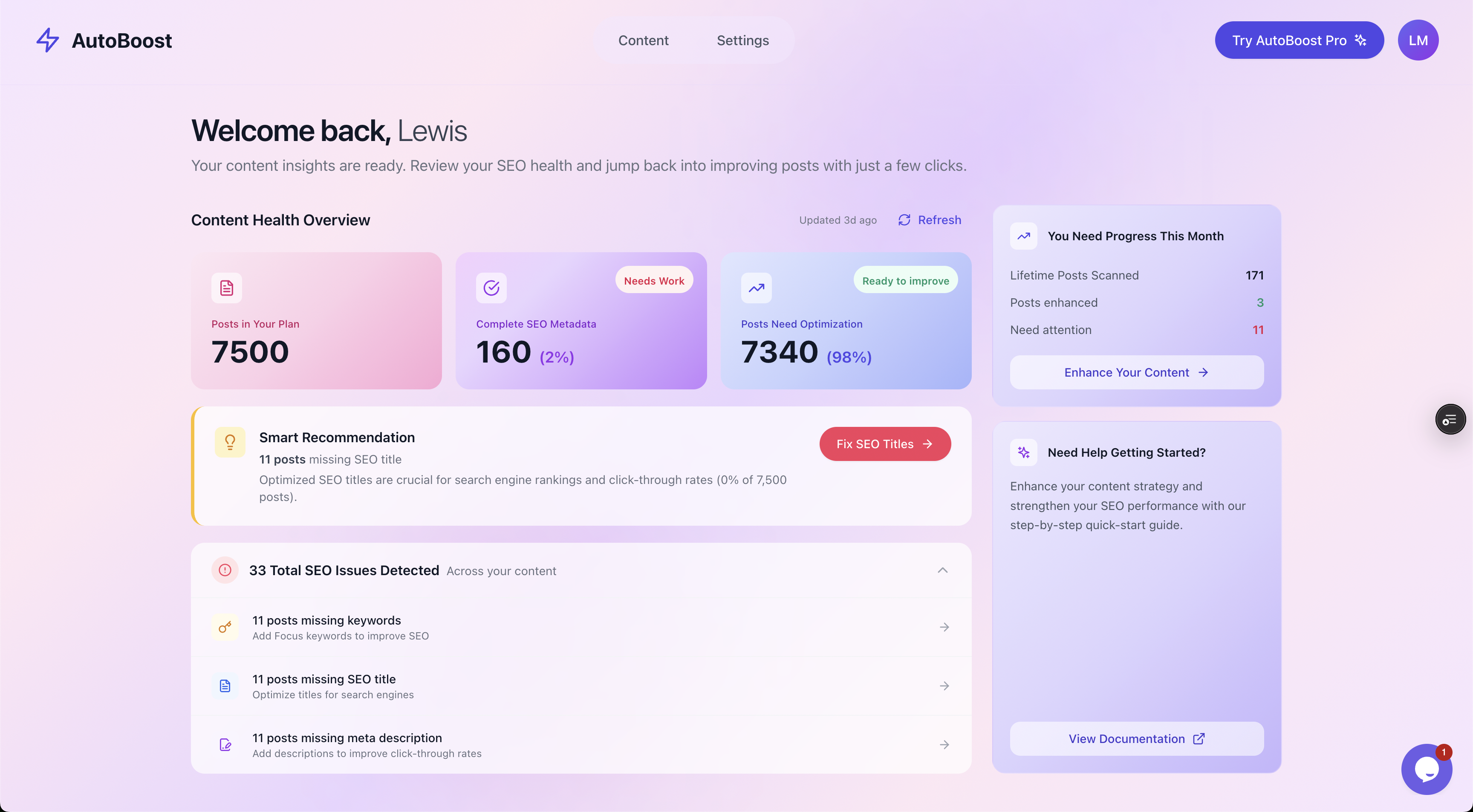
The first thing scale forces on you is a number. Here, 98% of 7,500 posts need some optimisation. Until you can see the size of the job, you are guessing.
The two-column rule: new posts versus the back catalogue
The single most useful mental model for blog SEO at scale is that every task has two versions:
- The version you do on a brand new post as part of publishing.
- The version you run across your entire back catalogue.
They are the same task, but the second column is where the leverage is hiding, and it is the column most bloggers never fill in.
Here is the full map. The left column is your publishing habit. The right column is the back-catalogue job that, done once properly, lifts the whole site at once.
| Blog SEO task | On a new post | Across the back catalogue |
|---|---|---|
| Focus keyword | Set it before you write | Find every post with no keyword and assign one |
| SEO title | Write a click-worthy title | Replace default templates on hundreds of old posts |
| Meta description | Write one that earns the click | Bulk-fill blanks and rewrite truncated auto-descriptions |
| Image alt text | Add alt as you upload | Backfill alt across years of images |
| Internal links | Link to 2 or 3 relevant posts | Audit orphans and add links between related older posts |
| Content freshness | Already current at publish | Refresh stats, dates and advice on posts that have aged |
| Schema markup | Apply your default type | Add or fix schema sitewide for rich-result eligibility |
| The article itself | Write it well | Rewrite or prune genuinely thin or dead posts by hand |
Read down the right-hand column and you have the entire scale workflow.
Notice the last row. The article itself is the one task that never gets a clean automated answer, on a new post or an old one.
Everything else is repetitive and rules-based, which is exactly what software is good at and humans find tedious. That split, mechanical metadata to automation and genuine writing to you, runs through this whole guide.
Step 1: Audit the whole library first
Never start a scale project by generating. Start by measuring.
Before you change a single post you need to know:
- How many are missing a focus keyword.
- How many have no real SEO title.
- How many have a blank or auto-generated meta description.
That count is the job. It tells you the size of the work, where the leverage is, and gives you a baseline to measure against later.
Doing this by hand on a large blog is hopeless. You would be opening posts one at a time, squinting at the RankMath or Yoast panel, and writing tallies on a notepad.
AutoBoost connects to your site through its connector plugin and an Application Password, scans every post, and surfaces exactly these gaps as filters you can click.
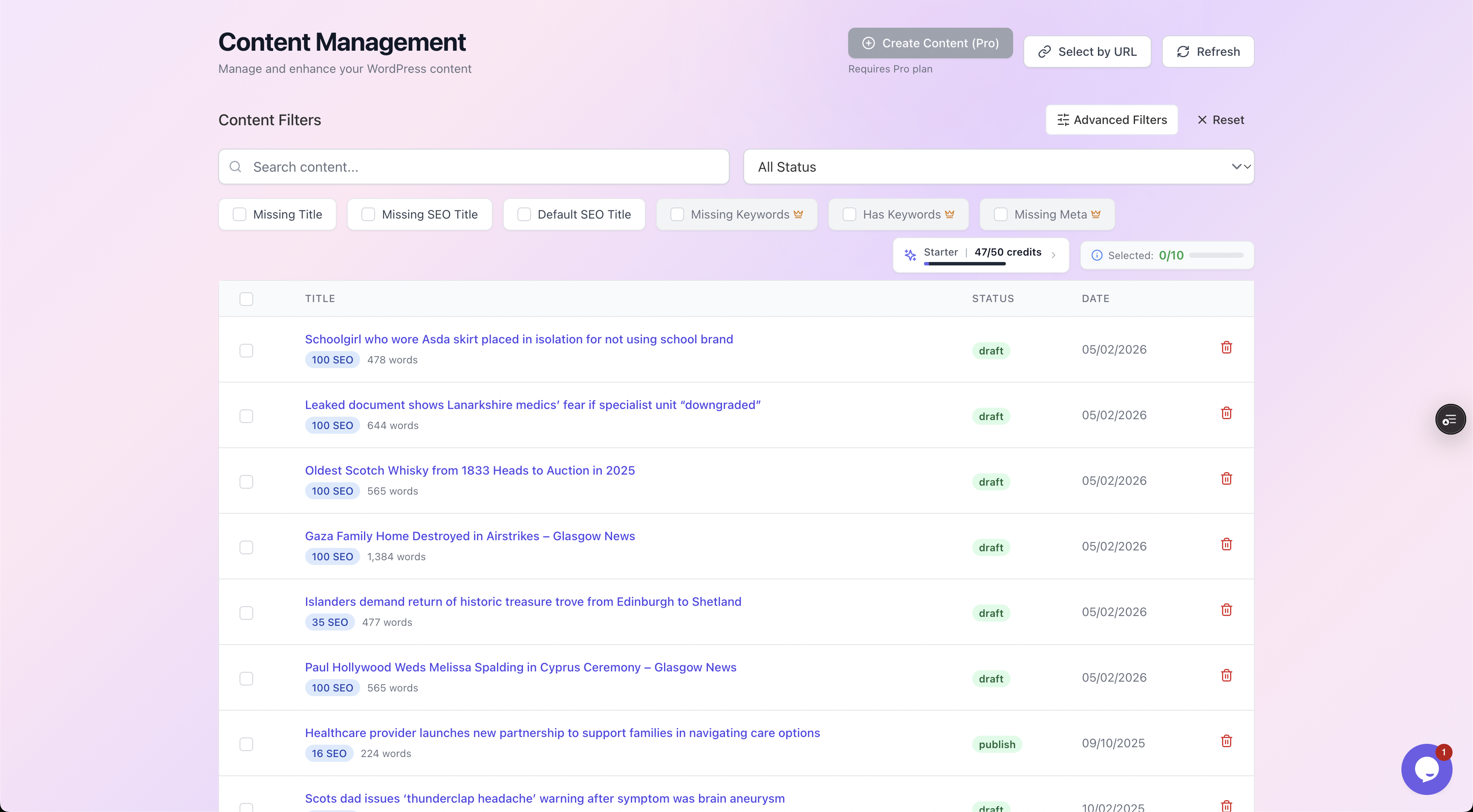
Filter chips turn the audit into a worklist. Click "Missing Meta" and you are looking at exactly the posts that need a description, with their SEO scores beside them.
The point of the audit is to stop optimising at random:
- Fixing the 600 posts that have no metadata at all beats re-touching the 40 that already score well.
- Filter to the biggest gap first, because that is where a single bulk action moves the most pages.
If you want the full audit method, including which fields matter most and why, the WordPress SEO audit guide goes deeper.
Tip: Run the audit before and after every scale project and screenshot the numbers. "98% needed work, now 12% does" is the kind of progress that is otherwise invisible on a blog this size.
Step 2: Fix the metadata in bulk
Once you can see the gaps, close them. This is the part that pays for itself fastest, because metadata is pure repetitive work that benefits from being applied consistently across the whole site.
The same rules, applied to 600 posts instead of one:
- The right title length.
- The keyword near the front.
- A description that fits and earns the click.
AutoBoost generates the missing pieces from a template library and writes them back into the RankMath or Yoast fields you already use. It works with those plugins rather than replacing them, so your existing setup, sitemaps and schema config all stay exactly as they are. You pick the enhancement you want and it drafts against your content.
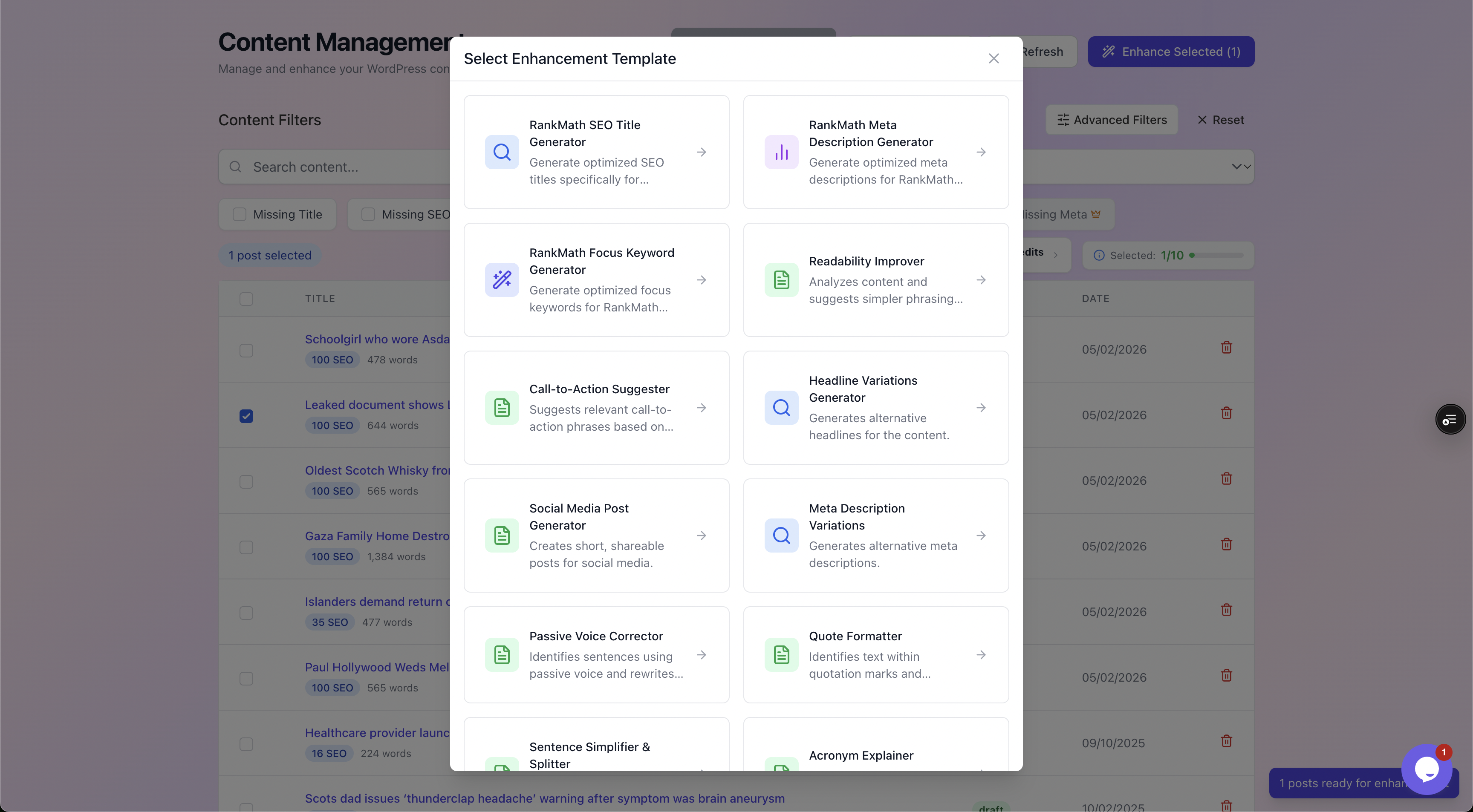
The template library covers the metadata layer: titles, descriptions, focus keywords, alt text, schema, plus readability and CTA helpers. Pick one, run it across a filtered batch.
The non-negotiable part is the review step. Nothing AutoBoost generates goes live until you approve it. On a per-post basis you see the current value next to the proposed one, with a quality checklist, and you approve or reject each change.
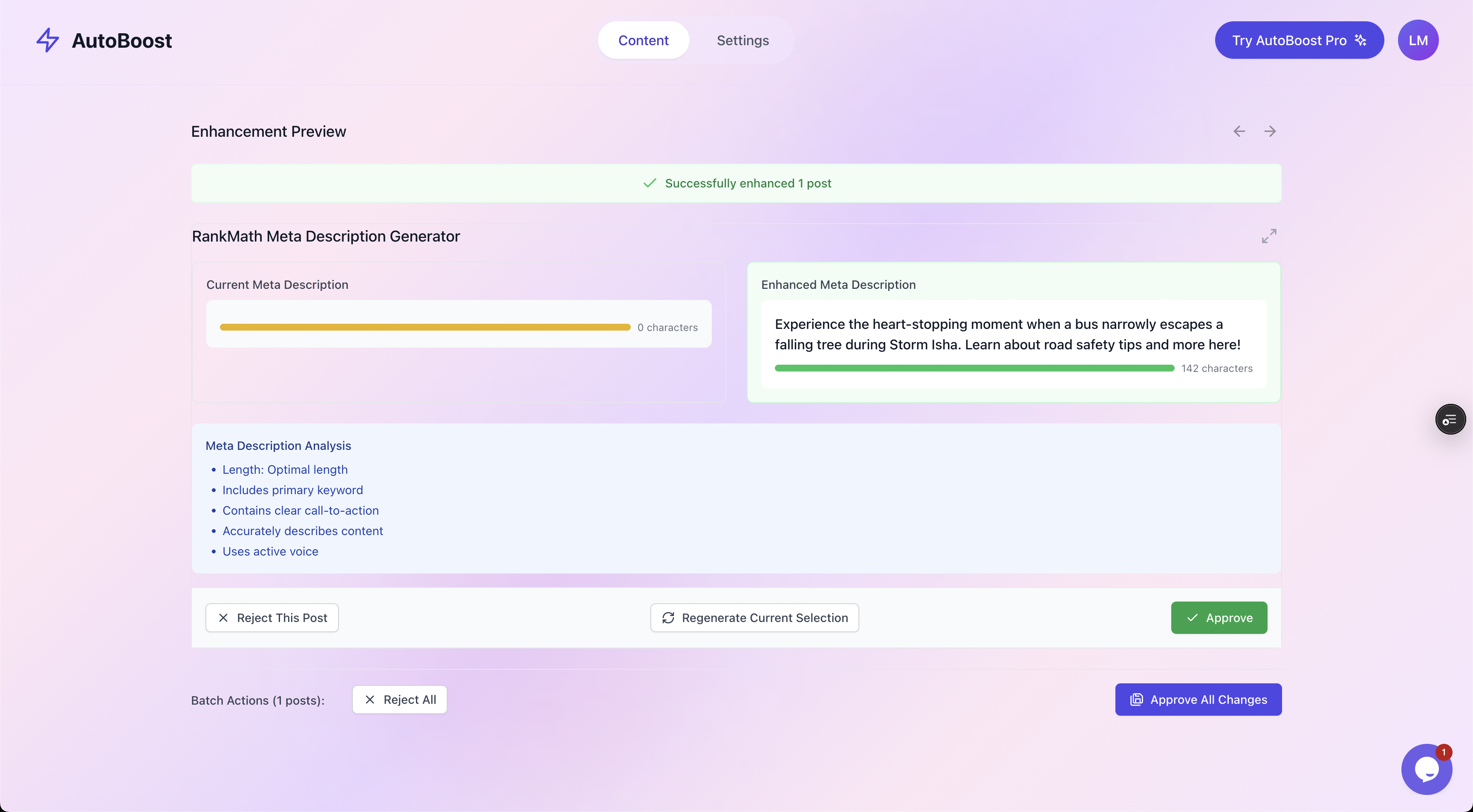
Human in the loop, always. Current value on one side, the proposed rewrite on the other, and nothing is written back until you click Approve.
This is the difference between automation and recklessness. You are reviewing drafts at speed, not handing your blog to a black box.
For the metadata-specific playbooks, see the focused guides:
For descriptions written specifically with a blogger's voice in mind, meta descriptions for bloggers is the focused read.
Step 3: Refresh the posts worth refreshing
Metadata is the cheap win. Content freshness is the higher-effort, higher-reward one, and it is where you have to be selective.
You cannot rewrite a thousand posts, and you should not try. The skill at scale is deciding which posts deserve a refresh and leaving the rest alone.
The candidates are the pages that already have history on their side:
- Posts that already rank somewhere on pages two or three.
- Posts that used to rank and have slipped.
These are pages search engines already trust, sitting just below the line. A genuine update often moves them further than a brand new post would, because the page already has history and links.
A real refresh means changing the substance:
- Current figures.
- This year's advice.
- A fresh example.
- A clearer intro.
Be ruthless about what a refresh actually is. Bumping the publish date and changing nothing is a trick, and a transparent one.
A real refresh changes the substance: updates that are wrong or stale, adds what is now missing, and cuts what no longer applies. That is human work. Automation can flag the candidates and tidy the metadata around them, but the actual rewriting is yours.
The dedicated guide on optimising old blog posts walks through how to triage and refresh a back catalogue without rewriting all of it.
Warning: Do not refresh thin content and expect it to rank. If a post was never genuinely useful, updating the date and tightening the meta description will not save it. Either rewrite it into something worth reading or remove it. Polishing metadata on a weak page just makes a weak page easier to find.
Step 4: Wire up internal links
Internal linking is the most undervalued lever on a high-volume blog, precisely because it only becomes powerful at scale.
With a thousand posts you have a thousand potential link sources, and most of them point nowhere useful:
- New posts get a couple of links when you remember.
- Older posts become orphans, with nothing linking to them and nothing useful linking out.
- Search engines struggle to understand and rank a page that nothing else on the site references.
The back-catalogue job is to find the orphans and the obvious missing connections, then add links between genuinely related posts. This pays off three ways:
- It builds topic clusters.
- It spreads authority from your strong pages to your weaker ones.
- It keeps readers moving through the site instead of bouncing.
AutoBoost can suggest relevant internal links based on your existing content, and as always you approve each one before it is written.
The judgement stays with you, because relevance is editorial. A suggestion that two posts are related still needs a human to confirm the link actually helps the reader.
The full method, including how to find orphans and structure clusters, is in internal linking for WordPress blogs.
A worked example: a 1,200-post blog in two months
Concrete numbers make this real. Take a food blog with 1,200 published posts, built up over eight years, running RankMath. The owner has never systematically audited it.
The audit. AutoBoost scans all 1,200 posts. The Content Health Overview reports that 71% need some optimisation. Filtering the gaps:
- 540 posts with no focus keyword set
- 610 posts still using the default SEO title template
- 480 posts with a blank or auto-truncated meta description
- 390 posts with images missing alt text
The bulk fix. The owner is on the Agency plan: 1,000 credits a month, one credit per post for each AI tool, and up to 500 posts a run. They work through the gaps in batches:
- Filters to "Missing Meta" first, 480 posts, and runs the Meta Description generator across the batch.
- Reviews at roughly 15 seconds per post, approving most and tweaking a few, which is around two hours of focused work.
- Runs the same pass for focus keywords and SEO titles on their batches.
- Backfills alt text across the 390 posts in another sweep.
The four passes come to about 2,000 credits, so the work spreads over two months of Agency credits, a couple of evenings of review per batch. By the end of the second month, the four biggest metadata gaps are closed and written back into RankMath.
The selective refresh. The owner pulls Search Console and finds 25 recipes ranking in positions 11 to 20, just off page one. Over the following fortnight, a few each evening, they rewrite intros, update cook times and add this year's photos by hand. Automation tidied the metadata; the human did the cooking.
The internal links. AutoBoost suggests links between related recipes, a curry post to its paste post, a baking guide to its individual bakes. The owner approves the sensible ones, declines the stretches, and several former orphans now sit inside proper clusters.
The split is the whole point:
- The metadata layer, the part that would have taken months of writing by hand, took a few evenings of review.
- The content judgement, refreshing the right 25 posts and approving the right links, stayed human.
That is blog SEO at scale: software does the repetitive volume, you do the thinking.
What this will not do for you
Honesty matters more than the pitch here, because the wrong expectation wastes your time. Automation handles the repetitive metadata layer. It does not, and cannot, do the following.
It does not write genuinely good content
A generated meta description points at your article; it does not improve the article. If the writing is dull, inaccurate or thin, no amount of metadata polish ranks it.
It does not earn backlinks
Off-site authority comes from other people choosing to link to you, which is relationship and outreach work no tool automates.
It does not rank thin content
This is the big one for high-volume blogs, where it is tempting to think volume alone is a strategy.
- Search engines reward useful pages.
- Making a weak page technically tidy makes it a tidy weak page.
- Prune or rewrite the dead weight; do not just optimise it.
What automation does is remove the throughput ceiling on the work that genuinely should be done everywhere and almost never is. That is a large, real win, but it is a different win from "ranks your blog for you".
If you want the broader case for where to draw that line, the auto SEO for WordPress guide lays it out.
Frequently asked questions
How is blog SEO at scale different from normal blog SEO?
Normal blog SEO optimises one new post at a time. Blog SEO at scale treats your entire back catalogue as the asset it is, auditing, fixing and refreshing hundreds of existing posts at once. On a high-volume blog the back catalogue is where most of your traffic and most of your unrealised opportunity already live, so it deserves at least as much attention as the next thing you publish.
Will bulk-optimising hundreds of old posts get me penalised?
No, because you are improving real on-page metadata, not gaming anything. Writing proper titles and descriptions, setting focus keywords and adding alt text is exactly what search engines want. The line you must not cross is faking freshness by bumping dates without changing substance, or trying to rank thin content by dressing it up. AutoBoost also keeps a human approval step on every change, so nothing goes live without your sign-off.
Do I need to change my SEO plugin to do this?
No. AutoBoost works with RankMath and Yoast rather than replacing them. It reads the gaps in your existing setup and writes the generated metadata straight back into RankMath or Yoast, so your sitemaps, schema and configuration stay exactly as they are. If you are weighing the plugins up, see the RankMath vs Yoast vs AIOSEO comparison.
How many posts can I optimise, and what does it cost?
AutoBoost plans are set by AI credits a month and posts per bulk run. Free gives 5 credits and 3 posts per run, Starter (
Should I automate the writing too?
No. The dividing line that makes this work is that automation owns the repetitive metadata and you own the actual content. Generated titles and descriptions are drafts you review and approve in seconds; the article itself, and the editorial judgement about which old posts to refresh and which links to add, stay human. Hand the writing to a machine and you get the one thing search engines reliably ignore: content with nothing to say.
Where to start
Run the audit. Connect your site, let AutoBoost scan the whole library, and look at the number.
That single figure, how much of your back catalogue needs work, reframes the whole project from "I should write more" to "I have hundreds of existing assets sitting half-finished".
Then work the plan:
- Close the metadata gaps in bulk this week.
- Refresh the handful of posts that are one good update away from page one.
See what AutoBoost can do across a large library on the features page, or read the rest of this cluster:
The work was always worth doing. Now it fits into a few evenings of review.