How to Optimise WooCommerce Category Pages for SEO
By AutoBoost Team · 2026-06-22 · 11 min read
Most WooCommerce store owners pour their SEO effort into individual product pages. They forget the pages that actually have a shot at the big keywords.
Your category pages, the URLs sitting at /product-category/..., are built to target broad, high-intent buying terms like "leather office chairs" or "waterproof hiking boots". Yet on a default install they ship with no intro copy, a templated title and a blank meta description.
That gap is the opportunity. This guide covers:
- Why category pages often outrank product pages for head terms.
- What to put on them.
- How to fix thin or duplicate categories across a catalogue without editing every term by hand.
Key takeaways
- Category pages target broader, higher-volume buying queries than single products, and Google often ranks them above product pages for head terms.
- Most WooCommerce categories ship empty: no description, no optimised title, no meta description. Filling them in is low-effort, high-return.
- A short, useful intro plus internal links to your best products turns a thin category page into a page Google can actually understand.
- Thin or near-duplicate categories dilute rankings. Consolidate, noindex, or differentiate them.
- AutoBoost finds categories missing a title, focus keyword or meta description and bulk-generates the metadata, with you approving every change before it goes live.
Why category pages beat product pages for head terms
Think about how people search before they buy. A shopper at the start of their journey types "running shoes" or "stainless steel water bottles", not "Nike Pegasus 41 Mens UK Size 9".
The first kind of query has far more search volume, and the matching page on your site is a category, not a product.
Category pages have three structural advantages for those head terms:
- They aggregate. A category links out to dozens of related products, so Google sees a tightly themed hub rather than one isolated item. That topical density is exactly what a broad query rewards.
- They are more stable. Products go out of stock, get discontinued and 404. Categories persist, so the links and authority they accumulate stick around and compound.
- They match intent. Someone searching "wireless headphones" wants to browse and compare, which is what a category page delivers. A single product page answers a narrower question.
The catch is that WooCommerce gives you almost nothing to rank with out of the box. The page exists, but:
- It has no descriptive content.
- The title is just the category name plus your site name.
- The meta description is empty.
You are asking Google to rank a page that barely says anything.
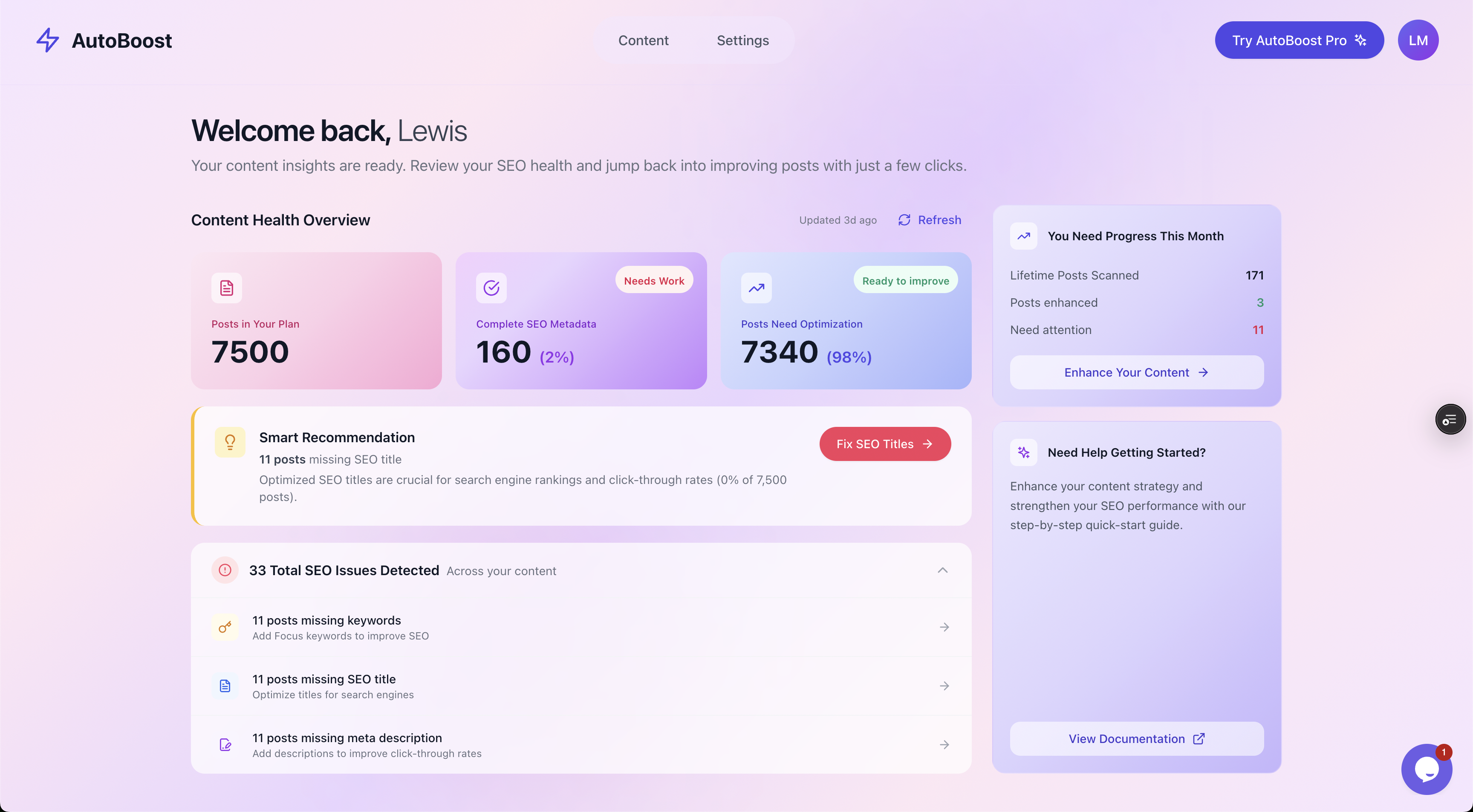
AutoBoost scans posts and products together, so missing category and product metadata surfaces in one Content Health view rather than hiding across hundreds of WooCommerce screens.
Add real content to your category pages
The single biggest fix is also the one most stores skip: putting a genuine description on the category.
WooCommerce has a category description field built in (Products, Categories, edit the term), and most themes render it at the top or bottom of the archive.
You do not need a thousand words. You need a short, useful block of copy that:
- Uses the target keyword naturally in the first sentence, so both shoppers and Google know what the page covers.
- Explains what is in the category and helps the buyer choose, for example the materials, sizes, price range or use cases on offer.
- Links to a few standout products or to closely related sub-categories.
Tip: Write for the shopper first. A category intro that helps someone pick between options reduces bounce and earns links far better than a paragraph of keyword stuffing. Google can tell the difference.
Avoid the classic mistake of dumping the same boilerplate paragraph on every category. Duplicate descriptions across forty categories give Google forty near-identical pages and a reason to rank none of them.
Each one should say something specific to that category.
Watch out: If your theme buries the description at the very bottom of the archive, consider moving it higher, or adding a short intro above the product grid. Content the shopper actually sees carries more weight than content hidden below the fold.
Get category titles and meta descriptions right
Your SEO plugin, RankMath, Yoast or AIOSEO, lets you set a custom SEO title and meta description per category through its taxonomy settings.
Both default to a template, and templates leave easy ranking signals on the table.
Category SEO titles
Lead with the keyword, keep it under roughly 60 characters, and add a differentiator. Compare:
| Weak (default template) | Strong (optimised) |
|---|---|
| Office Chairs - YourStore | Ergonomic Office Chairs, Free UK Delivery |
| Hiking Boots Archives | Waterproof Hiking Boots for Men and Women |
| Coffee | Speciality Coffee Beans, Roasted to Order |
Category meta descriptions
This is not a ranking factor directly, but it is your advert in the search results. A flat or empty description means Google writes its own snippet, usually by scraping whatever text it finds first.
Write one that states what is in the category and gives a reason to click: range, price, delivery, returns.
A practical 150 to 160 character pattern is to lead with the category and a benefit, then a hook. For example:
"Shop our full range of ergonomic office chairs with adjustable lumbar support and free next-day UK delivery. 30-day returns on every model."
The problem is scale. A mid-sized WooCommerce store has dozens of categories and sub-categories, and every one needs a distinct title and description.
Doing that by hand, then keeping it current as the catalogue changes, is where the effort usually collapses.
Internal linking: connect categories to products
Category pages are natural internal-linking hubs, and most stores under-use them in both directions.
- Category to product. The product grid links out automatically, but consider featuring your best sellers or highest-margin items higher up, or linking to them from the category intro copy. That funnels link equity and shopper attention to the products you most want to sell.
- Product to category. Make sure every product page links back to its parent category, usually through breadcrumbs. Breadcrumbs give Google a clean map of your site structure and reinforce which category each product belongs to.
- Category to category. Link related categories to each other from the intro copy, for example "office chairs" linking to "standing desks". This spreads authority and keeps shoppers browsing.
- Blog to category. Your content marketing should point at category pages, not just the homepage. A buying-guide post about choosing a coffee grinder is the perfect place to link to your grinders category.
If you want to go deeper on the wider strategy, our guide to internal linking for WordPress covers how to build link structure across a whole site, and the principles apply directly to category hubs.
Manage thin and duplicate category pages
More categories is not better. Over-segmentation is one of the most common ecommerce SEO problems, and it quietly drags down the categories that matter.
Watch for these patterns:
- Thin categories. A category with two or three products and no description has nothing to rank. Either build it out with more products and copy, or merge it into a broader parent.
- Near-duplicate categories. "Mens trainers" and "trainers for men" competing for the same query is keyword cannibalisation. Pick one, redirect the other, and consolidate the authority.
- Empty or seasonal categories. A "Christmas gifts" category that sits empty for ten months should be noindexed out of season, then reopened. An empty category indexed all year is a soft-404 waiting to happen.
- Auto-generated archive bloat. Tag archives, paginated pages and attribute archives can balloon into hundreds of thin URLs. Decide deliberately what to index. Your SEO plugin controls this under its taxonomy and archive settings.
Warning: Before you noindex or redirect a category, check Google Search Console for impressions and clicks. A category that looks thin to you might be quietly pulling traffic. Removing it then is a self-inflicted wound.
The goal is a lean set of strong, well-differentiated categories, each earning its place in the index, rather than a sprawl of overlapping thin ones.
Worked example: a category page before and after
Take a real-world category: a homeware store's "wool throws" category.
Before: a default WooCommerce setup
- URL:
/product-category/wool-throws/ - SEO title: "Wool Throws - Cosy Home Co" (template default)
- Meta description: empty
- Description content: none, just the product grid
- Internal links: none beyond the automatic grid
It is technically a page, but it gives Google nothing distinctive. It ranks on page two for "wool throws" at best, behind competitors who actually described their range.
After: the optimised version
- SEO title: "Pure Wool Throws and Blankets, Made in Britain" (keyword first, differentiator, under 60 characters)
- Meta description: "Browse our range of pure wool throws in 12 colours, ethically made in Britain. Free UK delivery over 50 pounds and easy 30-day returns."
- Description content: a two-paragraph intro covering wool weight, sizes, care and the British mills they source from, with the keyword in the opening sentence
- Internal links: intro copy links to the three best-selling throws and to the related "wool blankets" sub-category; breadcrumbs link products back up
Same products, same theme. The difference is metadata and a few hundred words of genuinely useful copy.
That page now has a credible shot at page one for "wool throws" and a clutch of long-tail variants, and its snippet earns clicks instead of being auto-generated.
Multiply that across forty categories and you see why this is the highest-leverage work in ecommerce SEO, and also why it rarely gets done. It is repetitive, and at scale it is tedious.
How AutoBoost handles category and product metadata at scale
This is the repetitive part AutoBoost is built for. You connect your store with the AutoBoost connector plugin and a WordPress Application Password, and it scans your posts and products, flagging every item missing a focus keyword, SEO title or meta description.
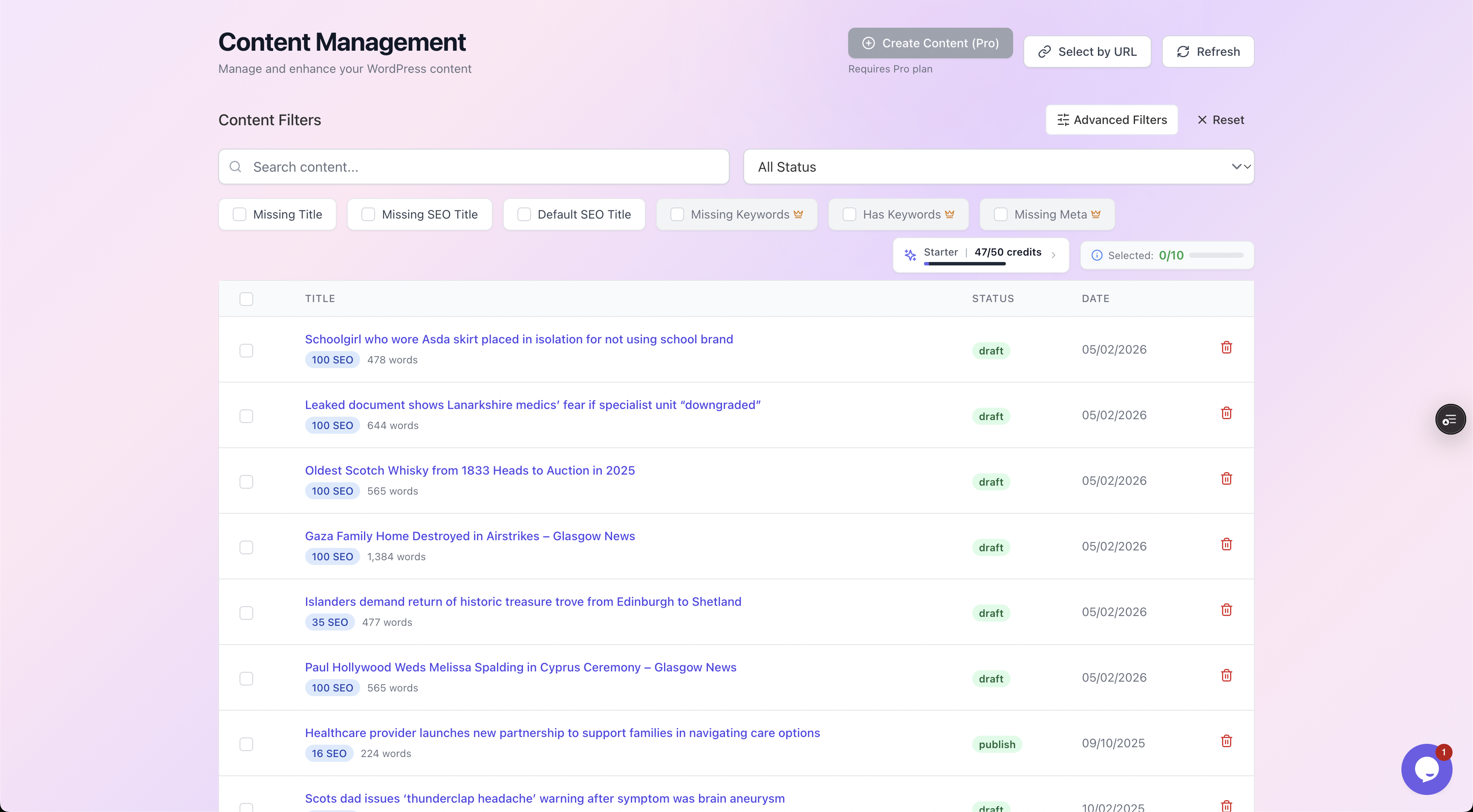
Filter chips let you isolate exactly what is missing, so you can work through every page lacking a meta description or focus keyword in one pass instead of hunting through WooCommerce term by term.
From there it bulk-generates:
- Optimised meta descriptions
- SEO titles
- Focus keywords
- Image alt text
- Schema
It then writes them straight back into your existing RankMath or Yoast setup. AutoBoost works with your plugin, it does not replace it.
The part that matters most: nothing publishes until you approve it.
Every generated title and description is shown to you first, with the current version alongside the proposed one, so you stay in control of how your store reads.
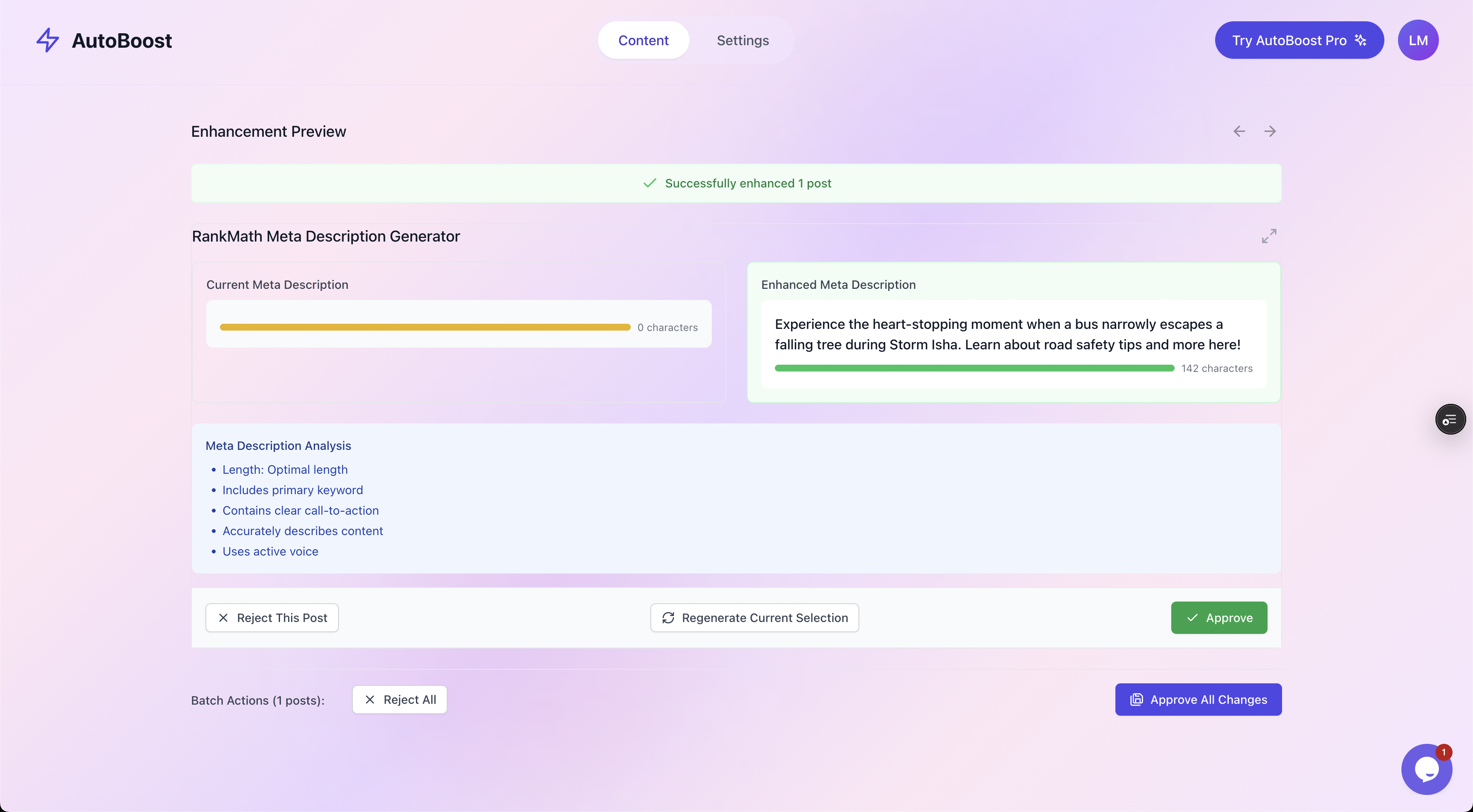
Human-in-the-loop by design: you see the current and enhanced version side by side, run it past a quality checklist, then approve or reject. Nothing changes on your live store without your sign-off.
What AutoBoost does and does not do
Be clear about the boundaries. AutoBoost handles the repetitive metadata layer: titles, descriptions, focus keywords, alt text and the fields your schema relies on.
It will not:
- Write the persuasive category copy you would craft for conversion.
- Improve a thin page that genuinely lacks products.
- Earn backlinks.
Note too that the Product schema, including price and reviews, is generated by your SEO plugin's WooCommerce module. AutoBoost fills the metadata those modules depend on, so the structured data they output is complete.
Choosing a plan
Catalogue size and how fast you want to work drive the plan:
- Free ($0): 5 AI credits a month, 3 posts per bulk run, 1 site
- Starter (
9/mo): 50 credits, 25 per run, 1 site - Pro ($49/mo): 250 credits, 125 per run, 3 sites
- Agency ($99/mo): 1,000 credits, 500 per run, 10 sites
A large WooCommerce catalogue with thousands of products plus categories will usually need one of the higher plans.
You can see the full breakdown on the pricing page and how it fits ecommerce specifically on our WooCommerce SEO solutions page.
For the wider picture, pair this with our guides to WooCommerce SEO for the full strategy and WooCommerce product page SEO for the individual-product side of the equation.
Frequently asked questions
Should I focus on category pages or product pages first?
Start with categories if you sell in a competitive niche, because they target the higher-volume head terms and there are far fewer of them, so the work is finite and the payoff is concentrated. Products matter for long-tail and conversion, but a handful of well-optimised categories often moves the needle faster than hundreds of tweaked product pages.
How much content should a category page have?
Enough to be genuinely useful, not a fixed word count. Two or three short paragraphs that help a shopper choose and use the keyword naturally is plenty for most categories. Competitive head terms may warrant a buyer's guide further down the page. Quality and relevance beat length every time, and thin boilerplate repeated across categories does more harm than good.
Will optimising the WooCommerce shop page help?
The default shop page is a generic product listing and rarely ranks for anything specific because it is not themed around a keyword. Most stores get more value setting a clear SEO title and description on it, then directing ranking effort to focused category pages that target real buying queries. Treat the shop page as a fallback, not a ranking asset.
How do I avoid duplicate content across similar categories?
Give each category a distinct description and SEO title written for its specific range, never the same boilerplate with the name swapped. Where two categories genuinely overlap, consolidate them and redirect the weaker one. For paginated and attribute archives, use your SEO plugin's controls to decide deliberately what gets indexed rather than letting WooCommerce index everything.
Can AutoBoost write the category descriptions for me?
AutoBoost generates the metadata layer, the SEO titles, meta descriptions, focus keywords and alt text, and writes it into RankMath or Yoast after you approve each one. It does not write the persuasive on-page intro copy you would craft for conversion, that is still your call. Think of it as clearing the repetitive metadata backlog at scale so you can spend your time on the copy that actually sells.