WooCommerce Product Page SEO: Titles, Keywords, Schema
By AutoBoost Team · 2026-06-22 · 11 min read
A WooCommerce product page has to do two jobs at once: convince a shopper to buy and give Google enough structured signals to rank it.
Most stores get the second job wrong, not through laziness but through volume. When you have a thousand SKUs, nobody is hand-writing a focus keyword and a meta description for each one.
This guide covers the full on-page checklist for a single product page, then shows you how to apply it across the whole catalogue without losing the human judgement that conversion copy needs.
Key takeaways
- A complete product page needs five things: a formula-driven SEO title, one focus keyword, a unique description, descriptive image alt text, and Product schema.
- Duplicate manufacturer descriptions are the single biggest ecommerce SEO problem, and metadata automation will not fix them. They need rewriting.
- Product schema (price, availability, reviews) comes from your SEO plugin's WooCommerce module, which relies on the metadata being filled in.
- AutoBoost bulk-generates titles, keywords, meta descriptions, alt text and schema fields across the catalogue and writes them into RankMath or Yoast, with you approving every change before anything goes live.
What a fully optimised product page actually contains
Before you scale anything, you need to know what "done" looks like on a single page. Here is the checklist we run every product against.
- SEO title following a repeatable formula, not the raw product name.
- One focus keyword that matches real search demand, set per product.
- Meta description that is unique, benefit-led, and inside 155 characters.
- A unique product description rewritten from, not copied off, the manufacturer sheet.
- Image alt text on every product photo, describing the product and including the model where natural.
- Product schema exposing price, availability and review data to search engines.
- A clean, keyword-bearing URL slug without stop words or SKU noise.
If your store fails any of these at scale, that is the work.
The first three and the last three are repetitive metadata that automation handles well. The fourth, the description itself, is the one that needs a human or at least a careful editorial pass. We will be honest about that throughout.
The SEO title formula for products
The default WooCommerce title is just the product name, which is rarely how people search. A better pattern is consistent and front-loads the term shoppers actually type:
Product name + key attribute + brand
So instead of "Trail Runner 3", you get "Trail Runner 3 Waterproof Running Shoes | Acme". Here is why each part earns its place:
- Product name gives specificity.
- The attribute captures the category-level query ("waterproof running shoes").
- The brand builds recognition in the SERP.
Keep the whole thing under roughly 60 characters so it does not truncate.
Rules that hold across catalogues
- Put the most-searched term first. For most products that is the category-style attribute, not the model name.
- Do not stuff. One primary attribute is enough; a wall of keywords reads as spam and gets rewritten by Google anyway.
- Keep the brand or store name in a consistent position, usually last, separated by a pipe.
- Match the title's promise to the focus keyword so the page has one clear topic.
Tip: Define the formula once and apply it as a template across every product. Consistency is worth more than per-page cleverness, and it makes the metadata auditable.
One focus keyword per product
Every product page should target one primary keyword, and only one.
With hundreds of near-identical variants, this is where stores either skip the field entirely or paste the same keyword onto fifty pages, which makes them compete with each other.
Good product keywords are specific and commercial:
- "Running shoes" is a category term and belongs on the category page.
- "Waterproof trail running shoes mens" is a product-level term with buying intent.
The closer a keyword is to a purchase decision, the better it fits a product page.
If you are unsure how focus keywords drive the rest of the on-page work, our guide on adding focus keywords in WordPress walks through the reasoning. The short version: the keyword is the anchor that the title, description and slug all align to.
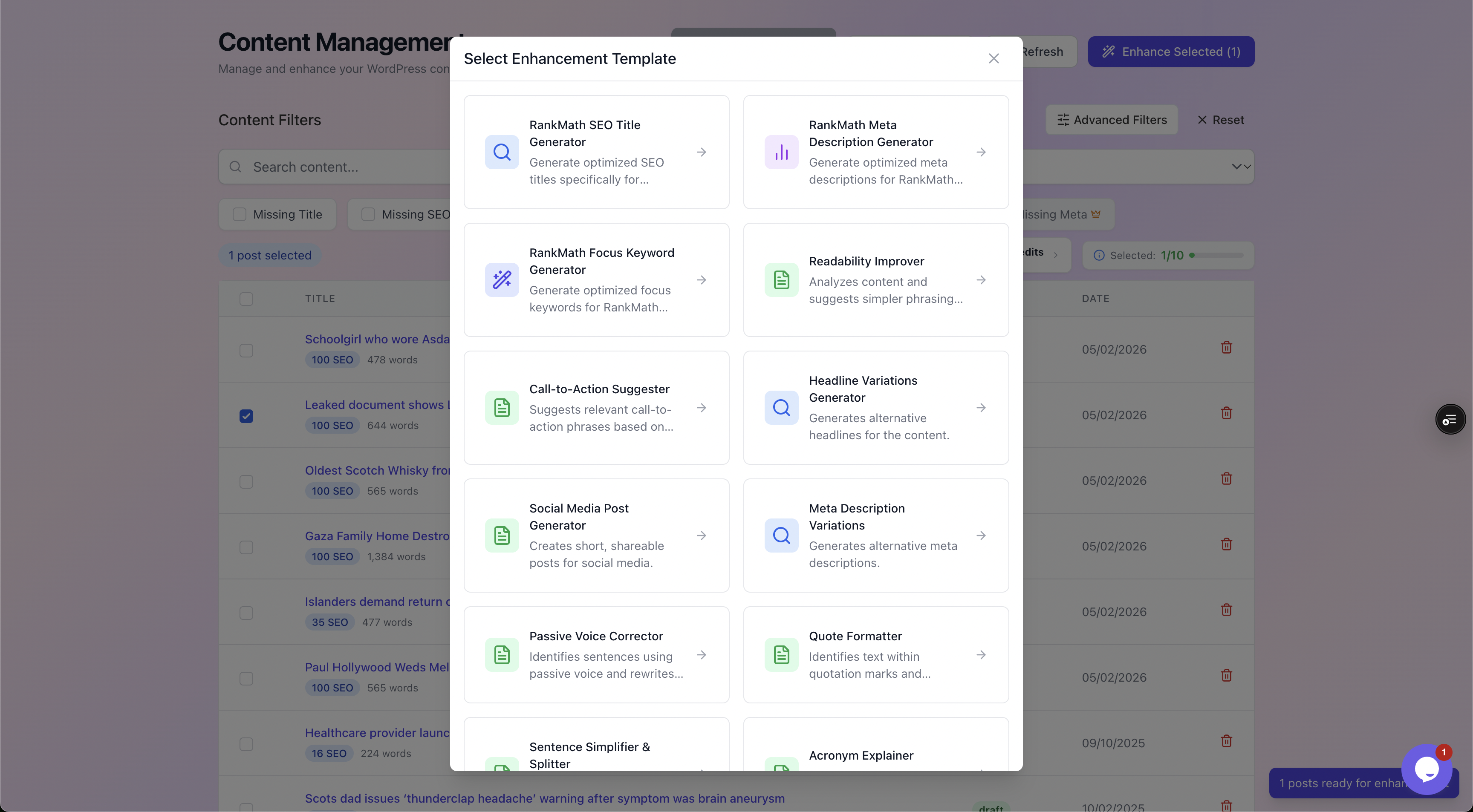
AutoBoost lets you pick the exact field to generate per product, from SEO title and meta description to focus keyword, so each page gets one clear target rather than a recycled term.
The description problem: duplicate manufacturer copy
This is the part most articles tiptoe around, so let us be blunt. Duplicate manufacturer descriptions are the number one ecommerce SEO problem.
If you sell the same product as forty other retailers and you all paste the supplier's blurb, Google sees forty near-identical pages and ranks the most authoritative domain, which is almost never the small store.
No amount of metadata fixes this. You can have a perfect title, a clean keyword and valid schema, and a thin, duplicated description will still cap your ranking.
The body copy has to be genuinely different:
- Your own framing.
- Your own use cases.
- The questions your customers actually ask.
- The details the manufacturer left out.
So treat descriptions as a separate workstream from metadata:
- Metadata (titles, keywords, meta descriptions, alt text, schema fields) is repetitive and safe to generate and apply at scale.
- Product descriptions are conversion copy and a uniqueness signal. Rewrite them, prioritising your best-selling and highest-margin lines first.
AutoBoost is deliberately honest here: it automates the repetitive metadata, not the descriptions you would write to convert and differentiate.
It will not turn a thin, duplicated product page into a ranking one. That work is yours, but at least automation clears the metadata backlog so you can spend your time on the copy that actually moves the needle.
Image alt text for product photos
Product images are an SEO asset that almost everyone neglects. Alt text serves accessibility first, but it also feeds Google Images, which is a real discovery channel for physical products.
The pattern is simple:
- Describe what is in the image.
- Include the product name and model where it reads naturally.
- Avoid keyword stuffing.
Here is the difference in practice:
- Useful: "Trail Runner 3 waterproof running shoe in slate grey, side view".
- Spam: "shoes shoes running shoes buy shoes", which modern algorithms treat as exactly that.
With multiple photos per product across a large catalogue, this is thousands of empty alt fields, which is exactly the kind of repetitive task worth automating. Our bulk alt text guide covers the approach in depth.
Product schema: where it comes from and what fills it
Rich results in the SERP, the price, the star rating, the in-stock badge, all come from Product schema. Here is the honest mechanism, because it is widely misunderstood.
WooCommerce Product schema is provided by your SEO plugin, not by AutoBoost. RankMath, Yoast and AIOSEO each ship a WooCommerce module that outputs the Product structured data, including price, availability, currency and aggregated review data.
That module pulls from WooCommerce's own product fields and from the SEO metadata you have set.
AutoBoost's role is to fill the metadata those modules rely on, so the schema your plugin generates is complete rather than half-populated.
If a product is missing its SEO title or keyword, the surrounding markup and the SERP presentation suffer. Get the metadata right and the plugin's schema does its job.
A quick sanity check for any product page
- The page outputs
Productschema withname,price,priceCurrencyandavailability. - Where you have reviews,
aggregateRatingandrevieware present. - The values match what is on the page (Google penalises schema that lies about price or stock).
- The SEO plugin's WooCommerce module is enabled, not just the core plugin.
Warning: Never put a price or availability in schema that differs from the visible page. Mismatched structured data can get rich results suppressed and, in repeated cases, the whole site flagged.
Common product-page SEO mistakes
| Mistake | Why it hurts | The fix |
|---|---|---|
| Title is just the product name | Misses the category-level query people actually search | Apply the name + attribute + brand formula |
| No focus keyword set | Page has no clear target; on-page signals scatter | One commercial keyword per product |
| Duplicate manufacturer description | Near-identical to competitors; caps ranking | Rewrite uniquely, best-sellers first |
| Missing or duplicate meta descriptions | Google rewrites the snippet; lower click-through | Unique, benefit-led, under 155 characters |
| Empty image alt text | Lost Google Images traffic and accessibility fails | Descriptive alt with product and model |
| SEO plugin WooCommerce module off | No Product schema, no rich results | Enable the module in RankMath, Yoast or AIOSEO |
| Same keyword on many variants | Variants cannibalise each other | Distinct keyword per variant or canonical to the parent |
Applying the checklist across the whole catalogue
Running this checklist on one page takes a few minutes. Running it on three thousand SKUs by hand is months of work nobody will finish. This is the gap AutoBoost is built for.
The connection is a small connector plugin plus an Application Password, no full admin handover.
Once linked, AutoBoost scans both posts and products and surfaces every page missing a focus keyword, SEO title or meta description, so you can see the true scale of the backlog rather than guessing at it.
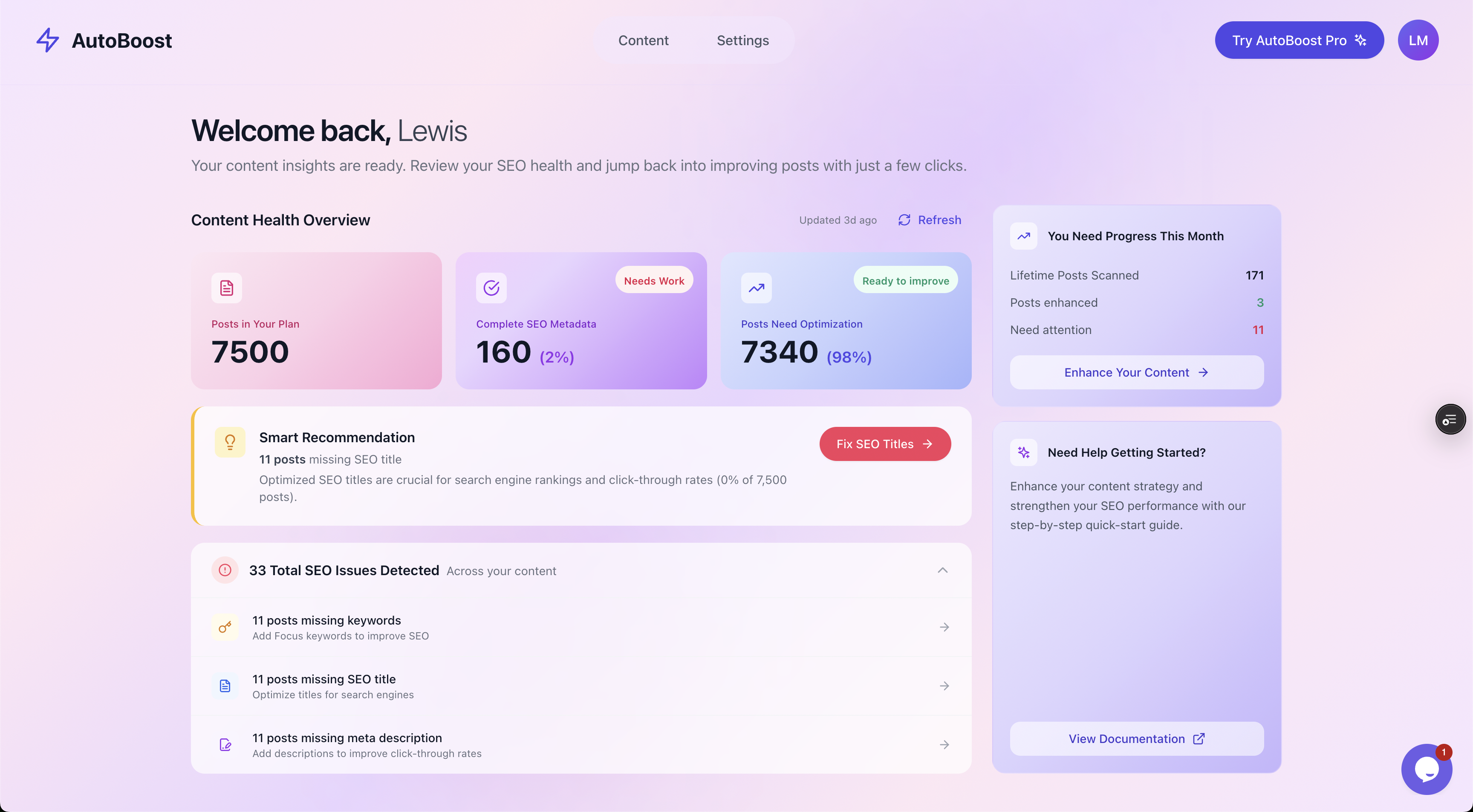
The Content Health Overview shows the real size of the job across the catalogue, here 7,500 items with 98 percent needing optimisation, so you can prioritise instead of guess.
From there you filter to the exact problem, missing SEO title, missing keyword, missing meta, and work through it in bulk.
AutoBoost then handles the generation and the write-back:
- It generates the optimised titles, focus keywords, meta descriptions, image alt text and schema fields.
- It writes them back into your existing RankMath or Yoast setup (it reads AIOSEO but cannot save into it yet).
- It works with your plugin, it does not replace it.
The part that matters most for an exacting store owner: nothing publishes until you approve it. Every generated field is shown as a before-and-after preview against a quality checklist, and you approve or reject each one. The automation does the typing; you keep the editorial control.
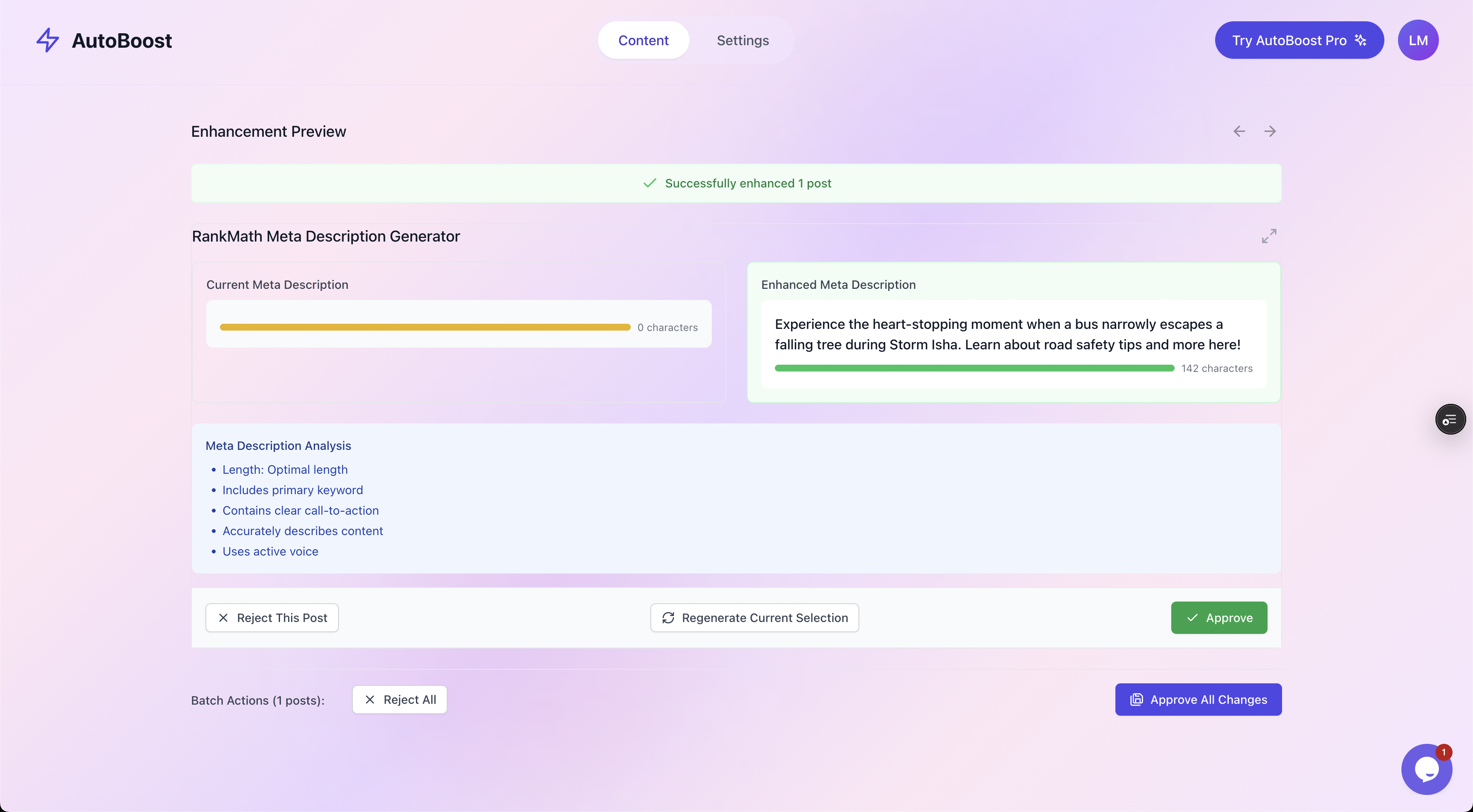
Every change is a before-and-after you approve or reject. The automation drafts; you stay the editor, which is non-negotiable when brand voice and accuracy matter.
If you want the wider strategy beyond single product pages, see our WooCommerce SEO overview and the companion piece on WooCommerce category page SEO, since products and categories need different treatment to avoid competing with each other.
A worked example
Take a real-world product: a mid-tier waterproof trail running shoe, one of 2,400 SKUs in a sportswear store. Here is the page before and after.
Before
- Title:
Trail Runner 3 - Focus keyword: none set
- Meta description: none (Google was pulling the first line of the spec sheet)
- Description: the manufacturer's 80-word blurb, identical to 30 other retailers
- Image alt text:
IMG_4471on all four photos - Schema: present but incomplete because the SEO title field was empty
After (metadata via AutoBoost, description rewritten by the team)
- Title:
Trail Runner 3 Waterproof Running Shoes | Acme - Focus keyword:
waterproof trail running shoes mens - Meta description:
Waterproof trail running shoes built for wet UK trails. Grippy outsole, sealed seams, free returns. In stock at Acme.(114 characters) - Description: 220 words of original copy covering UK trail conditions, fit notes and a sizing tip a customer had asked about
- Image alt text:
Trail Runner 3 waterproof running shoe in slate grey, side viewand so on per photo - Schema: RankMath's WooCommerce module now outputs complete
Productdata, including price and the four-star aggregate rating
Look at where the time went:
- The metadata (title, keyword, meta, alt text) took seconds to generate and a minute to approve.
- The description took the team fifteen minutes because it was a priority line.
That split, automate the repetitive, hand-craft the differentiating, is the whole approach. For the broader workflow around this, our WordPress SEO automation workflow piece shows how it fits into a recurring routine.
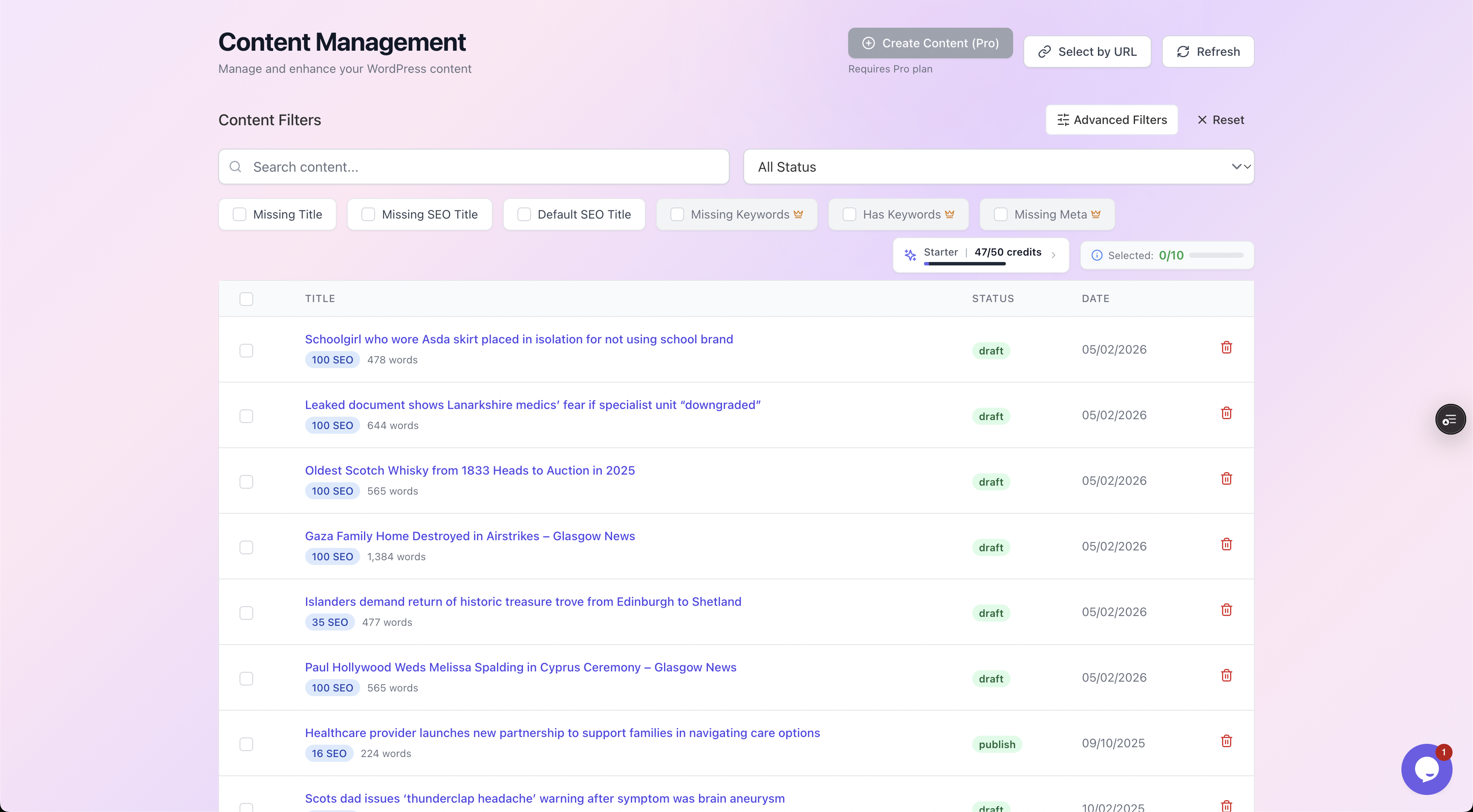
Filter to the exact gap, missing keyword, missing meta, missing SEO title, and clear that slice of the catalogue in one pass instead of clicking through products one by one.
Frequently asked questions
Does AutoBoost write my product descriptions?
No, and that is deliberate. AutoBoost handles repetitive metadata: SEO titles, focus keywords, meta descriptions, image alt text and the schema-supporting fields.
Product descriptions are conversion copy and a uniqueness signal, so they should be written or edited by your team. Automation will not turn a thin, duplicated product page into a ranking one.
Will this generate Product schema with price and reviews?
The Product schema itself, with price, availability and reviews, is produced by your SEO plugin's WooCommerce module (RankMath, Yoast or AIOSEO).
AutoBoost fills the metadata that module relies on, so the schema comes out complete instead of half-populated. Keep the plugin's WooCommerce module enabled.
How many products can it handle?
It scales by plan, measured in AI credits and posts per bulk run:
- Free ($0): 5 credits a month, 3 per run, 1 site.
- Starter (
9/mo): 50 credits, 25 per run, 1 site. - Pro ($49/mo): 250 credits, 125 per run, 3 sites.
- Agency ($99/mo): 1,000 credits, 500 per run, 10 sites.
Big WooCommerce stores generally need Pro or above. See pricing for the current limits.
Can I review changes before they go live?
Yes, always. Every generated field is shown as a before-and-after preview against a quality checklist, and nothing is written to your live store until you approve it.
You can approve in bulk once you trust the output or review page by page for sensitive lines.
Does it work with my existing SEO plugin?
Yes. AutoBoost writes into RankMath or Yoast rather than replacing them, and your plugin's WooCommerce SEO module keeps handling product schema.
You can read more on the integrations page and on our ecommerce solution overview.
The bottom line
Product page SEO is not one task, it is six: title, keyword, description, alt text, schema and slug.
- Five of them are repetitive metadata you can and should automate across the catalogue.
- One of them, the description, is the differentiator that needs a human.
Pretending otherwise is how stores end up with technically tidy pages that still do not rank.
AutoBoost clears the metadata backlog at catalogue scale, writes into the SEO plugin you already use, and keeps you in the approval seat for every change, so you can spend your effort where it actually counts.
Explore the features or start on the ecommerce solution to see it against your own store.