WooCommerce SEO: Optimise a Large Store at Scale (2026)
By AutoBoost Team · 2026-06-22 · 11 min read
Most WooCommerce stores do not have an SEO problem on any single page. They have a scale problem across thousands of them.
The usual symptoms:
- Products import with empty SEO titles.
- Categories ship with no description.
- The same boilerplate copy gets reused across half the catalogue.
None of that is hard to fix on one page. It is just impossible to fix on three thousand by hand.
This guide is the hub for store owners who need a workflow, not a checklist. We will cover how to:
- Audit your whole catalogue.
- Fix the repetitive metadata in bulk.
- Get the product and category basics right.
- Sort out schema and image alt text.
- Stay honest about what automation cannot do for you.
Key takeaways
- Large WooCommerce stores fail at SEO because of volume, not difficulty: thousands of products and categories with missing or duplicate metadata.
- Audit first so you know exactly how many pages are missing a focus keyword, SEO title or meta description before touching anything.
- Repetitive metadata (titles, meta descriptions, focus keywords, image alt text) is the part you can safely automate in bulk; product descriptions written for conversion are not.
- WooCommerce product schema comes from your SEO plugin (RankMath, Yoast, AIOSEO); automation fills the metadata those modules rely on, with you approving every change.
Why WooCommerce SEO breaks at scale
A blog with 40 posts can be optimised by hand in an afternoon. A WooCommerce store with 2,000 SKUs, 80 categories and a few hundred tag archives cannot.
The maths is brutal. If each page needs a focus keyword, an SEO title, a meta description and alt text on its main image, that is four fields per page across thousands of pages.
Three things make this worse on WooCommerce specifically:
- Imports leave fields blank. CSV imports, supplier feeds and dropship plugins rarely populate SEO fields. The product goes live with the default template title and no meta description at all, so Google writes its own snippet from whatever text it finds.
- Descriptions duplicate. Manufacturer copy gets pasted across every variant and every similar product. Duplicate or near-duplicate descriptions give Google little reason to rank one page over another.
- Auto-generated archives multiply. Categories, tags and attribute archives all create indexable URLs. Most have no description and thin content, so they compete with your product pages instead of supporting them.
The fix is not to write more by hand. It is to separate the work that genuinely needs a human from the work that is pure repetition, then automate the repetition.
Step 1: Audit the whole catalogue first
You cannot fix what you have not measured. Before generating a single title, you need a count: how many products and categories are missing a focus keyword, an SEO title or a meta description.
Guessing leads to wasted effort on pages that were already fine.
This is where a connected tool earns its keep. AutoBoost:
- Connects to your store through the AutoBoost connector plugin and a WordPress Application Password.
- Scans both posts and products.
- Flags every page missing those core fields.
No CSV export, no manual spreadsheet reconciliation.
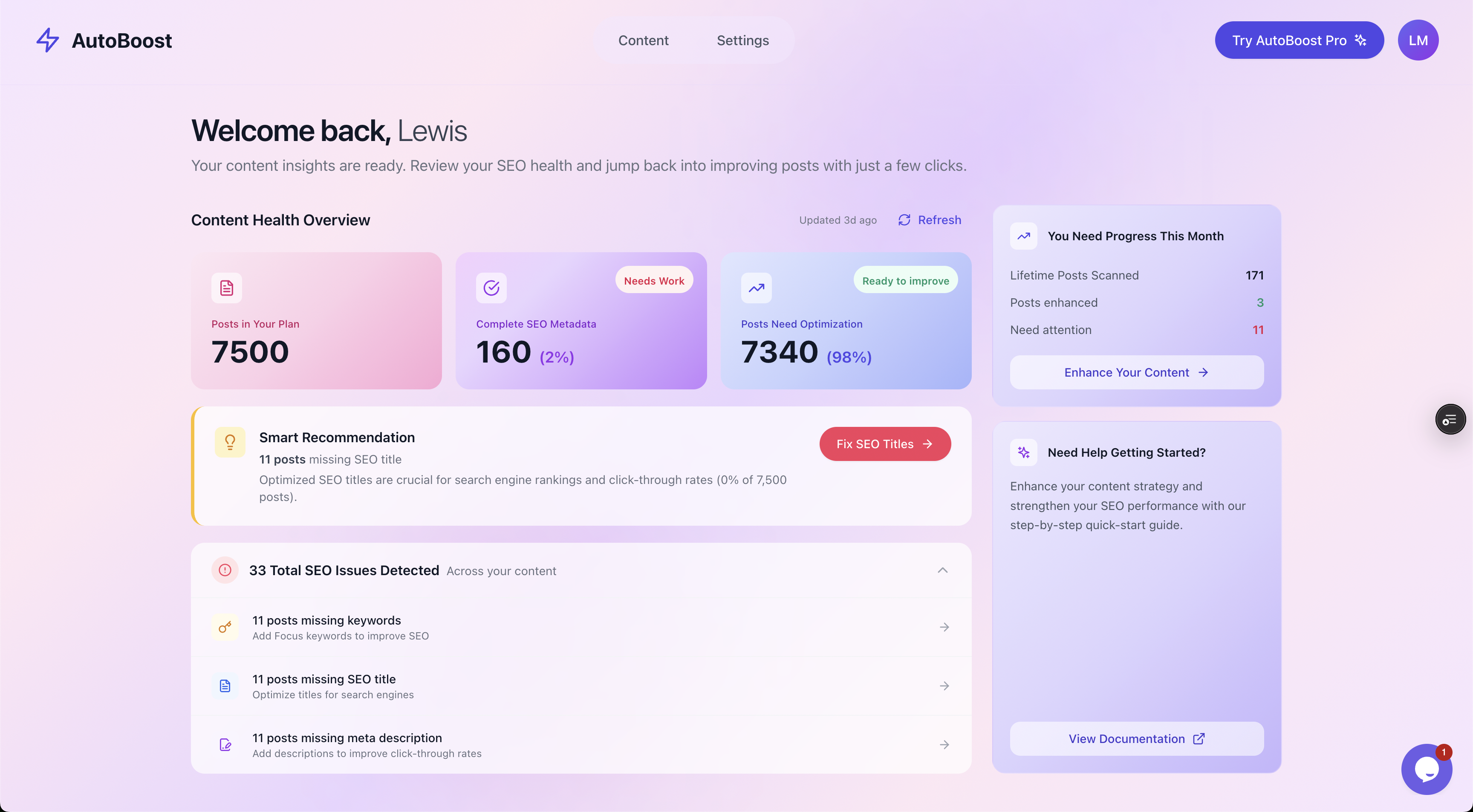
The Content Health Overview gives you the real number before you start: across 7,500 items, 98% need optimisation and 33 distinct SEO issues are flagged.
A number like "98% need optimisation" is uncomfortable, but it is also the point. Now you know the scope, and you can prioritise.
High-traffic categories and best-selling products come first. The long tail of discontinued lines can wait.
Tip: Run the audit, then sort by traffic or revenue if you have it. Fixing the metadata on your top 50 categories usually moves more revenue than fixing 500 dead product pages.
For a deeper look at how to read an audit and which fields matter most, see our guide on the WordPress SEO audit and missing fields.
Step 2: Fix the repetitive metadata in bulk
Once you know what is missing, the metadata fixes split into clear buckets you can filter and process as batches rather than one page at a time.
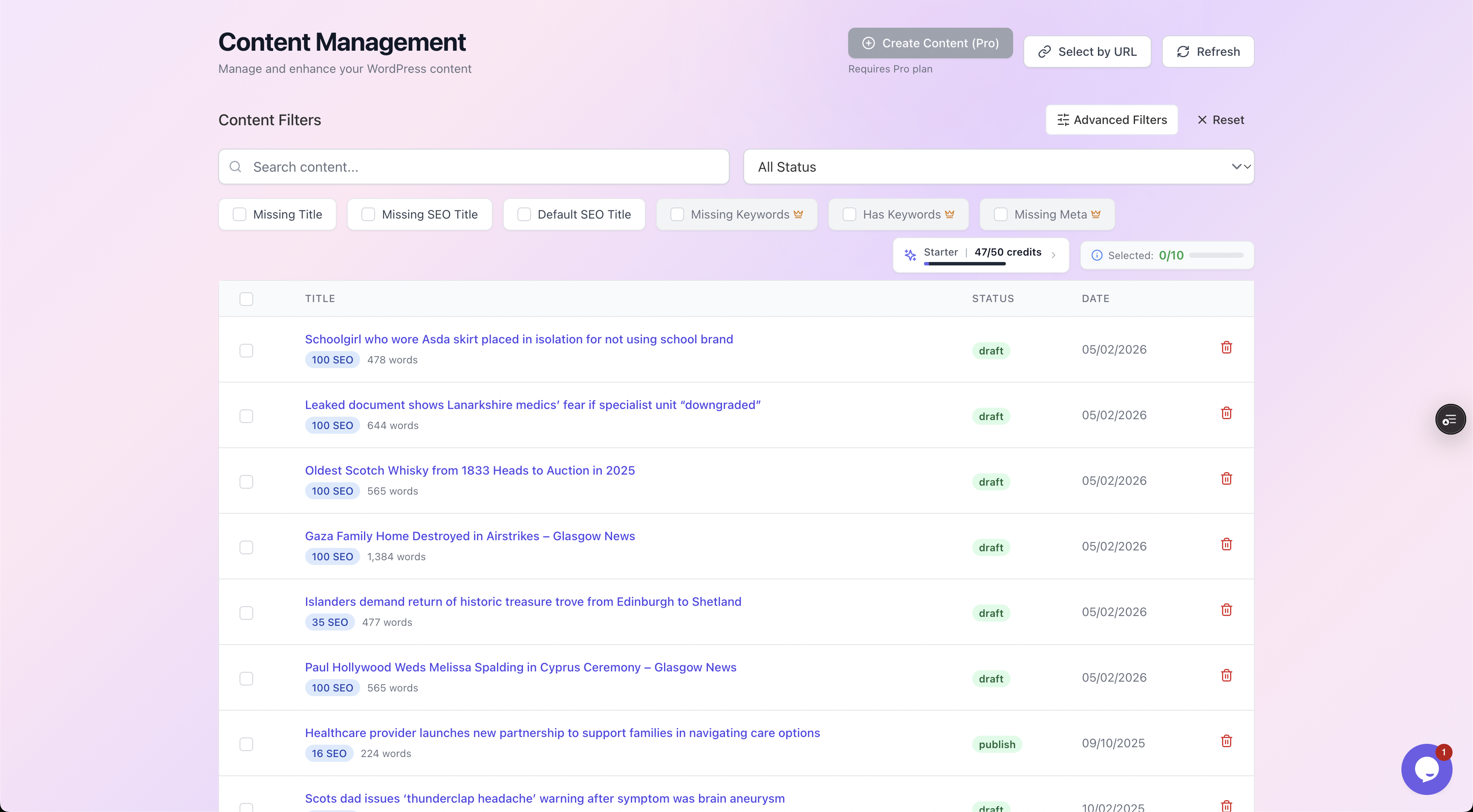
Filter chips let you isolate exactly one problem at a time: every product missing a meta description, or every page with no focus keyword, each row showing its current SEO score.
The workflow is the same for each bucket:
- Filter to the pages that share a gap.
- Generate optimised values for the whole batch.
- Review before anything goes live.
AutoBoost bulk-generates meta descriptions, SEO titles, focus keywords, image alt text and schema for many pages at once. It writes them back into your existing RankMath or Yoast setup. It works with your SEO plugin, not instead of it.
The part that matters most for a store owner: nothing publishes automatically. Every generated value is a proposal you approve or reject.
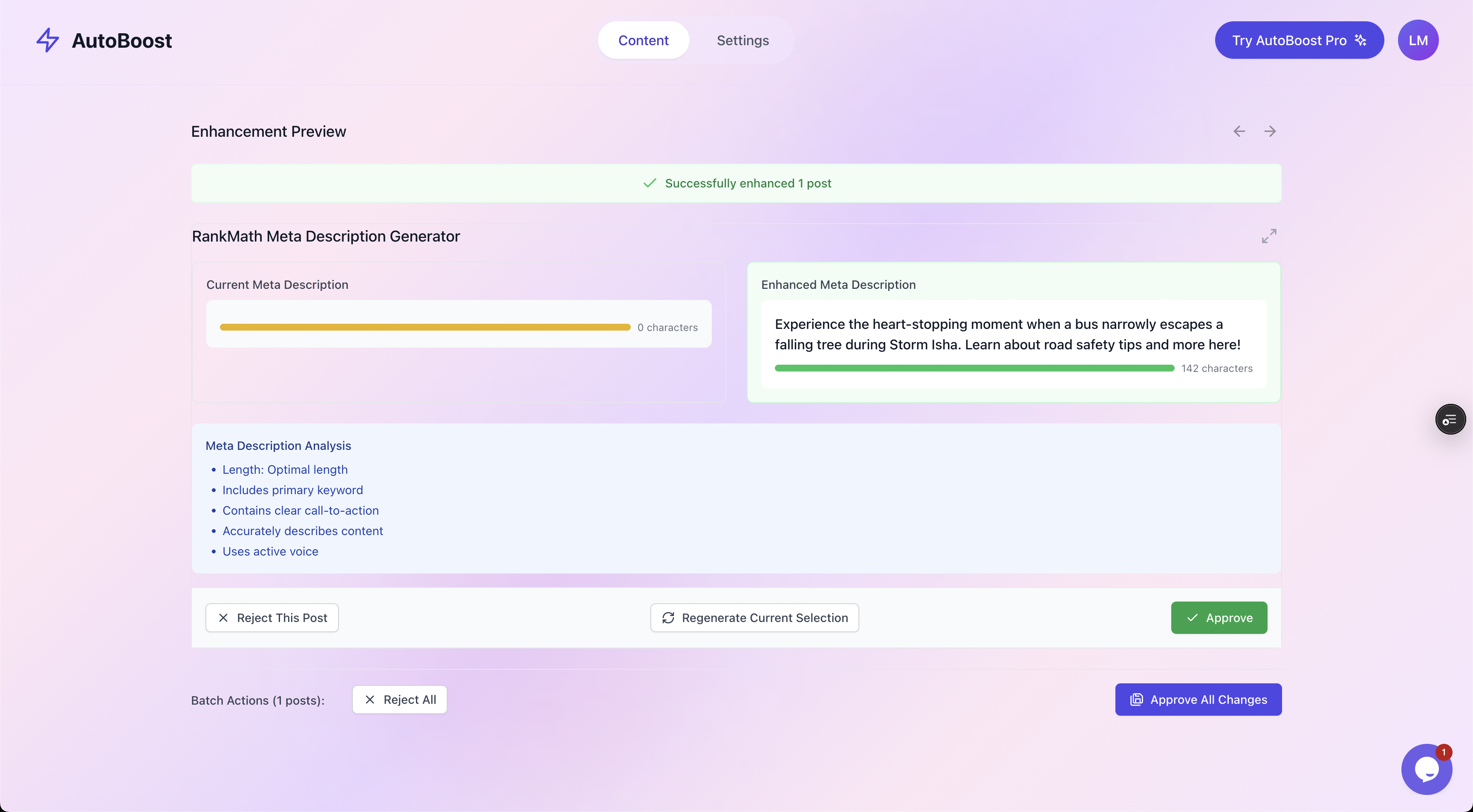
Before and after, side by side: the current meta description, the enhanced version, a quality checklist, and Approve or Reject. You stay in control of every change.
This human-in-the-loop step is non-negotiable on a store. You do not want a generator quietly changing the meta description on a page that already converts well.
The before-and-after preview lets you:
- Spot-check a sample from each batch.
- Approve in bulk once you trust the output.
- Reject anything that misses the mark.
Tip: If you want the end-to-end mechanics of running these batches, our WordPress SEO automation workflow guide walks through it in detail, and bulk editing meta descriptions covers that single field in depth.
Step 3: Get product page basics right
Bulk metadata gets the page eligible to rank. The on-page basics decide whether it actually does.
For each product that matters, you want:
- A unique, descriptive SEO title that leads with the search term, not just the product name. "Mens Waterproof Hiking Boots, Brown, Sizes 6 to 13" beats "Product #4471".
- A meta description that sells the click. It will not change your ranking directly, but it changes your click-through rate, and CTR matters. Lead with the benefit, mention price or a key spec, end with a reason to click.
- A focus keyword that matches buyer intent. People searching to buy use different words than people searching to learn. Target the commercial phrase.
- A product description written for the customer, not the crawler. This is the one part automation should not touch, more on that below.
The deeper version of this lives in our dedicated WooCommerce product page SEO guide, with product meta descriptions covered separately because they are the single highest-leverage field on a product page.
Step 4: Do not neglect category pages
This is the most common miss in WooCommerce SEO. Owners pour effort into product pages and ignore categories entirely.
Yet category pages often have a better shot at ranking for high-volume head terms. Someone searching "womens running shoes" is closer to a category page than to any single product.
A category page needs three things most stores never give it:
- An SEO title and meta description targeting the category keyword, not the WooCommerce default.
- A genuine intro description, a short block of unique text that explains what is in the category and why someone would buy from you. This is the difference between a thin archive and a page Google trusts.
- Sensible internal linking and pagination so crawl budget flows to your products.
Full detail is in the WooCommerce category page SEO guide.
The metadata parts (title, meta description) can be generated and approved in bulk exactly like products. The intro description is a writing job.
Step 5: Product schema and image alt text
Two more pieces complete the picture, and there is an important honest point about one of them.
Product schema
Product schema (the rich result data for price, availability and reviews) is generated by your SEO plugin.
- RankMath, Yoast and AIOSEO all ship WooCommerce modules that output
Productschema automatically. - AutoBoost does not replace that. What it does is fill the underlying metadata those modules read from, so the schema your plugin produces is complete rather than half-empty.
Watch out: If your titles and descriptions are blank, your rich snippets suffer too.
Image alt text
Image alt text is pure repetition and a perfect automation target.
- Every product photo should have descriptive alt text for accessibility and image search, yet most stores have hundreds of images with empty alt attributes.
- Generating alt text in bulk is fast and low-risk.
- Product images are a real source of traffic through Google Images.
Our bulk alt text guide covers the approach.
You can pick which of these enhancements to run per batch.
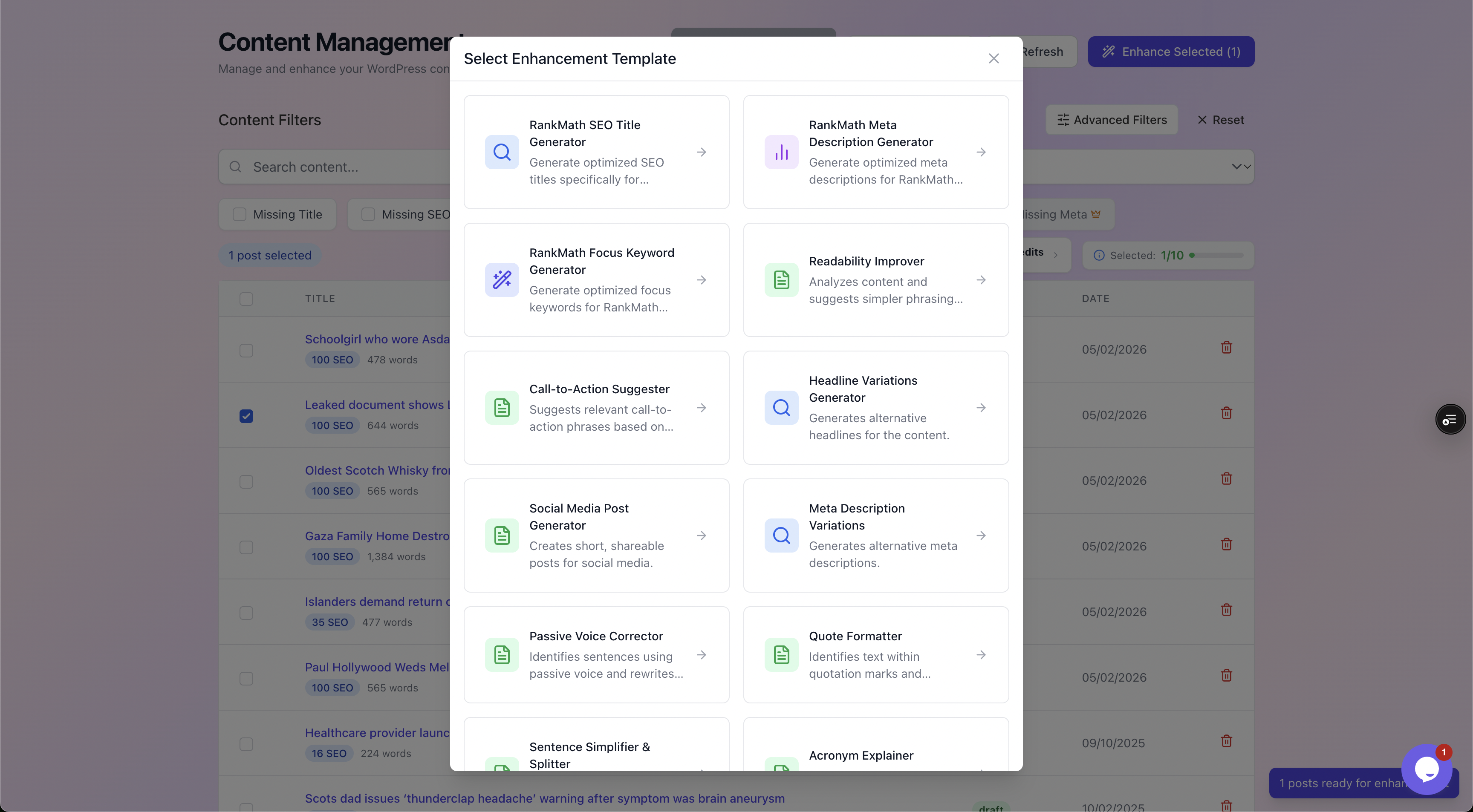
Enhancement templates let you choose what to generate per batch: SEO titles, meta descriptions, focus keywords, plus readability and CTA helpers, all written back into your existing SEO plugin.
A worked example: 2,000-product store
Here is how the whole thing plays out on a realistic catalogue. Say you run a store with:
- 2,000 products.
- 60 categories.
- Around 1,400 product images with no alt text.
Manually, optimising one product page properly (research keyword, write title, write meta, set focus keyword, write alt text) takes a careful 8 to 10 minutes.
At 2,000 products that is roughly 280 to 330 hours of work, before you touch a single category. That is why it never gets done.
The at-scale version looks like this:
- Audit the store. The scan returns, say, 1,900 products missing a meta description and 1,700 missing an SEO title. Now you have your batches.
- Generate metadata in batches, filtering by missing field. Spot-check 20 to 30 from each batch in the before-and-after preview.
- Approve in bulk once the sample looks right, reject the few that miss.
- Generate alt text for the 1,400 images in one pass and approve.
- Write category intros and your best product descriptions by hand, because those are conversion copy and worth your time.
The metadata and alt text that would have taken weeks compresses into a focused session of generation and review. Your human hours go where they actually matter: the 60 category descriptions and the 50 hero products that drive most of your revenue.
| Store SEO task | Manual | At scale with AutoBoost |
|---|---|---|
| Find pages missing SEO fields | Export CSV, reconcile by hand | One scan, filtered counts |
| Product SEO titles | Type each one | Bulk generate, review, approve |
| Product meta descriptions | Write per product | Bulk generate, approve in batches |
| Focus keywords | Research and set individually | Bulk suggest, approve |
| Image alt text | Edit each image | Bulk generate across all images |
| Category metadata | Manual per category | Bulk generate, approve |
| Product schema | Plugin outputs it | Plugin outputs it, fed by complete metadata |
| Product descriptions (conversion) | Write by hand | Write by hand (not automated) |
| Backlinks and authority | Outreach | Outreach (not automated) |
What automation will not do for you
Being straight about this matters more on ecommerce than anywhere else, because the temptation to automate everything is strongest when you have thousands of pages.
- It will not write product descriptions that convert. Generated metadata helps you get found. The description that turns a visitor into a buyer is sales copy, and that is your job. Automation handles the repetitive fields around it, not the persuasion.
- It will not fix thin or duplicate product content. If 200 variants share identical manufacturer copy, perfect titles will not make them rank. Thin pages stay thin. You need genuinely differentiated content, or you need to consolidate.
- It will not build authority. Backlinks, brand searches and reviews are off-page work no plugin touches.
In short, automation removes the grind so you can spend your time on the parts that need a human. It does not remove the need for a human.
Choosing the right tier for your catalogue
Catalogue size maps directly to the credits you need. AutoBoost counts posts and products together, so a large store eats into your monthly credits fast.
The plans run as follows:
- Free tier ($0): 5 AI credits a month, 3 posts per bulk run, 1 site.
- Starter (
9/mo): 50 credits, 25 per run, 1 site. - Pro ($49/mo): 250 credits, 125 per run, 3 sites.
- Agency ($99/mo): 1,000 credits, 500 per run, 10 sites.
A store with a few thousand SKUs plus blog content usually needs Pro or higher. See the Free tier and full plan list on the pricing page.
For more detail:
- See features for the full breakdown.
- See integrations for plugin compatibility.
- See solutions for ecommerce for the store-specific view.
- If you also run a content blog, solutions for bloggers covers that side.
Frequently asked questions
Does AutoBoost work with my existing SEO plugin, or replace it?
It works with it. AutoBoost writes generated metadata back into RankMath or Yoast fields. You keep your current plugin and its schema output; AutoBoost just fills the fields it reads from. Nothing is replaced.
Will it change pages without my approval?
No. Every generated value, whether a title, meta description, focus keyword, alt text or schema field, is a proposal you review and approve or reject. Nothing publishes until you say so. On a live store that human-in-the-loop step is the whole point, and you can spot-check a sample before approving a batch.
Can it generate my product descriptions too?
It can help with readability and metadata, but you should write the descriptions that sell. Conversion copy is a human job, and automation will not rank a thin or duplicated product page. Treat generated metadata as the layer that gets you found, and your own descriptions as the layer that closes the sale.
How does it handle product schema for rich results?
Your SEO plugin produces the Product schema (price, availability, reviews). AutoBoost does not generate that schema itself; it makes sure the underlying metadata the plugin relies on is complete, so your rich snippets are not missing fields. Complete metadata in means better structured data out.
My store has 8,000 products. Which plan do I need?
AutoBoost counts posts and products together. At 8,000 products, plus any blog posts, the credits are what limit you: Free gives 5 a month, Starter 50, Pro 250 and Agency 1,000 (500 posts per bulk run), so Agency is the realistic fit for clearing a catalogue that size, or for a large blog or multiple stores. Check the current limits on the pricing page.
Bringing it together
WooCommerce SEO at scale is a sequencing problem. The order that works:
- Audit so you know the real number.
- Batch the repetitive metadata and approve it in groups.
- Get your product and category basics right.
- Automate alt text.
- Let your SEO plugin handle the schema off complete data.
Then spend your saved hours on the two things automation cannot do: conversion copy and authority.
Start with the audit, then work through the spokes for products, product meta descriptions and categories. When you are ready to run it across the whole catalogue, the automation workflow ties it together.