WooCommerce Product Meta Descriptions: Write Them at Scale
By AutoBoost Team · 2026-06-22 · 10 min read
Open the SEO settings on twenty WooCommerce products at random and you will almost always find the same thing. The meta description field is empty, or it has been silently filled with the first 160 characters of the product description.
Multiply that across a catalogue of a few hundred or a few thousand SKUs and you have a real problem hiding in plain sight. The meta description is the one piece of copy Google shows shoppers before they ever reach your page, and on most stores nobody has written it.
This guide covers:
- What a converting product meta description actually contains.
- Why blank and duplicated ones quietly cost you clicks.
- How to generate good ones across an entire catalogue without typing them one by one.
Key takeaways
- A product meta description has one job: earn the click from the search result, so it needs a benefit, a concrete detail, and a reason to act, all inside roughly 155 characters.
- Most WooCommerce stores either leave the field blank (the SEO plugin auto-truncates the product copy) or duplicate the same line across colour and size variants, both of which waste the slot.
- The hard part is not writing one good meta description, it is writing a few thousand distinct ones, which is exactly where bulk generation with human review pays off.
- AutoBoost scans every product, finds the ones missing a meta description, generates drafts you approve, and writes them straight into RankMath or Yoast.
Why product meta descriptions are a special case
Blog posts are forgiving. A post about "best running shoes for flat feet" can lean on a single well written meta description and call it done.
Product catalogues do not work that way, for three reasons.
- The volume is brutal. A clothing store with 400 styles in six colours and five sizes is not 400 pages, it can be thousands of indexable URLs once variations, attributes and filtered category views are counted. Nobody is hand writing meta descriptions for all of those, so the field stays empty and Google fills the gap with whatever text it scrapes from the page. Sometimes that is a price and a tagline. Often it is a cookie notice or a "free delivery over fifty pounds" banner.
- Products are near duplicates of each other by design. The blue version of a jacket and the green version share 95% of their copy. If you let your SEO plugin auto-generate meta descriptions from the product content, you end up with hundreds of results that read identically in the search listing, which gives a shopper no reason to pick yours over the next.
- The meta description is pure commercial real estate. On a blog the snippet sets expectations. On a product result it is a tiny advert competing against price comparison sites, marketplaces and the brand's own listing. The words have to sell, not just describe.
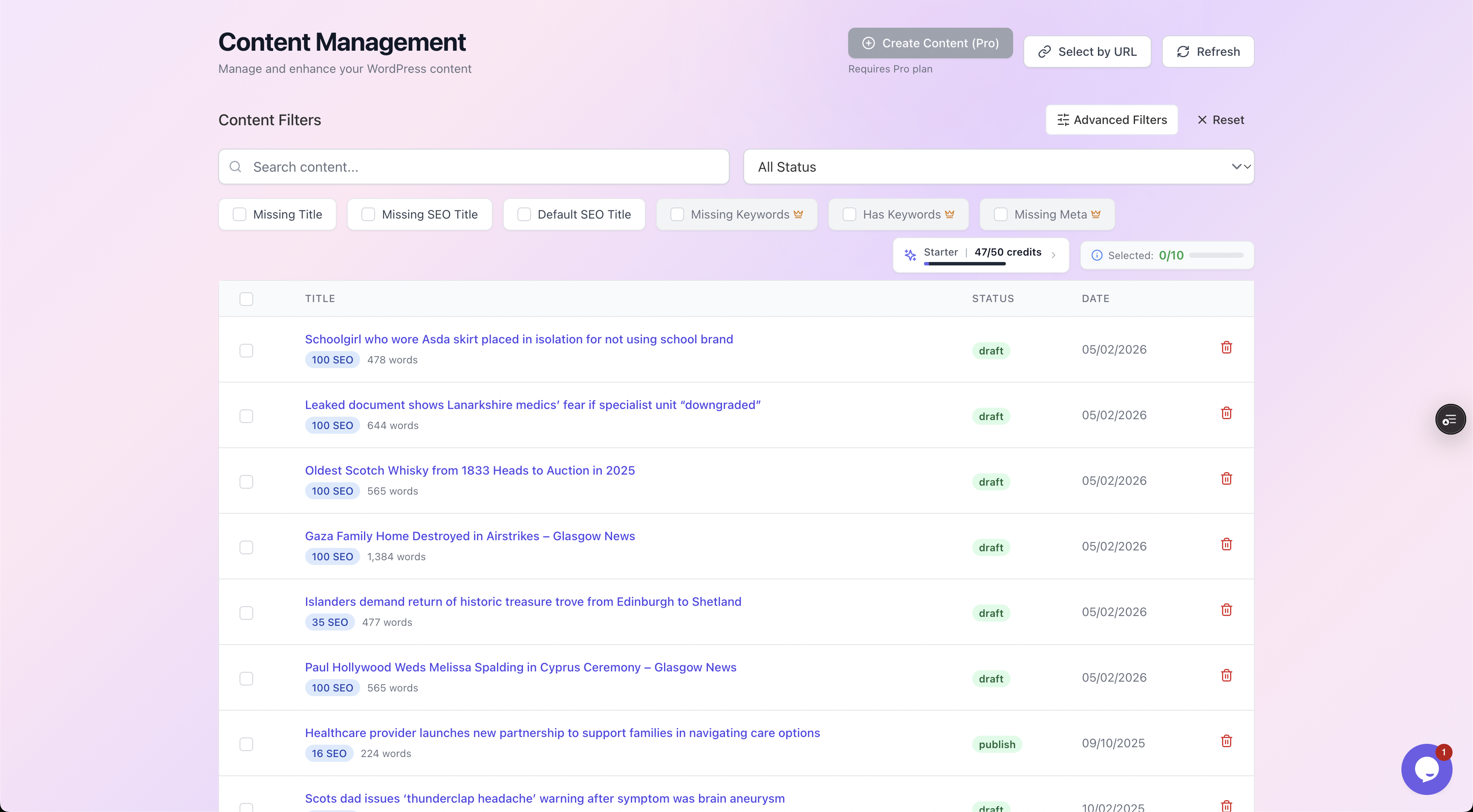
Filtering a WooCommerce catalogue down to just the products missing a meta description, so you can see the true size of the gap before you start.
What a converting product meta description contains
Forget the keyword-stuffing advice from a decade ago. Google rewrites a large share of meta descriptions anyway, so the goal is not to game the algorithm, it is to write the line you would want a shopper to read.
A strong product meta description usually carries four things in around 155 characters.
- The key benefit or use case, not just the product name. "Keeps logs dry through a Scottish winter" beats "wooden log store".
- One or two concrete specifics, a material, a capacity, a dimension, a certification. Numbers and nouns build trust and set the page apart from its variants.
- A commercial hook, price-from, free delivery, in stock, next-day dispatch, or a guarantee. This is what converts a curious searcher into a clicker.
- A reason to click now, often implied by the above rather than a tired "buy now". Specificity is the call to action.
Tip: Aim for 150 to 160 characters. Google truncates desktop snippets at roughly 920 pixels, which is around 155 to 160 characters for typical copy. Under 120 and you are leaving the slot half empty. Over 160 and your hook gets cut off with an ellipsis.
The 155 character limit, in practice
Character count is a guide, not a law, because Google measures pixels, not letters. A line full of capital I's and l's fits more than one full of wide M's and W's.
The safe working range is 150 to 160 characters. Write to the meaning first, then trim to fit. If your hook lands in the first 120 characters, a truncation will still leave a usable snippet.
Weak versus strong: annotated examples
Here is the same handful of products written badly, the way an auto-truncated field tends to read, and then written to convert.
Notice how the strong versions front-load a benefit and a specific, and never repeat across variants.
| Product | Weak (blank, truncated or duplicated) | Strong (benefit + specific + hook) |
|---|---|---|
| Cast iron casserole pot, 4L | "Cast iron casserole pot. This product is made from high quality materials and is..." | "Oven-to-table 4L cast iron casserole. Holds heat for slow braises, dishwasher safe. In stock, free UK delivery." |
| Merino base layer, navy | "Merino base layer. Available in navy. Add to basket. Related products you may like..." | "Lightweight 200gsm merino base layer in navy. Warm when wet, odour-resistant for multi-day trips. From 49 pounds." |
| Standing desk, 140cm | "Standing desk 140cm. Free delivery over fifty pounds. Sign up to our newsletter for..." | "Electric sit-stand desk, 140cm, lifts 80kg in 12 seconds. Quiet dual motor, 5-year warranty. Ships next day." |
| Dog raincoat, size M | "Dog raincoat size M. This product is made from high quality materials and is..." | "Waterproof, reflective dog raincoat (size M, 45cm back). Wipe-clean, fully adjustable. In stock, free returns." |
The weak column is what you get when nobody writes the field. There are three ways it goes wrong:
- The slot is empty and Google guesses.
- The SEO plugin pads it with boilerplate.
- Every size variant inherits the same parent line.
The strong column does work, and crucially each one is distinct, even between sizes of the same product.
Avoiding duplication across variants and similar products
Duplication is the trap that catches stores at scale. Two patterns cause almost all of it.
- Variant inheritance. WooCommerce variations often share the parent's metadata, so size S and size XL of the same shirt carry an identical meta description. Where variants are individually indexable, give them at least one differentiating detail, the size, the fit, the colour, so the snippet is not a carbon copy.
- Template sameness. If you write meta descriptions from a rigid formula, "[Product name], high quality, free delivery", you have technically filled the field while producing a thousand duplicates. A real meta description leans on what makes each product different, which is exactly the part a single template cannot supply.
Watch out: Do not paste the WooCommerce short description into the meta description field. The short description is on-page copy written for someone already on the page. The meta description is an advert written for someone who has not arrived yet. They have different jobs, and reusing one as the other wastes both.
For the wider strategy across product and category templates, our guide to WooCommerce product page SEO covers titles, schema and content depth, and the WooCommerce SEO overview ties the whole catalogue together.
Doing this across a whole catalogue
Everything above is straightforward for one product. The reason most stores never fix it is arithmetic.
At two minutes per product, a 1,500-SKU catalogue is fifty hours of identical, mind-numbing work, and that is before you account for new products added every week. So it never gets done, and the field stays blank.
This is the gap AutoBoost is built to close. It connects to your store through the AutoBoost connector plugin and an Application Password, then:
- Scans every post and every product.
- Flags the ones missing a meta description, an SEO title or a focus keyword.
- Bulk-generates drafts and writes the approved ones back into whichever SEO plugin you already run.
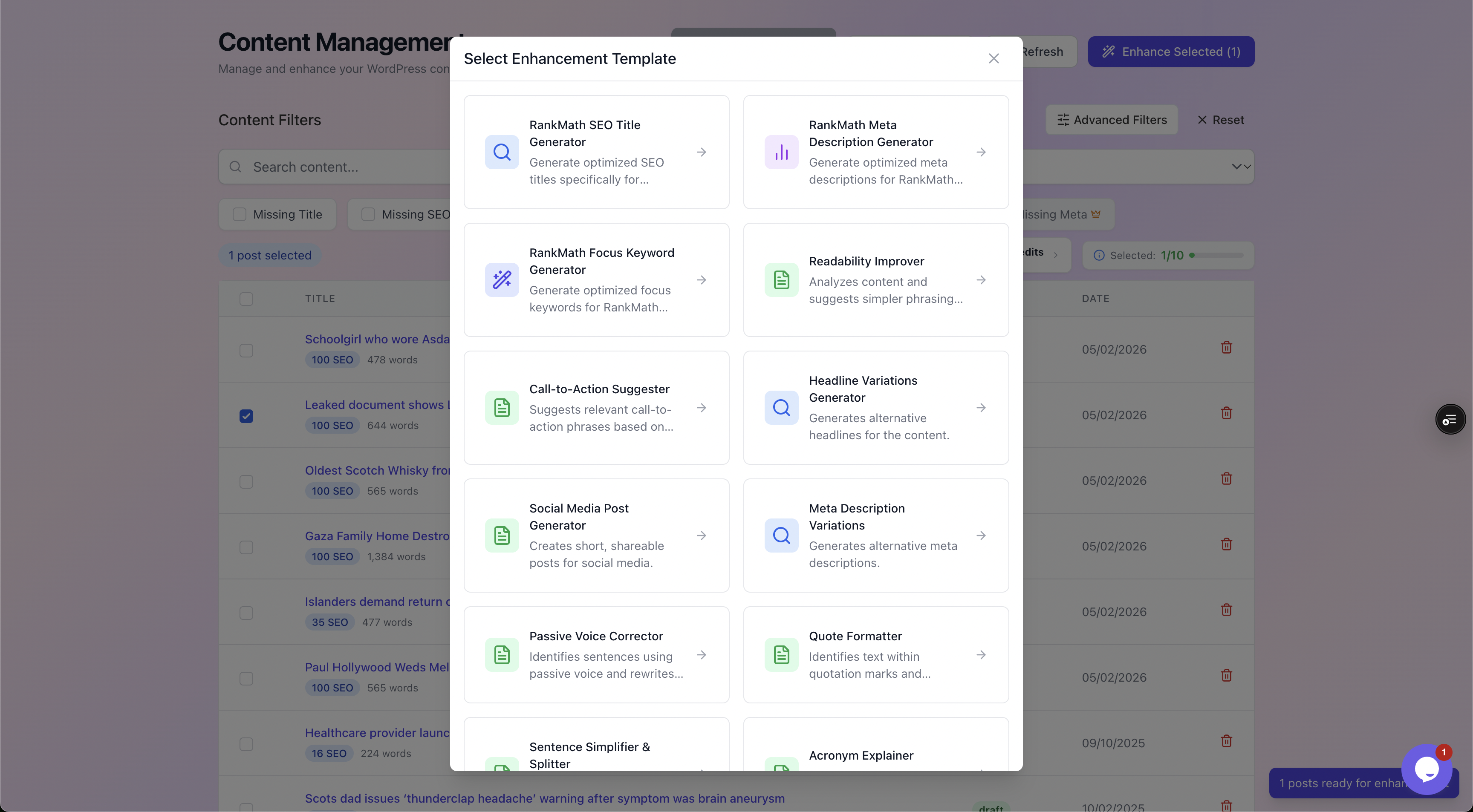
Choosing the Meta Description generator. AutoBoost works with your existing RankMath or Yoast setup rather than replacing it.
The part that matters most is the review step. Nothing AutoBoost generates goes live until you approve it.
You see the current value and the proposed one side by side, you can edit the wording, and you accept or reject each one. For product copy that affects how your brand reads in search, that human-in-the-loop control is not optional, it is the point.
A worked example
Say you run a 2,000-product homeware store on RankMath. A scan reports:
- 1,820 products have an empty meta description.
- Another 90 share duplicated text across variants.
Hand writing those is off the table. The workflow looks like this:
- Connect and scan. Install the connector, generate an Application Password, and let AutoBoost crawl the catalogue. The dashboard returns a Content Health Overview, items counted, percentage needing optimisation, and the specific issues detected.
- Filter to the gap. Use the Missing Meta chip to isolate the 1,820 empty products. Optionally narrow by category so you can batch the kitchen range separately from the bedding.
- Generate in bulk. Run the Meta Description generator across the filtered set. AutoBoost drafts a distinct description per product, drawing on the product title, attributes and existing content rather than a fixed template.
- Review and approve. Work through the before-and-after view. Approve the ones that read well, tweak the borderline ones, reject anything off-brand. The quality checklist flags length and keyword presence as you go.
- Write back. Approved descriptions are written straight into RankMath's meta fields. Nothing else on the product changes.
What took fifty hours becomes a focused review session, and the slow part is now your judgement rather than your typing. Add new products later and you rescan, filter and approve only the new arrivals.
For the underlying mechanics of generating and approving metadata in bulk, see how to bulk edit meta descriptions in WordPress.
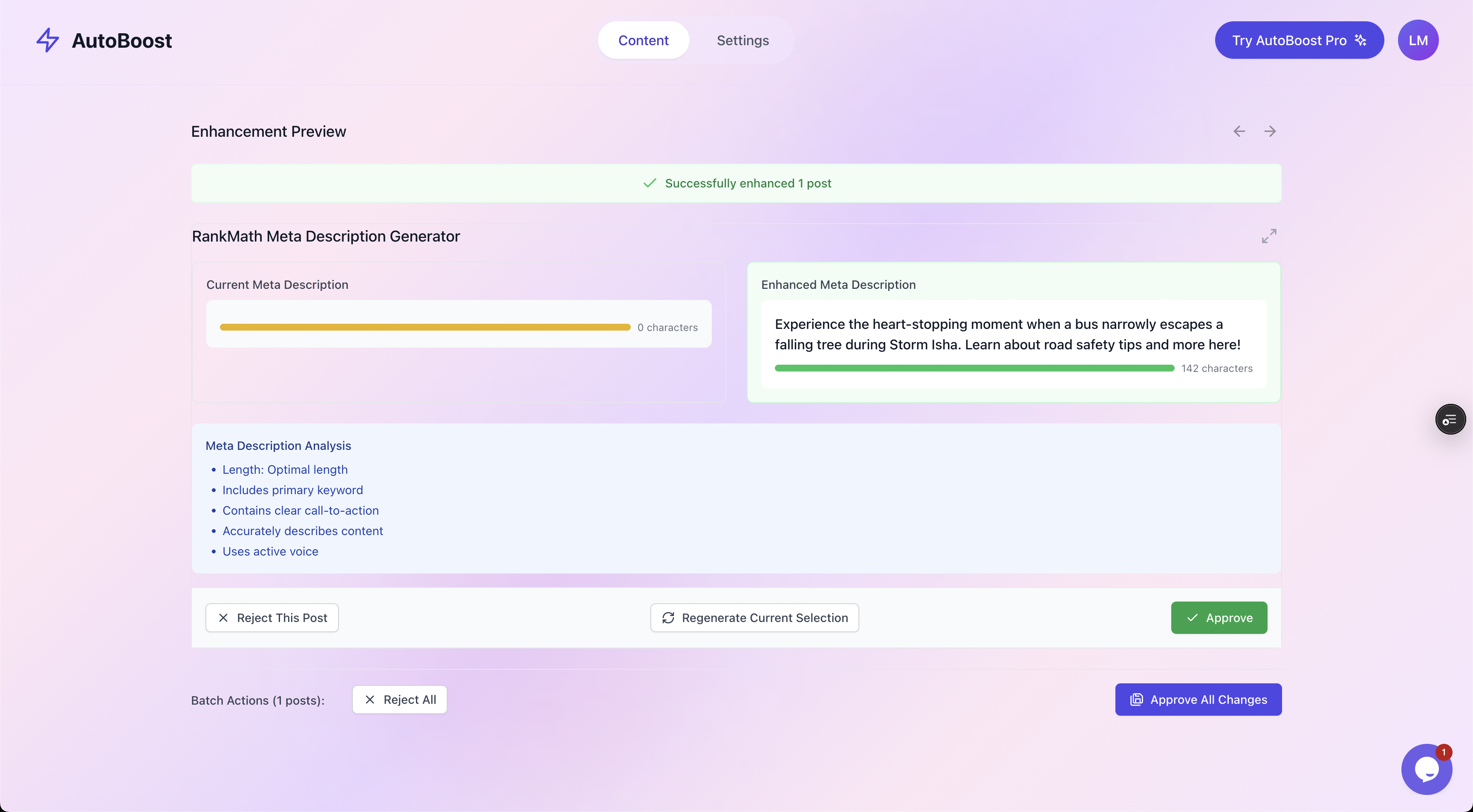
The review screen. Current value on the left, AutoBoost's suggestion on the right, with a quality checklist and explicit Approve or Reject before anything is saved.
Where automation helps, and where it does not
Be clear about the boundary. AutoBoost is built for the repetitive metadata layer:
- Meta descriptions.
- SEO titles.
- Focus keywords.
- Image alt text.
- Schema fields.
These are tedious at scale and well suited to generation with review. That is genuinely most of the grind on a large catalogue.
It is not a substitute for the things that actually win competitive product rankings. Specifically, it will not:
- Write the persuasive on-page product description you would craft for conversion.
- Improve thin product pages that have nothing to say.
- Build links or authority.
A product with three words of copy and no reviews will not rank because its meta description improved, it will simply get clicked more often when it does appear.
So keep the split clear. Metadata raises your click-through rate and tidies your catalogue. Content quality, merchandising and authority do the heavy lifting on position.
A note on product schema
Worth knowing too: WooCommerce product schema, the structured data for price, availability and reviews that powers rich results, comes from your SEO plugin's WooCommerce module (RankMath, Yoast or AIOSEO).
AutoBoost fills the metadata those modules rely on rather than emitting the schema itself, which is why it works alongside your existing stack instead of fighting it. See our integrations page for the plugins it connects to.
Pricing in short
The plans are set by AI credits a month and posts per bulk run:
- Free ($0): 5 credits a month, 3 posts per run, 1 site.
- Starter (
9/mo): 50 credits, 25 per run, 1 site. - Pro ($49/mo): 250 credits, 125 per run, 3 sites.
- Agency ($99/mo): 1,000 credits, 500 per run, 10 sites.
A mid-size catalogue sits comfortably on Pro; large multi-brand stores will want Agency. Full detail is on the pricing page, and the ecommerce solution page walks through the catalogue workflow end to end.
Frequently asked questions
Does WooCommerce have a meta description field at all?
Not natively. Core WooCommerce does not output a custom meta description, so the field comes from your SEO plugin, RankMath, Yoast or AIOSEO. Each adds a meta box to the product editor and, left blank, will usually auto-generate a description from the product content. AutoBoost reads and writes the RankMath and Yoast versions of those fields, so whatever you approve appears exactly where the plugin expects it.
How long should a WooCommerce product meta description be?
Target 150 to 160 characters. Google truncates desktop snippets at around 920 pixels, which works out to roughly 155 to 160 characters for normal copy. Keep your main benefit and hook inside the first 120 characters so the line still makes sense if it gets cut on a narrow screen.
Will Google just rewrite my meta description anyway?
Sometimes, yes. Google rewrites a meaningful share of meta descriptions to better match the query. That is not a reason to leave the field blank, it is a reason to give Google a strong, relevant option to choose from. A well written meta description is used far more often than an empty one, and for branded or specific queries it is usually shown verbatim.
Can I really generate thousands of these without them all sounding the same?
That is the whole design goal. AutoBoost drafts each description from the individual product's title, attributes and content rather than a single template, which is what keeps variants and similar products distinct. The review step is your safeguard: you see every suggestion and approve, edit or reject it before it is saved, so nothing generic slips through unchecked.
Do meta descriptions actually affect rankings?
Not directly. Meta descriptions are not a ranking factor. What they affect is click-through rate, the proportion of people who click your result when it appears. Higher click-through can support ranking indirectly over time, but the honest framing is simpler: better meta descriptions get more of the traffic you already qualify for, they do not lift a page that was not going to appear in the first place.
The bottom line
Product meta descriptions are the cheapest conversion lever on a WooCommerce store and the most neglected, purely because writing thousands by hand is impossible.
The fix is not a clever template. It is distinct copy per product, a benefit, a specific and a hook in 155 characters, generated at catalogue scale with a human approving every line.
That is exactly the loop AutoBoost runs:
- Scan your catalogue.
- Filter to the gap.
- Generate drafts.
- Review every line.
- Write back into your existing SEO plugin.
Start with a scan of your catalogue to see how many products are sitting with a blank or duplicated meta description, then explore the features or the ecommerce solution to see the full workflow.