How to Bulk Edit Meta Descriptions in WordPress (3 Ways)
By AutoBoost Team · 2026-06-22 · 11 min read
Meta descriptions are the snippet of text Google shows under your title in the search results. They do not directly move your rankings, but they are one of the biggest levers you have over click-through rate.
On a site with a few hundred posts, writing them one at a time is a job that simply never gets finished. This guide walks through:
- The three realistic ways to bulk edit meta descriptions in WordPress.
- What each one is genuinely good and bad at.
- How to do the AI-assisted route step by step, without publishing anything you have not read first.
Key takeaways
- Three ways to bulk edit: your SEO plugin’s built-in editor (still manual), CSV export and import, or AI-assisted generation with review.
- Meta descriptions do not rank you directly, but they drive click-through, and a missing one lets Google pick a random snippet.
- Aim for 150 to 160 characters, keyword near the front, and a clear reason to click.
- Fix the posts that already get impressions but no clicks first, that is where it pays off fastest.
Why meta descriptions matter (and why most posts do not have one)
Here is the part people get wrong: a meta description is not a ranking factor. Google said so years ago and has never walked it back.
What it does affect is whether someone clicks your result instead of the one above or below it. A page sitting at position 4 with a sharp, benefit-led description can out-earn a page at position 2 with an auto-truncated first sentence of body copy. CTR is the prize, not rank.
So why do so many posts ship without one?
Because writing a good 150 to 160 character description is small, fiddly, repetitive work, and there is always something more interesting to do. Multiply that by every post you have ever published and the backlog becomes invisible.
Most WordPress sites we see have a completion rate well under 10 percent. That means Google is auto-generating the snippet for the other 90 percent by grabbing whatever text it thinks is relevant. Sometimes that is fine. Often it is one of these:
- A cookie notice.
- A date stamp.
- The middle of a sentence.
If you want the wider picture on automating this kind of on-page work, our auto SEO for WordPress guide covers the whole metadata stack. This post zooms in on meta descriptions specifically.
First, see the scale of the problem
Before you pick a method, find out how many posts actually need work. The honest answer is usually "far more than I thought." A filtered view makes the gap concrete instead of theoretical.
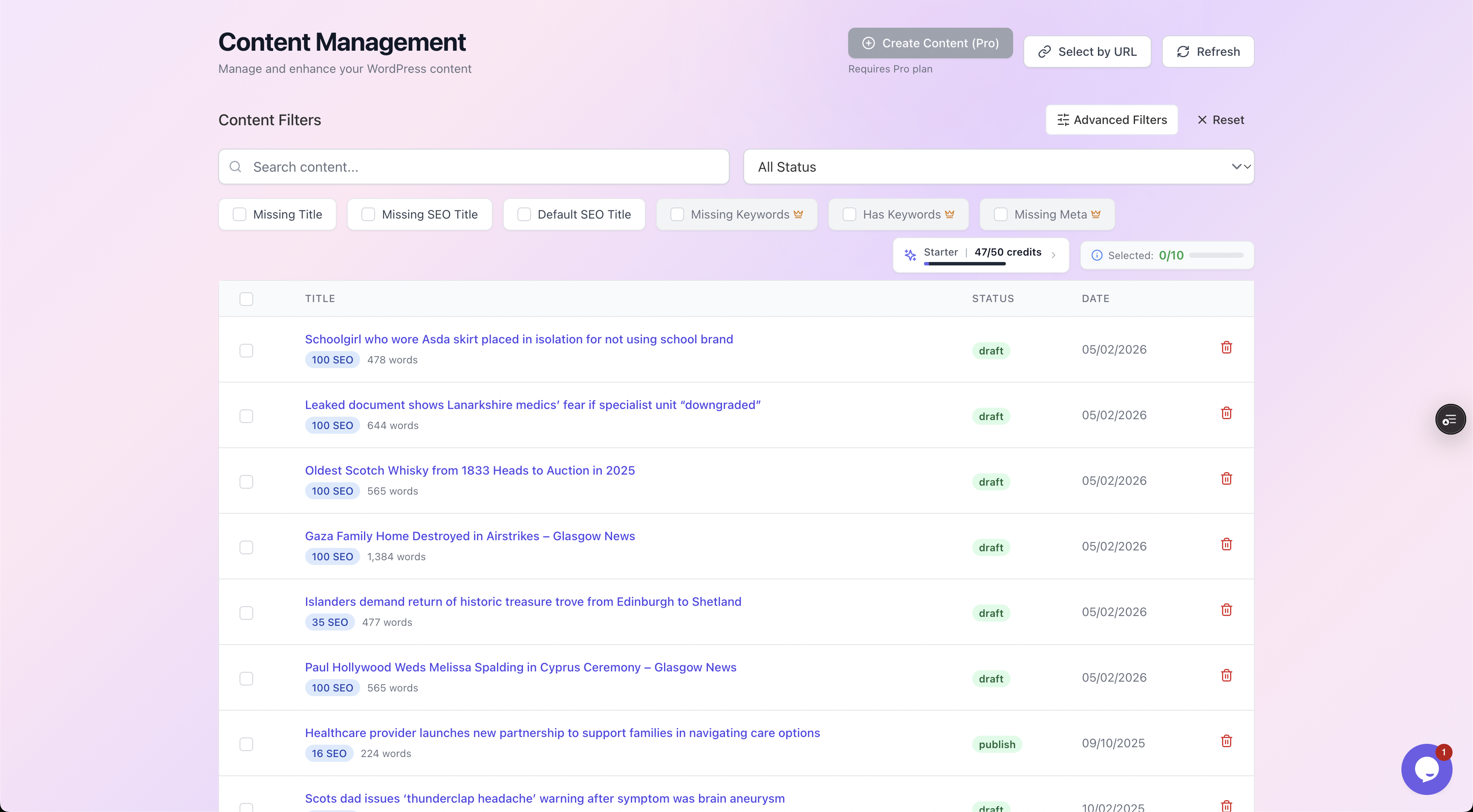
Filtering by "Missing Meta" surfaces exactly which posts have no description, each with its current SEO score, so you can size the job before you start.
This matters because the right method depends entirely on volume:
- Twenty posts? Edit them by hand and move on.
- Two hundred or two thousand? You need a bulk approach.
At scale, the difference between methods becomes the difference between an afternoon and a fortnight.
The three ways to bulk edit meta descriptions
There are exactly three approaches that actually work in practice. Everything else is a variation on these.
| Method | Best for | Writing still manual? | Speed at 250 posts | Risk |
|---|---|---|---|---|
| Built-in bulk editor (Rank Math / Yoast) | Small batches, full hands-on control | Yes, you write every line | Slow (hours of typing) | Low |
| CSV export / import | Spreadsheet lovers, dev-comfortable teams | Yes, you write in the sheet | Medium (writing is the bottleneck) | Medium (mapping errors, encoding) |
| AI-assisted generation + review | Large sites, agencies, backlogs | No, drafted for you, you approve | Fast (minutes to draft, review at your pace) | Low if you review every one |
The key thing to notice: the first two methods speed up entering descriptions, but they do nothing about writing them.
The writing is the slow part. That is the gap the third method closes, and also where the honest caveats live, so we will be specific about both.
Method 1: The built-in bulk editors (Rank Math and Yoast)
Both of the big SEO plugins ship a bulk editor, and most people do not know it exists.
Where to find it:
- Rank Math: go to Rank Math SEO, then Status & Tools, then Database Tools. Or use the dedicated bulk-edit table under the SEO menu, where you can see Title and Description columns for many posts on one screen.
- Yoast: it lives under SEO, then Tools, then Bulk editor, which gives you two tabs, Title and Description.
Either way you get an editable table: post on the left, a description field on the right, save inline.
This is a real improvement over opening each post in the editor. You stay on one screen and tab down the list. For a batch of 20 to 40 posts it is perfectly good.
The catch: it only removes the navigation overhead. You are still personally writing every single description, and the table gives you almost no help to do it:
- Writing from scratch in a cramped table cell.
- No live character counter in some versions.
- No guidance on keyword inclusion or tone.
- No preview of how it will look in the SERP.
At 250 posts you are looking at several hours of concentrated writing, which is exactly the wall that left those posts empty in the first place. If you want a deeper plugin comparison, see our Rank Math vs Yoast vs AIOSEO breakdown.
Verdict: great for small, deliberate edits. Does not scale, because the bottleneck was never data entry, it was the writing.
Method 2: CSV export and import
The spreadsheet route appeals to anyone who likes working in bulk and is comfortable with a bit of mapping. You export your posts and their existing meta to a CSV, write the descriptions in columns, and import them back.
There are two common ways to do it:
- A dedicated import/export plugin such as WP All Export paired with WP All Import, or the export tools some SEO plugins include. You map the meta fields (
rank_math_descriptionfor Rank Math,_yoast_wpseo_metadescfor Yoast) to spreadsheet columns. - WP-CLI if you are technical:
wp post meta update <id> rank_math_description "your text"scripted across a list of IDs.
The upside: a spreadsheet is a comfortable place to work.
- See everything at once.
- Sort by post type.
- Write in a flow.
- Keep the CSV as a backup of what you changed.
The downsides are real, though:
- No time saved on writing. You still write every description yourself, so the spreadsheet does not save the slow part either.
- Fiddly field mapping. Easy to get subtly wrong, which can write descriptions to the wrong meta key (so Rank Math shows nothing because you populated the Yoast field).
- Encoding gremlins. Character encoding can mangle apostrophes and quotes.
- Overwrite risk. One bad import with the wrong ID column can overwrite live metadata across hundreds of posts at once.
Watch out: always export a backup first and test the import on a handful of posts before running the whole file.
Verdict: powerful if you live in spreadsheets and are careful, but it shifts the work, it does not reduce it, and it carries the most "oops, I just overwrote production" risk of the three.
Method 3: AI-assisted bulk generation with human review
This is the route that actually attacks the bottleneck. It drafts the descriptions for you and then asks you to approve, reject, or regenerate each one. You are not writing from a blank box and you are not blindly trusting a machine to publish.
Tools like AutoBoost work like this:
- Connect to your site through the official connector plugin and an Application Password.
- Scan for posts missing a description.
- Generate one per post using a focused template, in this case the Rank Math Meta Description Generator (or the Yoast equivalent).
Crucially, nothing is written back to your live SEO plugin until you say so.
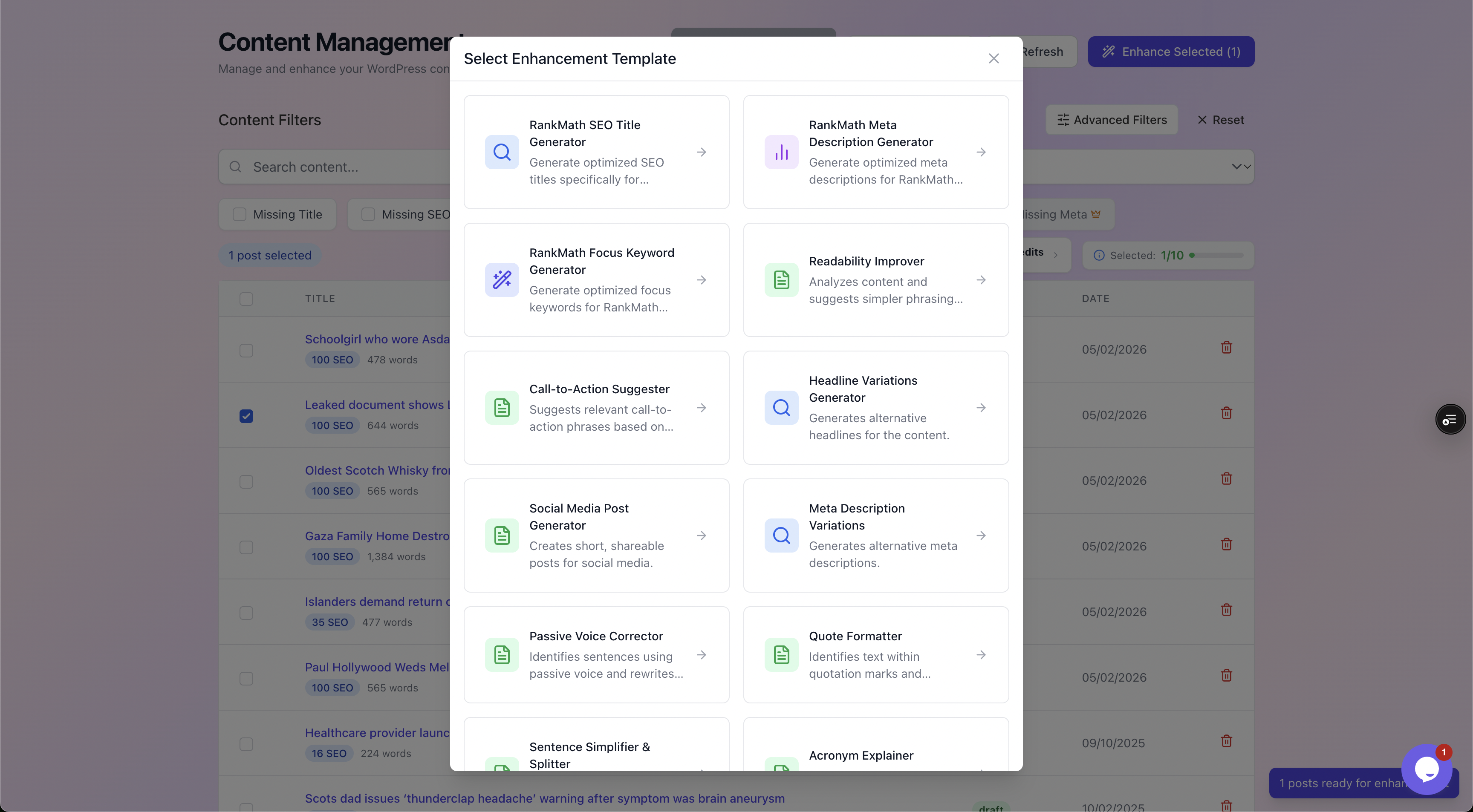
You pick the job per batch. For this task it is the Rank Math Meta Description Generator, but the same library covers titles, keywords, alt text and CTAs.
The honest framing matters here, so let us be clear about it.
- What it does well: the repetitive on-page metadata, because a meta description is a constrained, well-understood format. Right length, includes the keyword, leads with the benefit, ends with a reason to click.
- What it does not do: fix thin content, build links, or magically rank a page that does not deserve to.
If the underlying article is weak, a sharper snippet earns you a click and then a bounce. Use this to fix the metadata layer on content that is already worth reading.
A worked before/after example
The whole point of a meta description is the 155 or so characters that show in the SERP. Here is a real-feeling example for an article titled "Best Compost Bins for Small Gardens."
Weak (auto-generated by Google from body text):
In this post we will look at a few options. First, let's talk about what compost actually is and why it matters for...
That is 116 characters of throat-clearing. It fails on every count:
- No keyword in a useful position.
- No benefit.
- No reason to click.
- It cuts off mid-thought.
Google grabbed the first sentence of the intro because nothing better existed.
Strong (purpose-written, 153 characters):
Short on space? Compare the 7 best compost bins for small gardens, from odour-free tumblers to balcony-friendly bokashi, with prices and verdicts.
Look at what changed:
- Keyword placement: "compost bins for small gardens" sits naturally near the front.
- Opens on the problem: it leads with the reader's actual problem ("short on space?").
- Promises specifics: 7 options, a comparison, prices, verdicts.
- Safe length: it lands at 153 characters, comfortably inside the safe zone before Google truncates.
A quick anatomy of a strong meta description:
| Element | Weak version | Strong version |
|---|---|---|
| Length | 116 chars (too short, wastes space) | 153 chars (uses the full snippet) |
| Keyword position | Absent | Near the front, reads naturally |
| Benefit / hook | None | "Short on space?" speaks to intent |
| Specificity | Vague ("a few options") | "7 best", "prices and verdicts" |
| Call to action | Implicit at best | "Compare" invites the click |
| Active voice | Passive, meandering | Direct and active |
This is exactly the checklist a good meta description generator scores against. That is why the review step is fast: you are eyeballing whether it nailed those boxes, not composing from scratch.
Step by step: the AI-assisted route
Here is the full walk-through for the third method, end to end.
- Connect your site. Install the official AutoBoost connector plugin, generate a WordPress Application Password (Users, then Profile, then Application Passwords, not your login password), and paste it in. The plugin handles CORS and the REST API so the scan can read your posts and meta. See integrations for the supported setups.
- Scan and filter. Run a scan, then filter to "Missing Meta" so you are looking only at posts that genuinely need a description. This is the same filtered view shown earlier, and it stops you wasting generations on posts that already have a decent snippet.
- Select your batch. Tick the posts you want to fix. On a large backlog, work in sensible batches by category or post type rather than firing at all 2,000 at once, so the review stays manageable.
- Pick the template. Choose the Rank Math Meta Description Generator (or the Yoast version if that is your plugin) from the template library.
- Generate. The tool drafts a description per post, aiming for the right length, keyword placement, active voice and a reason to click.
- Review every one. This is the non-negotiable step. For each post you see the current description next to the proposed one, with a quality checklist, and three buttons: Approve, Reject, or Regenerate.
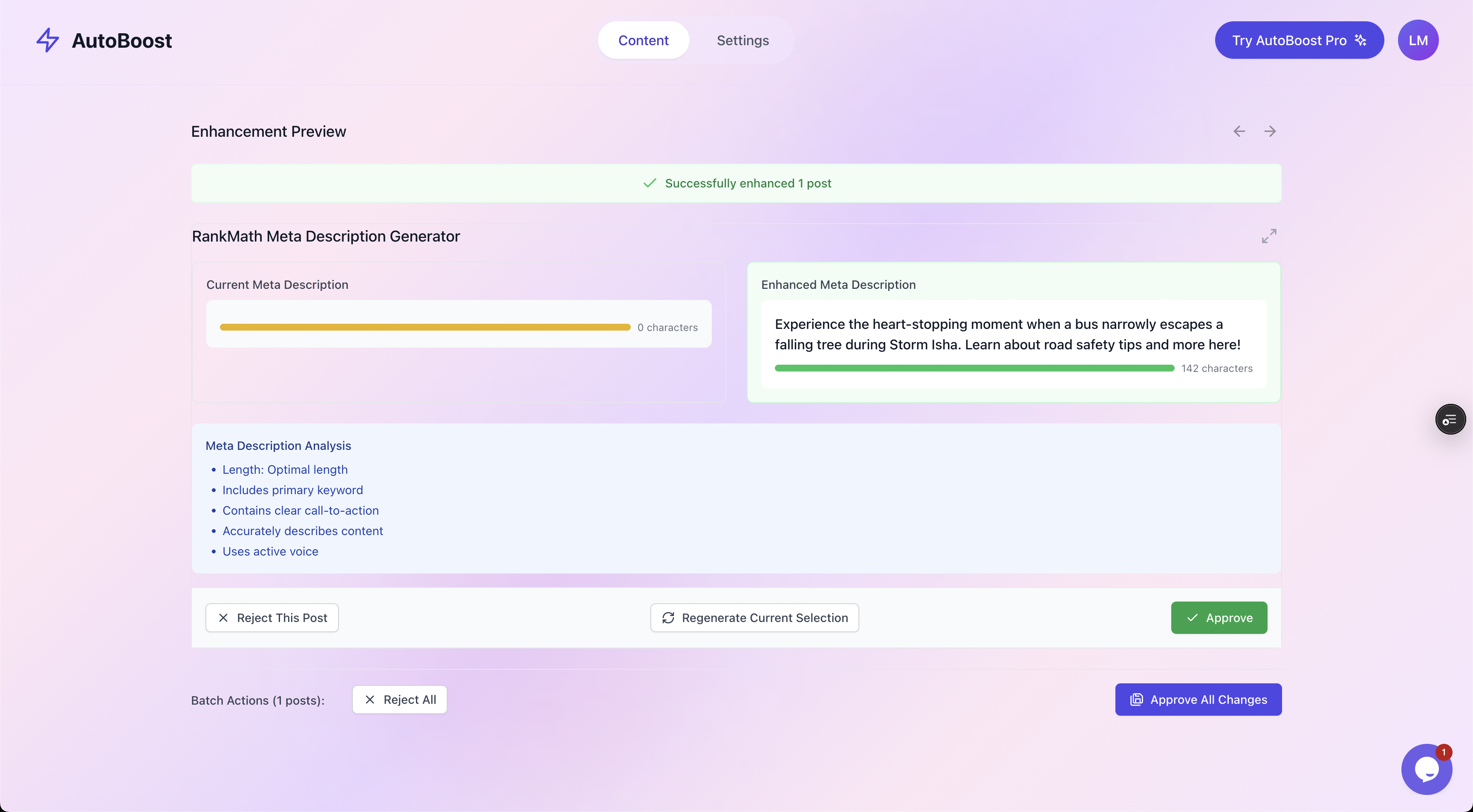
The human-in-the-loop review: current versus enhanced side by side, a checklist scoring length, keyword, CTA and voice, and you decide what gets written back.
- Approve, then write back. Approved descriptions are written into your existing SEO plugin's correct field. Nothing touches your live site until you have approved it, so there is no "the AI published something weird" failure mode.
That review loop is the whole reason this scales safely. You move at reading speed, not writing speed:
- Reading a drafted line and clicking Approve takes a couple of seconds.
- Composing from scratch takes a minute or two.
That is how "fix 250 posts in under an hour, not 10 hours" actually works in practice, and it is the same pattern we lay out in our WordPress SEO automation workflow guide.
Which method should you pick?
A simple decision guide:
- Under ~30 posts, or you want to hand-craft every word: use the built-in Rank Math or Yoast bulk editor. No new tools, full control.
- You live in spreadsheets, have a dev handy, and are careful with backups: CSV export/import is fine, but remember it does not save you the writing and it carries the highest overwrite risk.
- Hundreds or thousands of posts, an agency managing many sites, or a backlog you have been avoiding for a year: AI-assisted generation with review is the only one that removes the actual bottleneck. Bloggers can see this in our solutions for bloggers page and stores in ecommerce solutions, where product and category descriptions multiply the problem fast.
Tip: whatever you choose, the principle is the same. Review before you publish. None of these methods should put text live that you have not read.
If you are weighing tools specifically, our best auto SEO plugin for WordPress comparison goes deeper on features and limits, and pricing shows the AI credits and posts per bulk run for each plan, from the Free plan upward.
Frequently asked questions
How many characters should a WordPress meta description be?
Aim for roughly 150 to 160 characters. Google typically truncates desktop snippets around 155 to 160 characters and shorter on mobile, so anything longer risks being cut off mid-sentence. Too short and you waste valuable snippet real estate. The sweet spot is one tight sentence, or two short ones, that includes your keyword and a reason to click.
Do meta descriptions affect SEO rankings?
Not directly. Google has confirmed meta descriptions are not a ranking factor. What they affect is click-through rate from the search results, and a higher CTR can indirectly help by sending stronger engagement signals. Think of them as ad copy for your organic listing: their job is to win the click, not the rank.
Can I bulk edit meta descriptions without a plugin?
You can via WP-CLI (wp post meta update) or a direct database/CSV import, but you still need to know the correct meta key for your SEO plugin (rank_math_description for Rank Math, _yoast_wpseo_metadesc for Yoast). For most site owners that is more risk and effort than using the SEO plugin's own bulk editor or an AI-assisted tool, both of which write to the right field for you.
Will AI-generated meta descriptions get penalised by Google?
No. Google judges the output, not how it was made, and there is no penalty for AI-assisted metadata. The risk is quality, not origin: generic, duplicate, or misleading descriptions hurt CTR. That is exactly why the review step matters. You approve each one, so what goes live reads like you wrote it and accurately reflects the page.
Does AutoBoost replace Rank Math or Yoast?
No, it works with them. AutoBoost connects to your site, generates the metadata, and writes it back into whichever of Rank Math or Yoast you already use. It can read All in One SEO, SEOPress and The SEO Framework data but does not write to them. You keep your existing plugin, its schema, sitemaps and settings. AutoBoost just fills in the gaps at scale, with your approval on every change.