How to Write Blog Meta Descriptions That Earn Clicks
By AutoBoost Team · 2026-06-22 · 9 min read
A meta description does not change your ranking, but it does change how many people click once you are ranked. For a blog with hundreds of posts fighting for the same spots on the results page, that click-through rate is one of the few levers you can pull from your desk this afternoon.
The catch is that most bloggers do one of three things:
- Leave the field blank entirely.
- Let Google scrape a random sentence from the page.
- Paste the title in twice and move on.
This guide is about the copywriting craft:
- What makes a description earn the click.
- The length that actually shows on the results page.
- Several annotated good and weak examples.
- How to apply one repeatable formula across a whole archive without rewriting each post by hand.
If you want the mechanical side, the bulk editing workflow, read bulk edit meta descriptions in WordPress alongside this one.
Key takeaways
- A meta description does not directly affect rankings, but it strongly affects click-through rate, which is the whole point of ranking.
- Aim for 150 to 160 characters, lead with the value, use active voice, and give one concrete reason to click.
- Match the description to search intent and never duplicate the page title; the title and the snippet should do different jobs.
- Across a big blog, apply one formula consistently rather than agonising over each post; tools can draft them and a human approves.
Why the meta description still matters for bloggers
Google has said for years that meta descriptions are not a ranking factor, and that is true. What it is, is a sales line.
When your post appears in the results, you get three things:
- A headline (your title).
- A URL.
- Roughly two lines of text underneath.
Those two lines are your one chance to convince a stranger that your post answers their question better than the nine others on the page.
Why this matters more for blogs
For bloggers this matters more than for most sites:
- You publish often.
- You compete in crowded niches.
- You rarely outrank big brands on raw authority.
A description that frames the value sharply can win the click even from a slightly lower position. Multiply a one or two point CTR gain across hundreds of indexed posts and it is real traffic, with no new content and no link building required.
Two honest caveats
Before we go further, two things to keep in mind:
- Google rewrites your description on roughly half of all queries when it thinks a different snippet fits the search better. You still write yours, because the half it keeps are the ones where your wording wins.
- A brilliant description cannot save a post that does not match what the searcher wanted. If the intent is wrong, you may earn the click and lose the trust, which is worse than no click at all.
Snippet copywriting amplifies good content; it does not replace it.
The anatomy of a click-worthy description
A strong blog meta description does four things in a single breath. Strip away the theory and it comes down to this.
Lead with the value, not the wind-up. The reader scans, so the payoff has to be in the first few words. "Learn how to..." and "In this post we discuss..." waste your best real estate. Start with the outcome the reader wants.
Use active voice and a verb. "Cut your meal-prep time in half" beats "Meal-prep tips are discussed." Verbs imply the reader will do something, and doing is why they searched.
Give one concrete reason to click. A number, a timeframe, a specific promise, a named tool. "Seven recipes under 20 minutes" is a reason. "Some great recipe ideas" is not. One specific is worth a paragraph of adjectives.
Match the search intent and do not repeat the title. The title and the description are a pair, not an echo. If the title states the topic, the description should add the angle, the proof, or the benefit the title left out. Repeating the title wastes the only second line you get.
Tip: Keep it natural. This is a line a human reads, not a keyword bin. Include your main keyword once if it fits, because Google bolds matching terms in the snippet and bolding draws the eye, but never at the cost of readability.
Blog meta description length: what actually shows
The practical target is 150 to 160 characters, including spaces. Google truncates roughly around 155 to 160 characters on desktop and shorter on mobile, and a cut-off mid-sentence with an ellipsis looks careless and buries your call to action.
A useful rule for surviving truncation:
- Write the most important half of the message in the first 120 characters, so even an aggressive mobile truncation still shows your point.
- Treat everything after that as a bonus that desktop users get to see.
- Do not pad to hit 160. A tight 130-character line that says one thing clearly beats a bloated one that says three things vaguely.
Tip: Character count, not word count, is what gets cut. Watch for em dashes, brackets and emoji, which eat characters and sometimes display unpredictably. A live preview that shows the truncation point is worth more than any counter.
The preview below is from AutoBoost's generator, showing the current description against an enhanced one with a quality checklist on the right, length, active voice, keyword presence, before anything is saved.
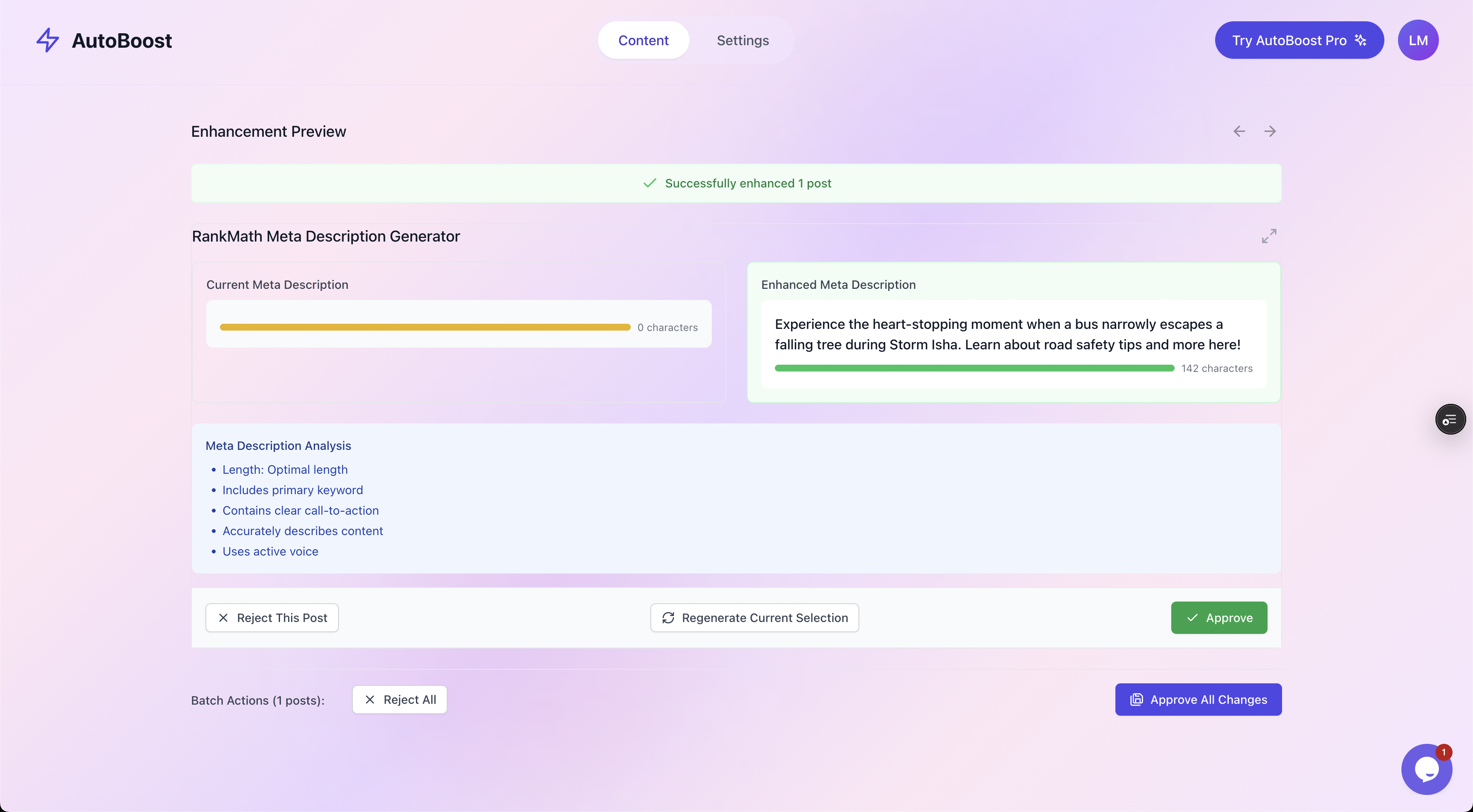
The before and after view with a quality checklist. Nothing is written back until you approve it.
Good versus weak: annotated examples
Theory is cheap, so here are real-shaped examples for a typical blog. Each pair targets the same post; the difference is craft. Character counts are approximate.
| Post topic | Weak description | Why it fails | Strong description | Chars |
|---|---|---|---|---|
| 20-minute weeknight dinners | "In this blog post we share some delicious dinner ideas you can make at home." | Wind-up opener, no specifics, no verb the reader acts on. | "Seven weeknight dinners on the table in 20 minutes, with one pan and a short shopping list. Tested on fussy eaters." | 116 |
| Beginner running plan | "Running for beginners. Read our guide to learn all about how to start running today." | Repeats the title, vague "learn all about", filler "today". | "A four-week plan to go from sofa to a steady 5k, with the exact run-walk splits and what to do on bad days." | 108 |
| Best budget DSLR cameras | "Best budget DSLR cameras 2026 best budget DSLR cameras reviewed for you." | Keyword stuffing, reads like spam, zero benefit. | "We tested nine budget DSLRs under £500 for two weeks each. See which won on image quality, battery and value." | 110 |
| Sourdough troubleshooting | "Sourdough can be tricky. Here are some tips that might help you with your bread." | Hedging ("might help"), no concrete promise, passive. | "Flat loaf, gummy crumb or no rise? Diagnose the eight most common sourdough faults and the exact fix for each." | 110 |
| Freelance invoicing | "Read this article about invoicing as a freelancer and getting paid on time." | "Read this article" is dead weight; no angle. | "Steal our freelance invoice template and the three follow-up lines that cut our average payment time to nine days." | 114 |
Notice the pattern in the strong column. Every one of them:
- Opens on the value.
- Uses a verb or a sharp hook.
- Names a number.
- Adds something the title did not already say.
None of them repeats its title verbatim, and none crosses the truncation line.
A repeatable formula you can apply at scale
You will not hand-craft 400 descriptions from a blank page, and you should not try. Use a formula and vary the inputs. A reliable structure for blog posts:
[Specific outcome or hook] + [concrete proof or detail] + [who it is for or a soft CTA].
Worked through one post, a tutorial on speeding up a slow WordPress site:
- Outcome or hook: "Cut your WordPress load time below one second"
- Proof or detail: "with five changes you can make today, no plugins required"
- Who or CTA: "even on cheap shared hosting."
Stitched together: "Cut your WordPress load time below one second with five changes you can make today, no plugins required, even on cheap shared hosting."
That lands at about 137 characters. It does four things well:
- Leads with the win.
- Names a number.
- Sets a no-jargon expectation.
- Reads like a person wrote it.
Swap the three slots and the same formula serves a recipe post, a review, or an opinion piece.
Tip: For category and tag pages, lean on what the page collects: "Every [topic] guide in one place, from [beginner angle] to [advanced angle], updated as we publish." Consistency across the archive is the goal, not bespoke poetry on every URL.
Applying the formula across a whole blog
Here is where volume becomes the real problem. A 300-post blog with half its descriptions missing is a few days of mind-numbing work in the editor. The order of operations that keeps it sane:
First, find the gaps
You cannot fix what you cannot see, so start with an audit that flags every post missing a description, a title or a focus keyword.
AutoBoost connects to WordPress through its connector plugin and an Application Password, scans your posts, and surfaces exactly which ones are missing each field. The filter chips below let you isolate, for example, only the posts with no meta description.
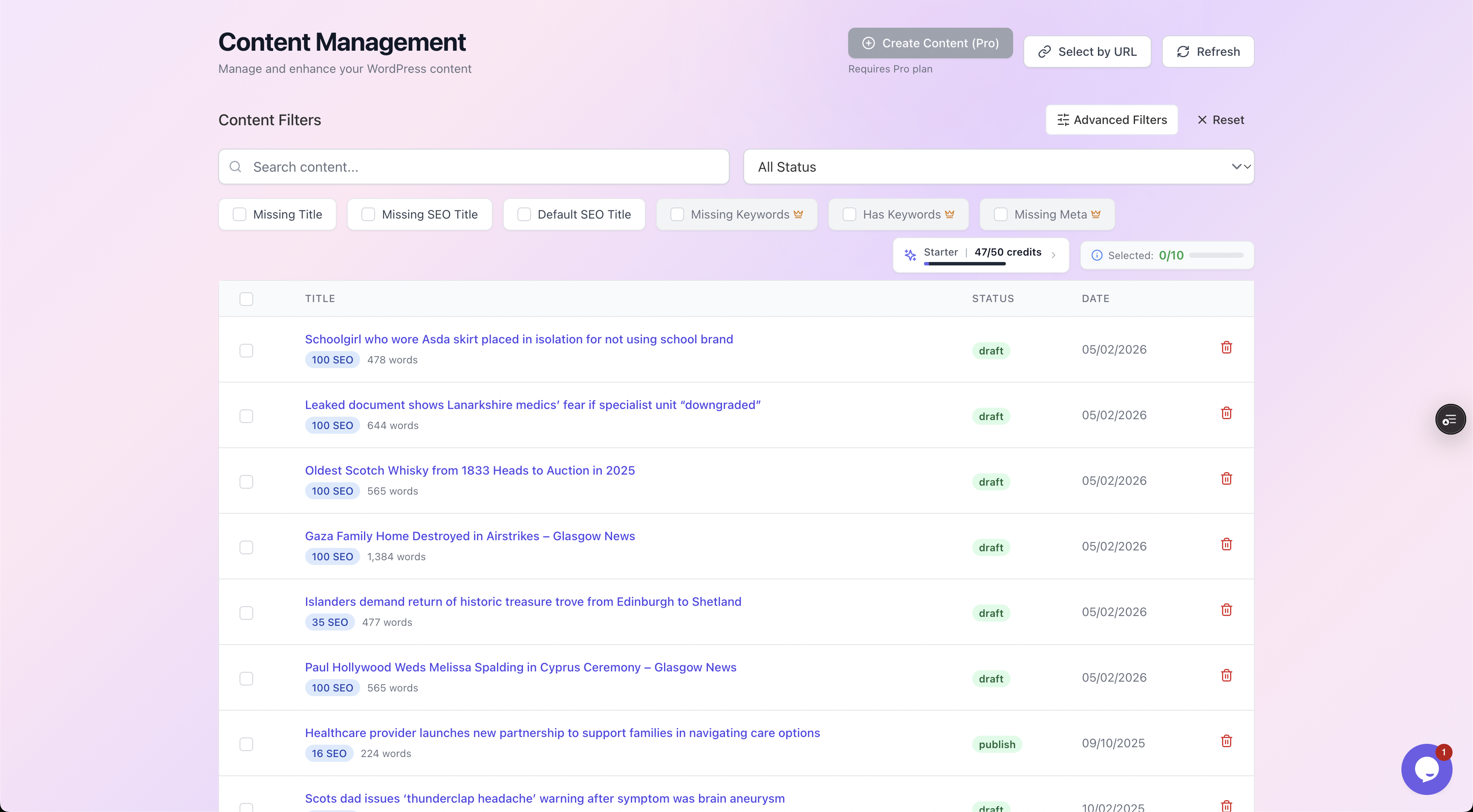
Filter to just the posts missing a meta description, then work that list instead of scrolling your whole archive.
Second, draft in bulk from a template, then refine
Rather than facing an empty box hundreds of times, you generate first-draft descriptions that already follow the formula, then edit the ones that need a human touch.
AutoBoost's template library covers meta descriptions alongside SEO titles, focus keywords, alt text, schema and more, and writes the approved result straight back into your existing RankMath or Yoast setup. It works with your SEO plugin, it does not replace it.
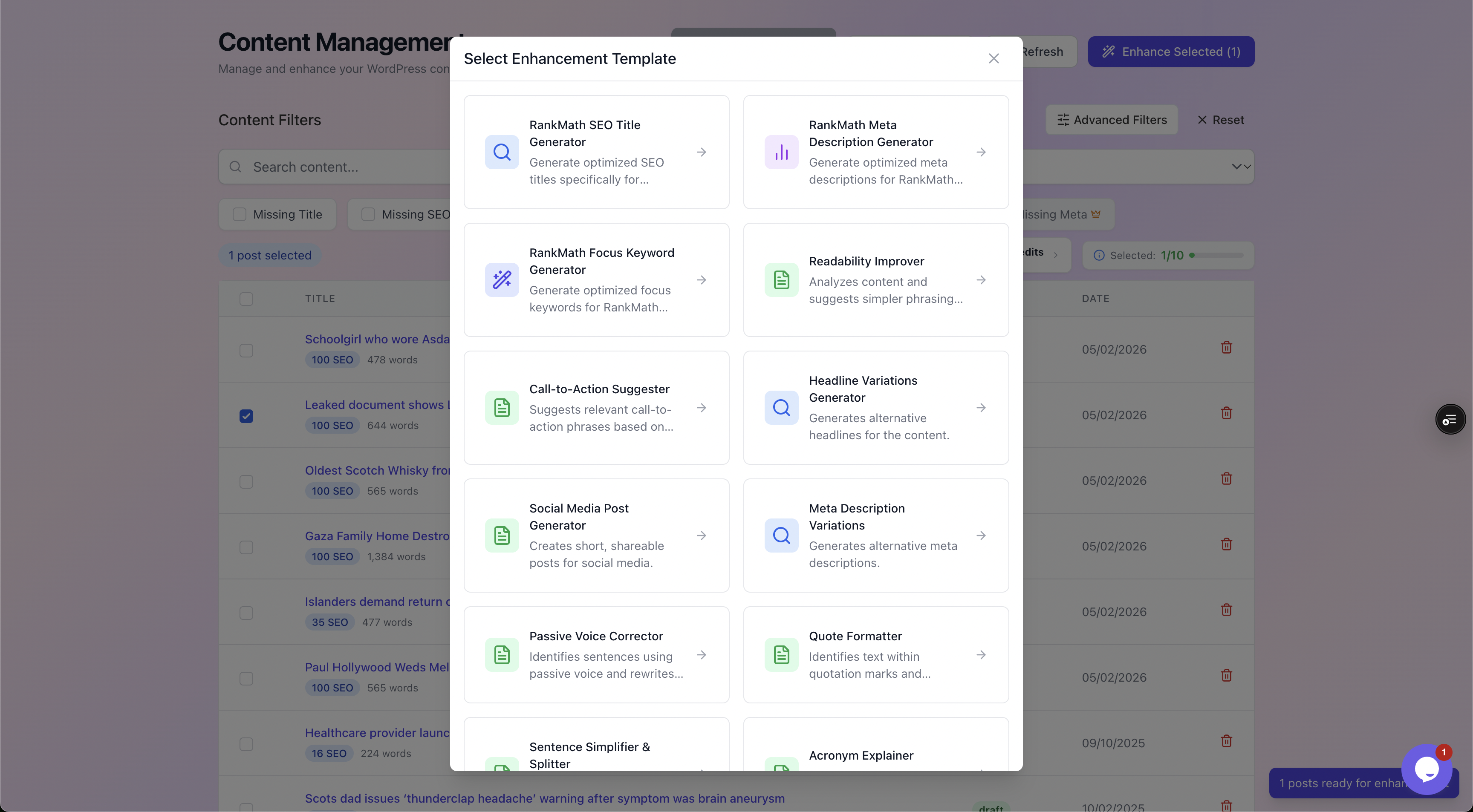
The template library. Pick the meta description generator, run it across the filtered list, and review each result.
Third, approve before anything goes live
This is the part to insist on. AutoBoost is human-in-the-loop by design. Nothing is published until you say yes to it, which is exactly right for descriptions, where a generic draft can read worse than a thoughtful blank.
Treat the generated lines as a strong first draft, not a final word, and spend your saved time sharpening the highest-traffic 20 posts.
Warning: Do not auto-approve in bulk and walk away. A description that quietly contradicts the page, or oversells what the post delivers, costs you trust and can raise pogo-sticking back to the results page. Skim every batch.
If you are tackling a large back catalogue, pair this with optimise old blog posts for SEO and the broader blog SEO at scale on WordPress workflow, where descriptions are one field among several you fix in the same pass.
A quick checklist before you hit save
Run every description, written by you or generated, through this:
- Does it lead with the value in the first few words?
- Is it 150 to 160 characters, with the key point inside the first 120?
- Active voice, at least one verb the reader acts on?
- One concrete, specific reason to click (number, timeframe, named thing)?
- Does it match the actual search intent the post serves?
- Is it different from the title, adding angle or proof rather than echoing it?
- Does it read like a human wrote it, with the keyword in once if it fits naturally?
Six or seven yes answers and the line is doing its job. Anything less, rewrite the weakest part.
Frequently asked questions
Does the meta description affect my Google ranking?
No, not directly. Google has confirmed it is not a ranking factor. What it affects is click-through rate, how many people choose your result over the others on the page. A higher CTR from a sharper description means more traffic from the same position, and sustained engagement signals can help indirectly, but the description itself is a copywriting tool, not a ranking input.
What is the ideal meta description length for a blog post?
Aim for 150 to 160 characters including spaces. Google truncates roughly around there on desktop and shorter on mobile, so put the most important half of your message in the first 120 characters. A tight, complete line beats a padded one that gets cut off mid-sentence with an ellipsis.
Why does Google show a different description from the one I wrote?
Google rewrites descriptions on a large share of queries when it thinks a passage from your page matches the specific search better than your written snippet. You still write your own, because the queries where Google keeps your version are the ones where your wording is the strongest fit. Writing a good one gives Google a good option to choose.
Should the meta description repeat the page title?
No. The title and the description are a pair that should do different jobs. If the title names the topic, the description should add the angle, the proof, or the benefit the title left out. Repeating the title verbatim wastes your only second line of persuasion on the results page.
Can I generate meta descriptions automatically across my whole blog?
Yes, with a human checking the output. AutoBoost scans your WordPress posts, flags the ones missing a description, and bulk-drafts optimised ones from a template library, then writes the approved results into your existing RankMath or Yoast. Nothing publishes until you approve it. Automation handles the repetitive drafting; it will not fix content that does not match search intent, and it will not rank thin posts on snippet copy alone.
Where to go next
A strong description is one field. The same audit-and-approve pass can fill your missing SEO titles and focus keywords in one go.
To see how the pieces fit together:
- See how AutoBoost handles the whole archive on the features page.
- Find what fits a high-volume blog on solutions for bloggers.
- Check where the limits land on pricing, with 5 AI credits a month on Free up to 1,000 on Agency.
Write the descriptions like a human, let the tooling handle the drudgery, and keep yourself in the loop on every line.