How to Manage SEO Across Multiple WordPress Sites
By AutoBoost Team · 2026-06-22 · 10 min read
Running SEO for one WordPress site is a tidy job. Running it for fifteen is a logistics problem.
The work itself does not get harder. What gets harder is the context-switching, the half-remembered plugin quirks and the "which site was I meant to fix this week" guilt.
This guide is about the mechanics: how to manage SEO across multiple WordPress sites with a process that stays the same no matter how many clients you take on.
Key takeaways
- Standardise one SEO plugin and one repeatable per-site process so every site behaves the same way.
- Batch the boring metadata work across sites instead of doing it post-by-post, by hand, site-by-site.
- Track which site needs what in one place, so nothing slips between client reviews.
- Pick a tool and tier built for volume, but keep a human approving every change before it goes live.
The real problem is not SEO, it is context-switching
When you manage many sites, the bottleneck is rarely your SEO knowledge. You already know that a post needs a focus keyword, a tidy SEO title and a meta description that earns the click.
The problem is everything around the knowledge. Each site brings its own baggage:
- Its own login.
- Its own SEO plugin.
- Its own backlog of half-optimised posts.
- Its own client expectations.
Every time you open a new dashboard you reload all of that into your head, and that reloading is where the hours vanish.
Why by-hand work scales so badly
Doing it manually scales badly in a way that is easy to underestimate. Twenty posts on one site is an afternoon.
Twenty posts across ten sites is a fortnight. The per-site overhead gets paid ten times over instead of once:
- Logging in.
- Remembering the brand voice.
- Finding the gaps.
- Exporting a report.
The fix is to stop treating each site as a bespoke project and start treating them as instances of the same process. Same plugin, same audit, same bulk-fix pass, same review step.
The sites differ in content and audience. The mechanics should not differ at all.
Step 1: standardise your SEO plugin across clients
The single highest-leverage decision in multi-site SEO is picking one SEO plugin and using it everywhere you can.
RankMath on one client, Yoast on the next and AIOSEO on a third means three different field layouts, three sets of quirks and three mental models you have to keep straight.
You will not always get a clean slate. Inherited sites come with whatever the last person installed, and migrating a live site off its SEO plugin is risky and rarely worth the regression.
So the practical rule is simple:
- Standardise on new sites where you control the setup.
- Tolerate the legacy ones rather than ripping them out.
If you are weighing up which to standardise on, our RankMath vs Yoast vs AIOSEO breakdown compares them on the things that actually matter at scale.
What matters more than the brand is that your tooling works with whatever is already installed. AutoBoost writes optimised metadata back into the site's existing RankMath or Yoast fields, so a mixed estate of those plugins stops being a daily friction.
You audit and fix every site the same way, regardless of which plugin sits underneath.
Tip: Keep a one-line note per client recording which SEO plugin they run and which version. It saves you from "why does this field look different" every single time you switch sites.
Step 2: run the same audit on every site
A multi-site process needs a single, repeatable audit you run identically on each site. You are looking for the same gaps every time:
- Posts with no focus keyword.
- Missing or duplicate SEO titles.
- Missing meta descriptions.
These are the high-volume, high-impact misses, and they are the same on every WordPress site ever built.
Connect the site (AutoBoost uses its connector plugin plus an Application Password), then let it scan and surface what is missing rather than you clicking through hundreds of posts manually.
The Content Health Overview turns a vague "this site needs work" into a number you can act on.
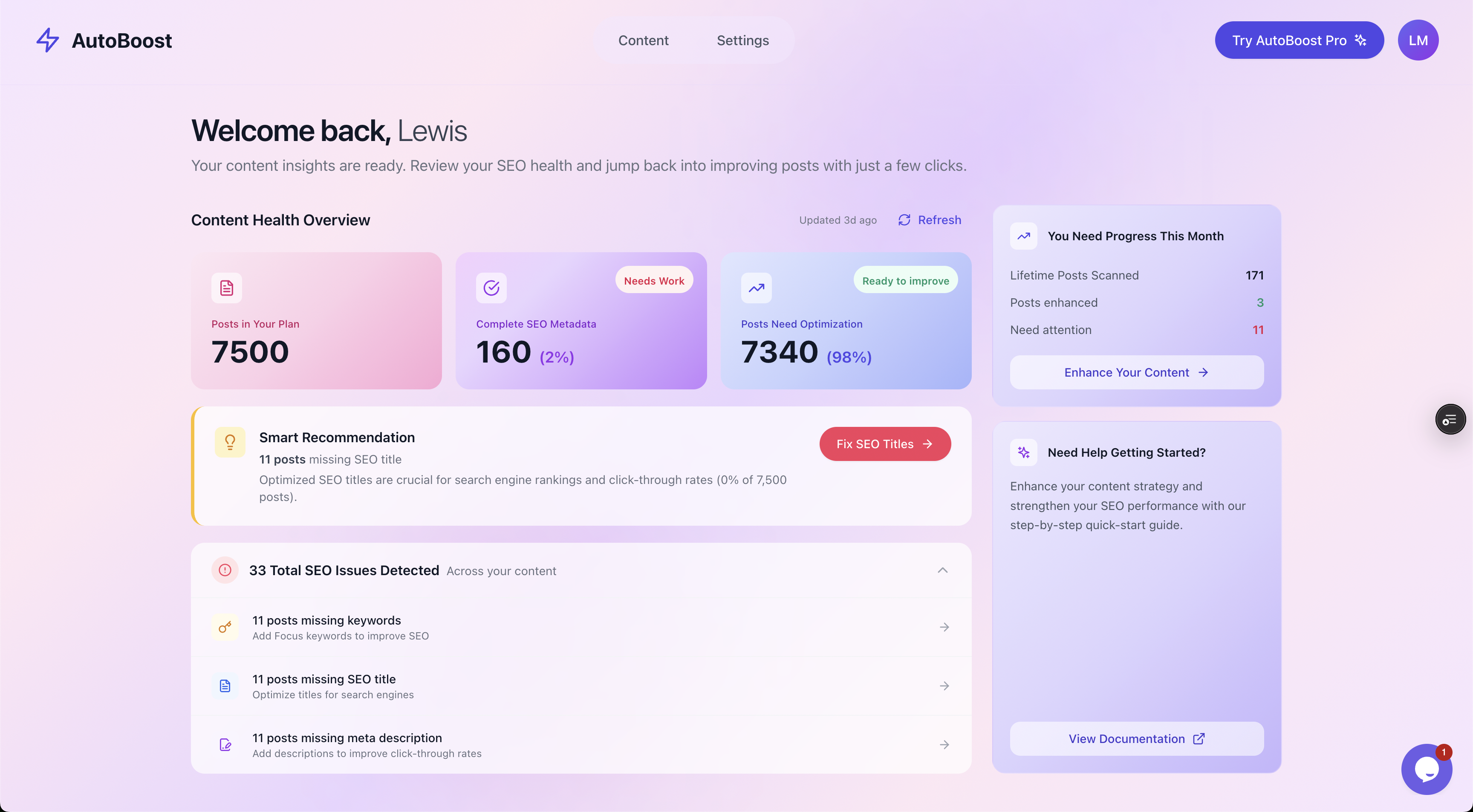
The Content Health Overview turns "this site needs work" into a concrete count: items scanned, percentage needing optimisation, and issues detected.
Doing the same audit on every site gives you something invaluable across a portfolio: comparability.
You can glance at ten dashboards and instantly see which client is in good shape and which one has 98% of its content unoptimised and is quietly leaking traffic. That is the difference between managing a portfolio and reacting to whichever client emails you first.
Our WordPress SEO audit guide walks through the specific fields worth checking on each pass.
Step 3: filter to the gaps, then bulk-fix
Once a site is audited, the worst thing you can do is start scrolling the full post list. Filter straight to the problem.
The filter chips let you isolate one category of fix at a time, which is exactly how you want to work when you are moving across multiple sites:
- Missing Title
- Missing SEO Title
- Missing Keywords
- Missing Meta
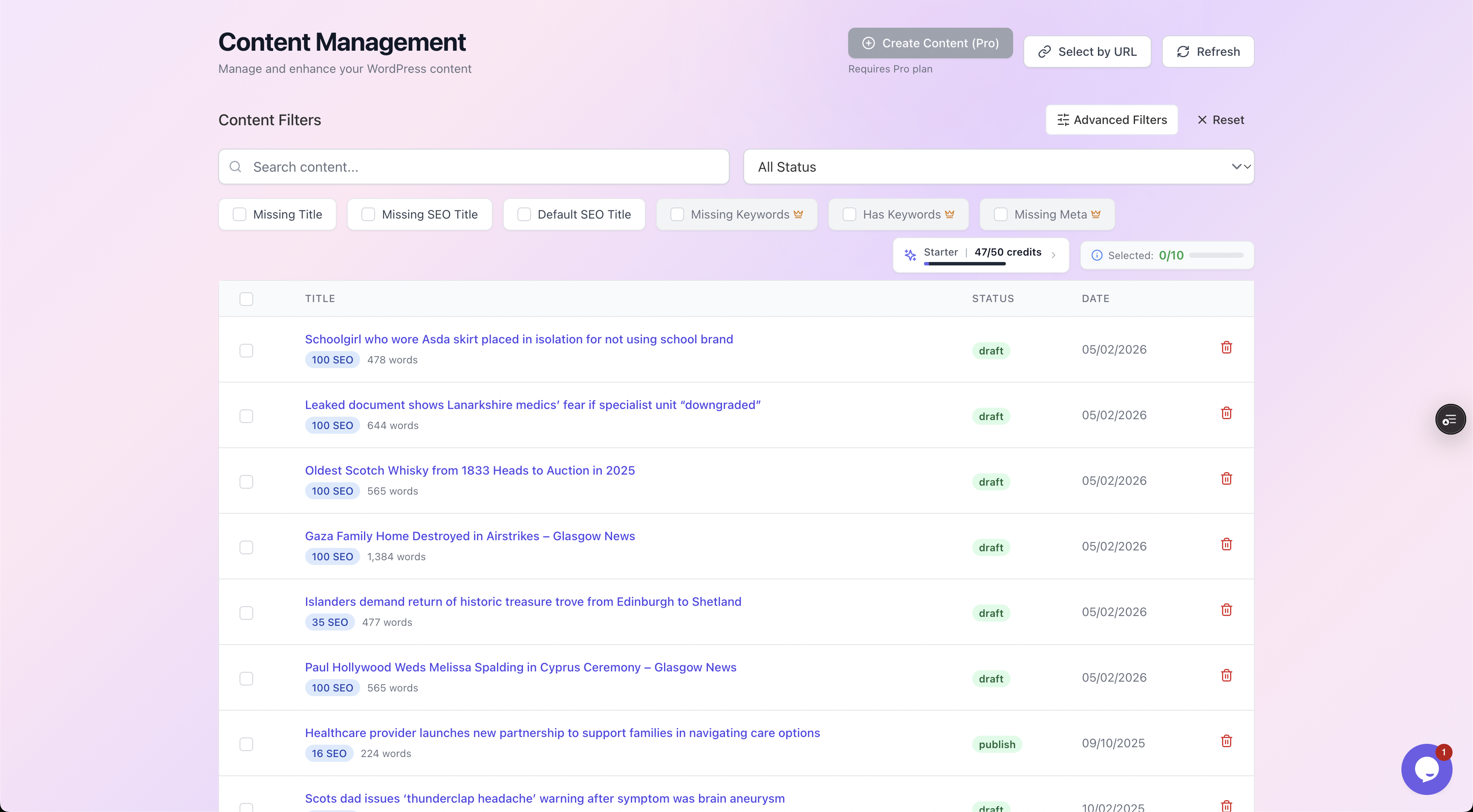
Filter to a single category of gap, fix that category in one pass, then move on. No scrolling the full post list.
Working by category rather than by post is what makes the work batchable. You generate meta descriptions for every post that is missing one, in one pass, then move to focus keywords, then titles.
Because the process is identical on each site, your brain stays in "writing meta descriptions" mode rather than ricocheting between five different jobs.
AutoBoost can bulk-generate the lot:
- Meta descriptions
- SEO titles
- Focus keywords
- Image alt text
- Schema
So a site that was 98% unoptimised becomes a series of reviewed batches, sized by your plan, rather than a month of clicking. If you want the deeper mechanics, our WordPress SEO automation workflow covers the full loop.
Watch out: This batches the repetitive work only. It does not write your content strategy, judge whether a post is actually any good, or build links.
The automation handles the metadata grind so you can spend your billable hours on the judgement calls and the client relationship, which is where you earn your fee.
For the wider picture of running SEO as a service, see SEO for agencies on WordPress.
Step 4: keep a human in the loop, especially for client work
When it is your own site, a sloppy auto-generated meta description is an embarrassment. When it is a client's site, it is a reputation problem and possibly a refund conversation.
So nothing AutoBoost generates publishes until you approve it. You see the current value next to the proposed one, with a quality checklist, and you Approve or Reject.
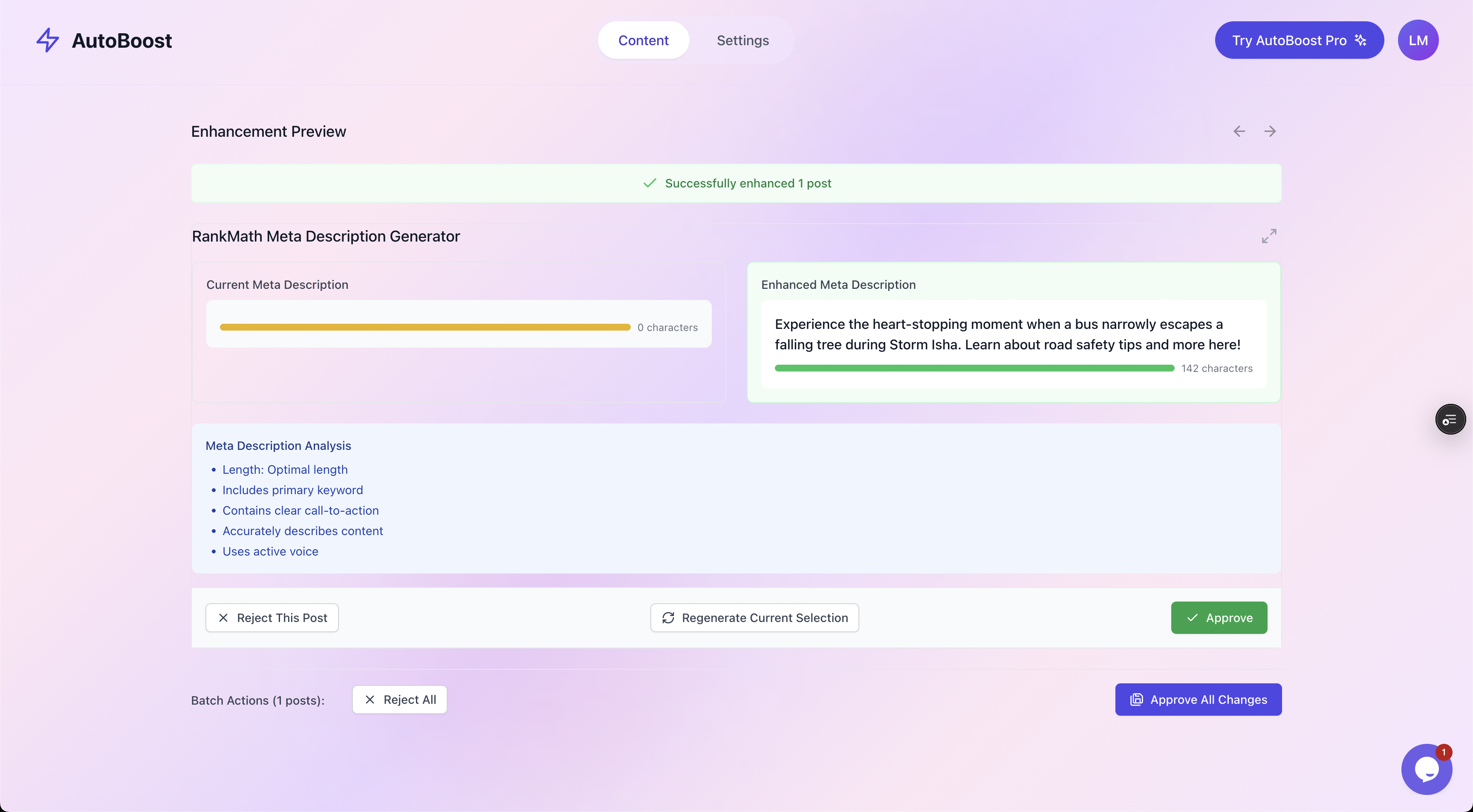
Every generated change shows current versus enhanced side by side with a quality checklist. Nothing goes live until you approve it.
Across many sites this review step is also your quality gate per brand. A meta description that fits a SaaS client's clipped tone is wrong for a wedding photographer.
Reviewing in batches lets you catch off-brand phrasing fast. Because you are approving rather than writing from scratch, you can review a whole site's worth of changes in the time it used to take to write five by hand.
By-hand versus a systemised multi-site approach
Here is the difference laid out plainly. Both columns assume you know your SEO. Only the mechanics change.
| Task | Per-site, by hand | Systemised multi-site |
|---|---|---|
| Finding gaps | Click through every post on every site | One audit per site surfaces the gaps automatically |
| Plugin handling | Re-learn each site's plugin quirks | Same process, writes to existing RankMath or Yoast |
| Fixing metadata | Write each title and description individually | Bulk-generate per category, review in batches |
| Tracking status | Spreadsheet you forget to update | Live per-site health overview you can compare across clients |
| Time per 20 posts | An afternoon, multiplied by every site | An afternoon for the first site, minutes of review thereafter |
| Quality control | Inconsistent, depends on energy that day | Consistent checklist and approval step every time |
| Scaling to 20 sites | Linear pain, you hit a wall | Process stays the same, only review volume grows |
The point is not that automation does the thinking. It is that the per-site overhead, the part that does not require any thinking, stops being paid over and over.
Worked example: a weekly multi-site routine
Say you manage ten client WordPress sites on the Agency tier. Here is a routine that keeps all of them moving without any one of them eating your week.
Monday: the portfolio scan (about 30 minutes)
Open the dashboard and glance at the Content Health Overview for each site. You are not fixing anything yet, you are triaging:
- Three sites are green.
- Eight are steady.
- One client just imported 200 legacy posts from an old blog and is now showing a wall of missing meta descriptions.
That last site is this week's priority.
Tuesday: the deep pass on the priority site (about 90 minutes)
Connect to the site with the imported backlog and work through it by category:
- Filter to Missing Meta, bulk-generate descriptions for all 200 posts, then review them in batches, approving the good ones and rejecting the handful that missed the brand voice.
- Switch the filter to Missing Keywords, repeat.
By the end you have cleared a backlog that would have taken a fortnight by hand.
Wednesday and Thursday: the maintenance sweep (about 20 minutes per site)
Work through the eight steady sites. Each one usually has a handful of new posts published since last week with no metadata.
Filter to the gaps, generate, approve. Twenty minutes a site, and you are done before lunch.
Friday: reporting and judgement work (the rest of the day)
Now the metadata grind is gone, this is where the real value goes:
- Reviewing rankings.
- Planning content.
- Checking the strategy calls that automation will never make for you.
The week's mechanical work took roughly a day across ten sites. The other four days are the work clients actually pay a premium for.
Tip: Stagger your client onboarding so new sites do not all land in the same week. Our guide on onboarding an SEO client on WordPress covers the first-week setup that makes a new site fit straight into this routine.
Picking the right tier for volume
Multi-site work lives or dies on credits and site limits, because your real number is the total across every client, not the biggest single site.
Ten sites each needing 100 posts fixed is 1,000 posts, which the smaller plans will not cover.
| Plan | Credits a month | Posts per run | Sites | Typical fit |
|---|---|---|---|---|
| Free ($0) | 5 | 3 | 1 | Trialling on one small site |
| Starter ( | 50 | 25 | 1 | A freelancer with a single client site |
| Pro ($49/mo) | 250 | 125 | 3 | A small portfolio of established sites |
| Agency ($99/mo) | 1,000 | 500 | 10 | A working agency across several client sites |
Most agencies sit on the Agency plan.
If you are reselling SEO as a productised service, note that AutoBoost has no white-label feature, so any branding stays in your own reports and communication. Our white-label SEO guide explains how a reseller model works in general.
To dig into the details:
- Compare the tiers in full on the pricing page.
- See what each plan unlocks on the features overview.
The enhancement templates are worth a mention here too, because they are what keeps the work consistent across a portfolio. You pick the generator you need (SEO title, meta description, focus keyword, readability) and run it the same way on every site.
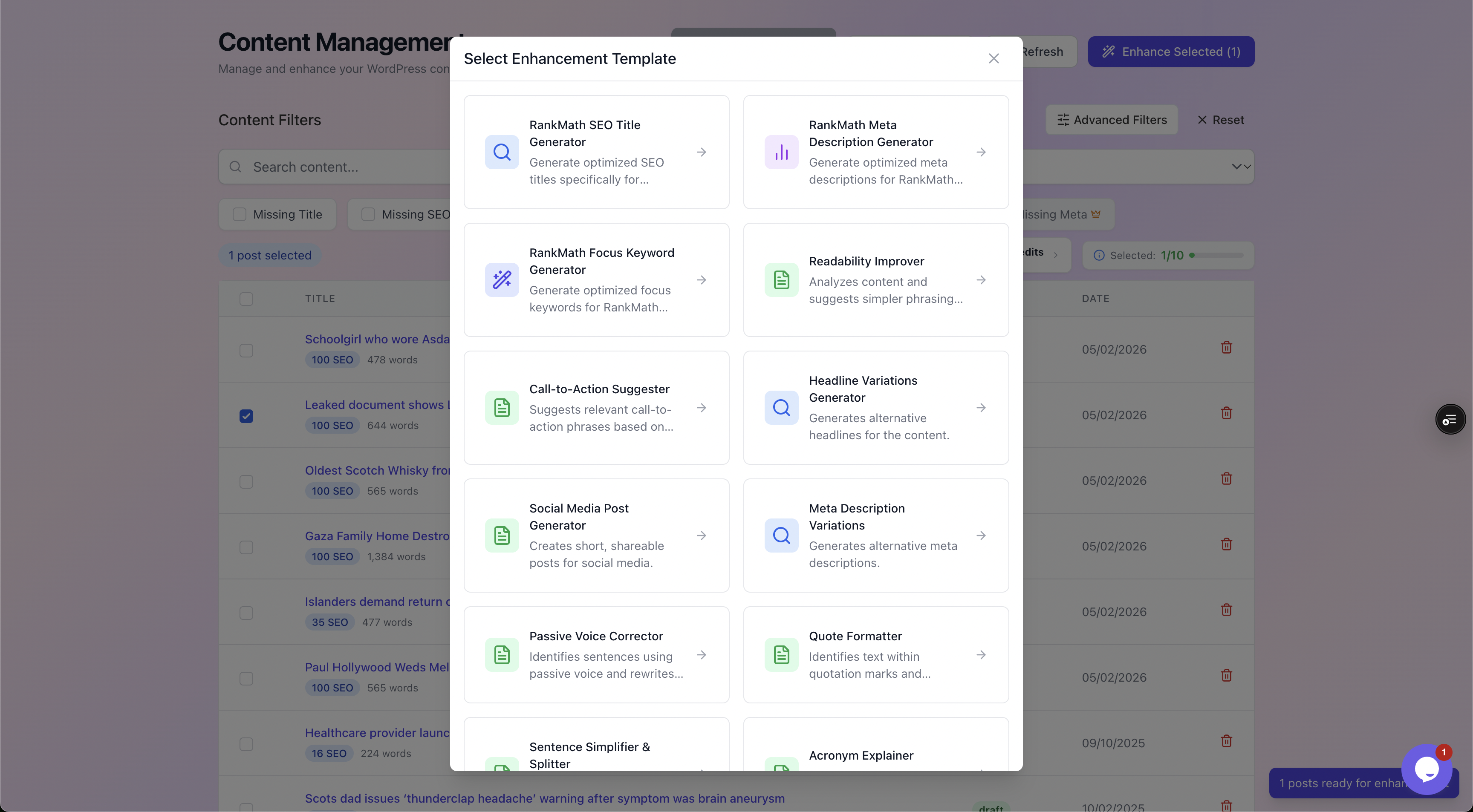
Pick a generator and run it identically across every site, so your output stays consistent no matter which client you are working on.
Frequently asked questions
How many WordPress sites can I realistically manage with this approach?
Each plan has a site limit: 1 on Free and Starter, 3 on Pro and 10 on Agency. The Agency plan also includes 1,000 AI credits a month and 500 posts per bulk run. The systemised process is what makes the site count manageable; the plan just needs to cover your combined volume across all of them.
Do all my client sites need to use the same SEO plugin?
No. AutoBoost writes back into whichever of RankMath or Yoast is already installed on each site, so a mixed estate of those two is fine. Sites running All in One SEO, SEOPress or The SEO Framework can be read but not written to. We still recommend standardising on new sites where you have the choice, purely to reduce the mental overhead of switching between them, but you are not forced to migrate inherited sites off their existing plugin.
Will bulk-generating metadata across many sites publish anything without me checking it?
No. Every generated meta description, title, keyword and piece of alt text is shown to you as current versus proposed, with a quality checklist, and nothing goes live until you approve it. This matters even more for client work, where an off-brand or wrong description is a reputation issue, so the human approval step is deliberate and not optional.
Can I tell at a glance which client site needs attention this week?
Yes, that is the point of running the same audit on every site. Each site has a Content Health Overview showing how many items need optimisation and how many issues were detected, so you can triage your whole portfolio in one sitting and put your time where it is actually needed rather than reacting to whoever emails first.
Does this replace having an SEO strategy for each client?
No, and it is not meant to. Automation handles the repetitive metadata work, finding gaps and filling titles, descriptions, keywords and alt text. It does not write your content, judge content quality, build backlinks or set the strategy. You bring the SEO judgement and the client relationship; the tool just buys back the hours you used to lose to mechanical work.
The takeaway
Managing SEO across multiple WordPress sites is not about working harder per site, it is about refusing to pay the per-site overhead more than once.
Do these four things:
- Standardise the plugin where you can.
- Run the same audit everywhere.
- Batch the fixes by category.
- Keep a human approving every change.
Do that and ten sites stop feeling like ten jobs and start feeling like one process running ten times.
Start with a single site on the free plan, prove the routine works, then scale it across the rest of your portfolio.