SEO for Agencies: Scaling On-Page SEO Across Client Sites
By AutoBoost Team · 2026-06-22 · 11 min read
Every agency hits the same wall. You win the client on strategy, then your margin quietly drains away into the on-page grind.
The usual culprits:
- Missing meta descriptions
- Blank SEO titles
- Posts with no focus keyword
- Images with no alt text
One site is annoying. Fifteen sites, each with a few thousand posts, is a business problem.
This guide lays out a repeatable workflow for scaling on-page SEO across client WordPress sites, without hiring a small army of juniors to copy and paste into RankMath all day.
Key takeaways
- Your margin dies in the repetitive on-page work multiplied across every client, not in the strategy you actually sell.
- Standardise one audit you run on every site, so onboarding and reporting look the same for every client.
- Batch the repetitive metadata generation, but keep a human review and approval step on every site for quality and client trust.
- Automation protects margin on the grunt work. The strategy, content quality and client relationship stay with you.
Where agency margin actually leaks
When agency owners talk about SEO profitability, they usually look at the wrong line.
The hours that lose you money are not the strategy calls or the keyword research. Those are billable and clients happily pay for them.
The leak is everywhere else: the silent, repetitive, low-judgement work that has to happen on every page of every site before any strategy can show results.
What a single onboarding actually involves
Think about what a new client onboarding turns up. Typically you find:
- Half the posts have no meta description.
- The SEO titles are just the post titles, untouched.
- Older articles have no focus keyword set, so RankMath cannot score them.
- Images uploaded over three years have no alt text.
None of that is hard. All of it is necessary. And all of it scales linearly with the number of posts and the number of clients, which is exactly the kind of cost structure that kills an agency.
The fix is not to stop doing the work. Clients need it done.
The fix is to systemise the parts that require no creative judgement, so a person only ever touches the decisions that actually need a person. That is the whole game for agency SEO at scale.
The strategy work versus the repetitive work
The single most useful thing an agency can do is draw a hard line between work that needs human SEO judgement and work that is mechanical.
Once that line is clear, you can price the first column as strategy and systemise the second column so it stops eating your team.
| Agency SEO task | The billable strategy work (keep human) | The repetitive work to systemise |
|---|---|---|
| Keyword research | Mapping intent, picking targets, building the content plan | Pulling raw volume and competitor lists |
| On-page metadata | Choosing the angle and primary keyword for key pages | Writing meta descriptions and SEO titles across the long tail |
| Focus keywords | Deciding the target for money pages | Assigning sensible focus keywords to hundreds of older posts |
| Image alt text | Alt for hero and brand imagery | Bulk alt text for body and archive images |
| Schema | Choosing which schema types a client needs | Applying the chosen schema across matching post types |
| Content audits | Interpreting findings, deciding what to prune or rewrite | Scanning every post to find what is missing |
| Reporting | The narrative, the next quarter's plan | Counting what got fixed this month |
Read the right-hand column again. None of it is where you add value, yet it is where most of the hours go.
The left-hand column is what clients are paying for and what keeps them. An agency that automates the right and sells the left protects its margin and its reputation at the same time.
For a deeper breakdown of how this maps to an automated pipeline, see our WordPress SEO automation workflow guide.
Step one: standardise one audit across every client
Inconsistency is expensive. If every account manager audits sites their own way, onboarding is slow, reporting is incomparable, and quality drifts.
The first move to scale is a single audit you run identically on every site you take on.
A good baseline on-page audit checks for the same five gaps every time:
- Focus keyword missing on the post
- SEO title missing on the post
- Meta description missing on the post
- Alt text missing on images
- Schema missing on pages
Run it the same way on a five-page brochure site and a four-thousand-post publisher, and you get a like-for-like picture you can put in front of any client.
This is exactly what AutoBoost surfaces the moment a site is connected. The dashboard gives you a Content Health Overview across the whole library, so you can see the size of the problem before you quote on the work.
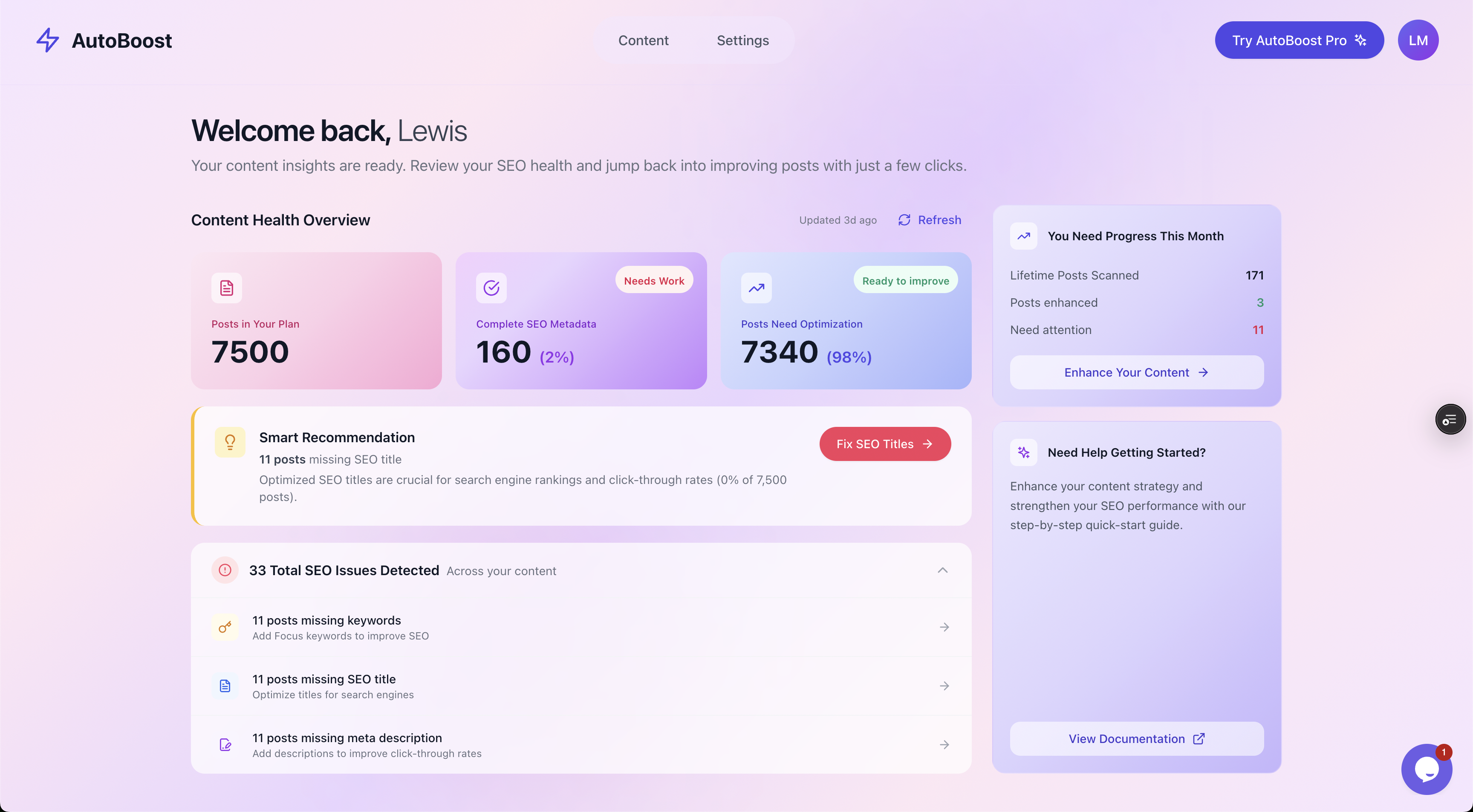
The Content Health Overview on a connected site: total items, the share needing optimisation, and detected SEO issues, all in one place.
Connecting a client site
Connection itself is deliberately light:
- You install the AutoBoost connector plugin on the client's WordPress site.
- You authenticate with an Application Password, no FTP and no developer hand-off.
- AutoBoost then scans every post and flags the ones missing a focus keyword, SEO title or meta description.
For the structure behind running this repeatably across a portfolio, our guide on managing SEO across multiple WordPress sites covers the multi-site side in detail.
Step two: triage with filters before you touch anything
A raw audit on a large site is overwhelming. Three thousand issues is not an action plan, it is a wall.
The next step is triage, so you and the client agree what gets fixed first.
Filtering by gap type turns the wall into a queue. You can isolate every post missing a meta description, or every post with no focus keyword, then decide the order:
- Money pages first
- High-traffic posts next
- The long tail last
The same filters let you scope a fixed-price engagement honestly, because you can count exactly how many of each issue exist.
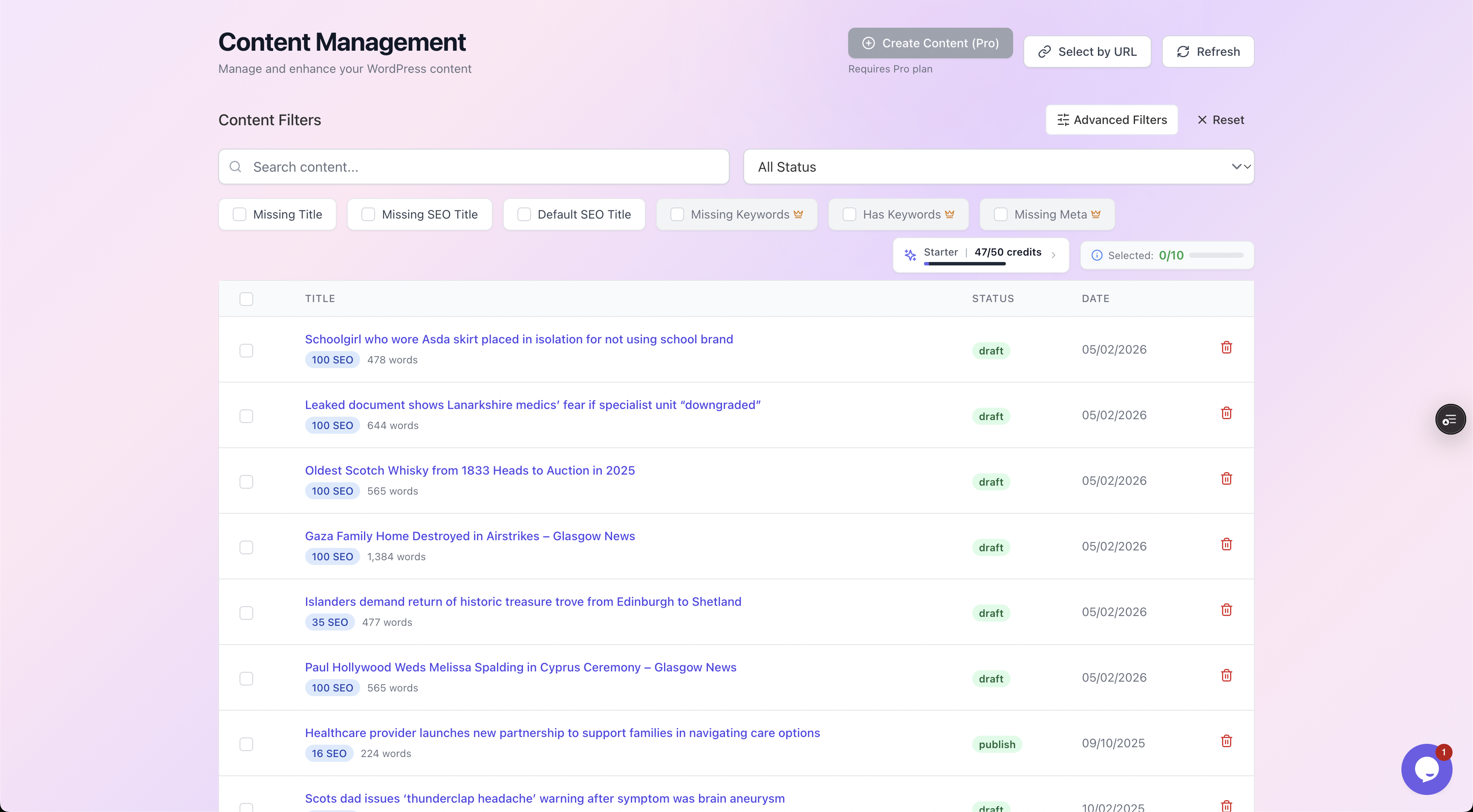
Filter chips isolate each type of gap so you can triage by impact and scope the work precisely.
This triage step is also where the client conversation gets easier. Instead of vague promises, you show them the count, agree the priority order, and set expectations for the first month.
Tip: Scoping from real numbers beats guessing. It stops you over-committing on a site that turns out to have far more debt than the pitch suggested.
Step three: batch the repetitive metadata
This is the part that used to need a junior and a fortnight.
Once you know what is missing and in what order, you generate the metadata in bulk rather than typing it post by post.
AutoBoost bulk-generates and writes back:
- Optimised meta descriptions
- SEO titles
- Focus keywords
- Image alt text
- Schema
It writes those into whatever SEO plugin the client already runs.
Why it works with your existing plugins
AutoBoost works with RankMath and Yoast rather than replacing them (it can also read All in One SEO data), which matters enormously for agencies:
- You inherit clients on different plugins.
- You never want to migrate a client's SEO plugin just to do routine on-page work.
- AutoBoost fills the existing fields in the tool they already trust.
You pick the enhancement you want per batch from a template picker, so a run of meta descriptions is one job and a run of focus keywords is another. That keeps each batch reviewable as a single unit of work.
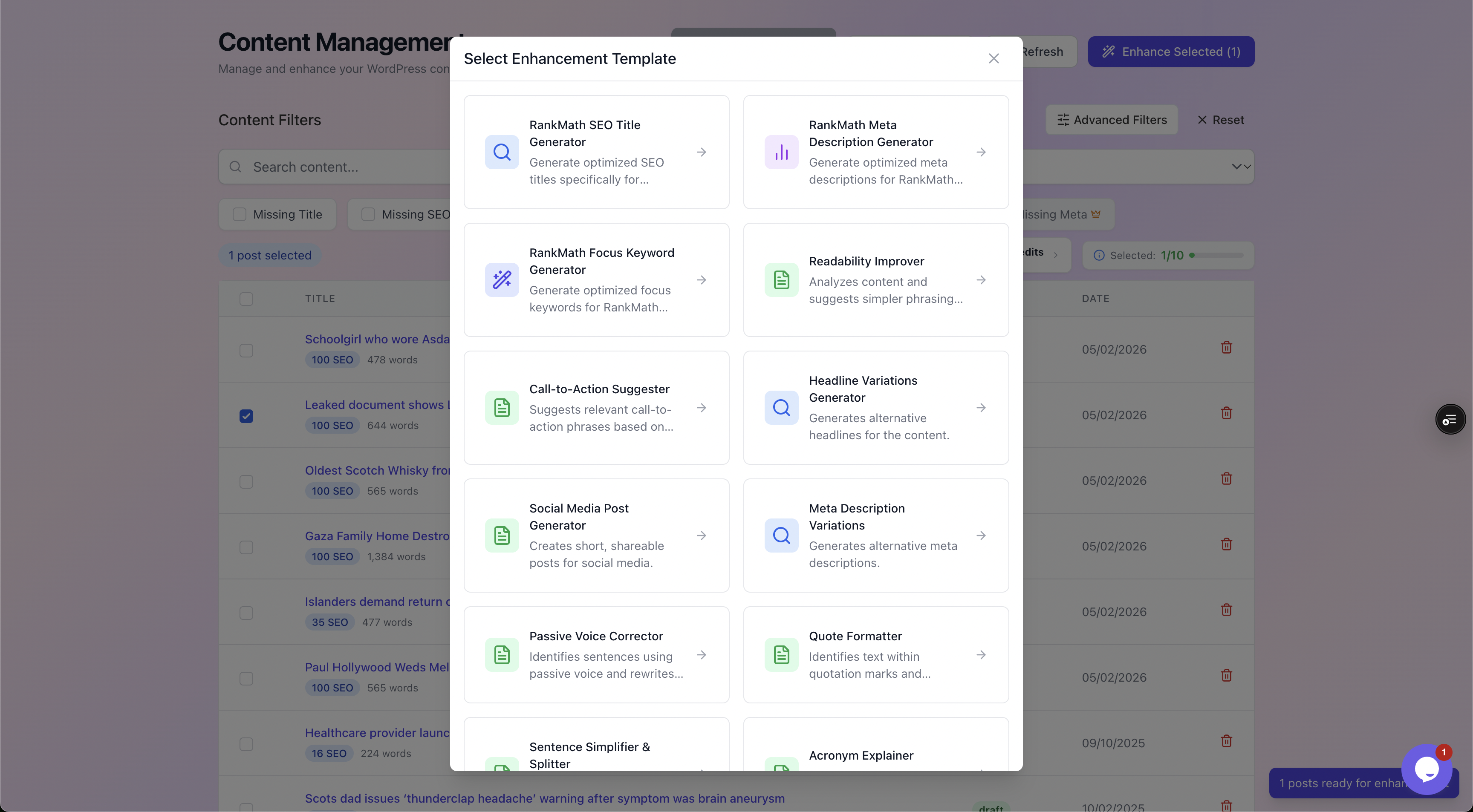
Choosing an enhancement template scopes each batch to one type of fix, which keeps review clean.
For the specific repetitive jobs, we have dedicated walkthroughs:
- Bulk editing meta descriptions
- Fixing missing SEO titles
- Adding focus keywords
- Adding image alt text in bulk
Each one is a repeatable batch you can run on any client site.
Step four: keep the human review on every site
Here is the line you do not cross, especially on client work. Nothing publishes automatically.
AutoBoost is human-in-the-loop by design: every generated field is proposed, not pushed, and you approve or reject before anything is written live.
This matters more for an agency than for a solo blogger:
- A weird meta description on your own site is a shrug.
- The same thing on a client's homepage is an awkward email and a dent in trust.
The review step is what lets you scale volume without scaling risk. You batch the generation, then a person scans the proposals and signs off, which is minutes per batch instead of hours of typing.
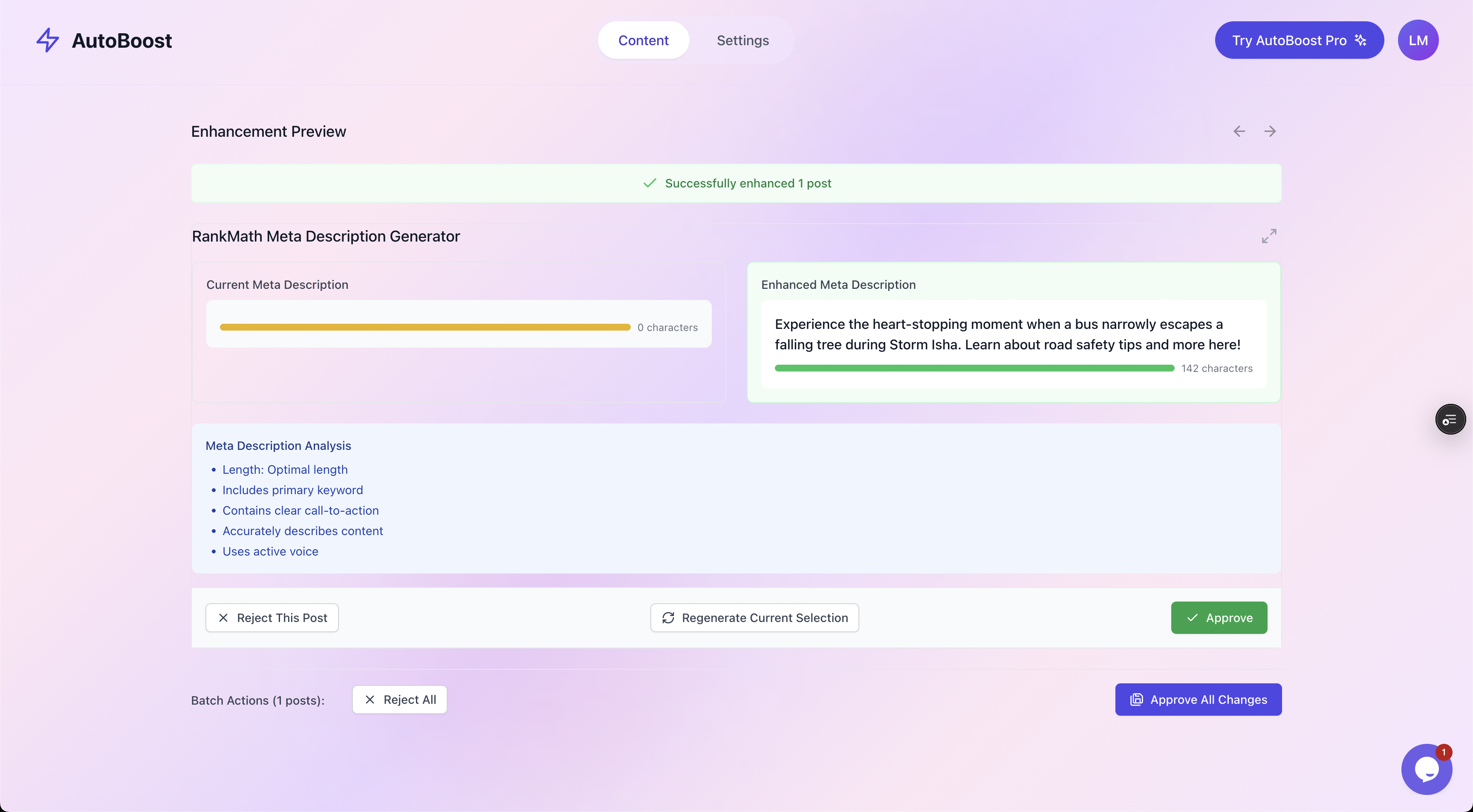
Every suggestion shows current versus enhanced with a quality checklist, and nothing goes live until someone hits Approve.
Tip: Make approval an explicit role on client accounts. One named person reviews and signs off each batch, so quality control is owned, not assumed. It also gives you a clean audit trail if a client ever queries a change.
The review step is also where your SEO judgement quietly re-enters the process. The automation handles the heavy lifting of drafting hundreds of descriptions, but the human deciding what ships is applying brand voice, accuracy and intent.
That blend, machine speed with human approval, is the entire point.
Step five: report what changed
Agencies live and die on demonstrating progress.
The good news is that a systemised on-page process produces reporting almost for free, because the counts are already there.
At the start of an engagement you have the audit numbers: posts missing meta, missing titles, missing keywords. After each batch, those numbers drop.
The monthly report writes itself:
Started the month with 1,800 posts missing meta descriptions, optimised 600 this cycle, 1,200 remaining and on track to complete in two more cycles.
That is a concrete, defensible story of work delivered, and it is far more persuasive than a screenshot of a ranking chart you do not fully control.
The narrative on top, what the trend means and what you will do next, is your strategy work. The raw counts underneath it are the systemised part. Same pattern as everything else in this guide.
Worked example: onboarding a 4,000-post client
Picture a new client: a regional services company with a WordPress blog built up over six years, around 4,000 posts, running Yoast. They came to you for growth, but the on-page foundation is a mess.
You connect the site with the AutoBoost connector and an Application Password, and the audit lands within the hour.
The Content Health Overview shows:
- Roughly 3,100 posts with no meta description
- 2,400 posts with no focus keyword
- A few thousand images with no alt text
On the old manual model, that is weeks of junior time and a margin you would rather not calculate.
How the workflow plays out
Instead you triage:
- Using the filters, you isolate the 180 service and location pages that drive revenue and handle those first, with metadata you write and refine yourself because those are money pages worth the judgement.
- Then you batch the long tail: a meta description run on the remaining posts, reviewed and approved in sittings of a couple of hundred at a time.
- A focus keyword run after that.
- An alt text run for the image library.
Across the first month, a single reviewer approves the batches in short sessions rather than one person typing for ten working days.
The client gets a report showing 3,100 missing descriptions down to 900, with a clear finish line. You spent your senior time on the 180 pages that matter and on the strategy, and the grunt work no longer ate the account's profit.
That is the difference between SEO at scale being a cost centre and being a margin.
For the publisher-heavy version of this, see blog SEO at scale, and for stores, WooCommerce SEO.
Choosing the right tier for an agency
Plans on AutoBoost are set by AI credits a month, posts per bulk run and number of sites:
- Agency plan ($99/mo): 1,000 credits a month, 500 posts per run and up to 10 sites, enough to run several client sites.
- Pro ($49/mo): 250 credits, 125 per run and 3 sites, a fit for a small portfolio.
- Solo freelancers managing a couple of sites can start lower and move up as the book grows.
AutoBoost has no white-label feature, so keeping client perception in your hands means presenting the work, reports and review step under your own brand yourself.
Where to look next:
- Our white-label SEO guide covers what that looks like in practice.
- The pricing page shows the limits and prices.
- The full capability list lives on features.
- The integrations page confirms how AutoBoost sits alongside RankMath and Yoast.
Worth being honest about: automation handles the repetitive metadata, not your strategy, your content quality or your link building. You still bring the SEO judgement, the editorial standard and the client relationship. AutoBoost just stops the grunt work from consuming the hours those things deserve.
Building the repeatable agency workflow
Put the five steps together and you have a process you can run on every client identically, which is what scaling actually means.
- Standardise the audit. Same five-point on-page check on every site you connect.
- Triage with filters. Sort by gap type, prioritise money pages, scope from real counts.
- Batch the metadata. Bulk-generate descriptions, titles, keywords, alt text and schema into the client's existing plugin.
- Review and approve. A named person signs off every batch. Nothing publishes unapproved.
- Report the deltas. Counts before, counts after, narrative on top.
The first time you run this it feels like setup. By the third client it is muscle memory, and onboarding a new site stops being a dread and becomes a same-day job.
For the onboarding mechanics specifically, our guide on onboarding an SEO client on WordPress walks through the connection and first-audit steps in order.
Frequently asked questions
Will AutoBoost replace my clients' existing SEO plugin?
No. AutoBoost works with RankMath and Yoast rather than replacing them. It writes generated metadata back into whichever of the two a client already runs, so you never have to migrate a client off the tool they trust just to do routine on-page work. It can read All in One SEO, SEOPress and The SEO Framework data but does not write to them.
Can it publish changes automatically across all my clients?
No, and that is by design. AutoBoost is human-in-the-loop. Every generated field, meta description, SEO title, focus keyword, alt text or schema, is proposed for review, and nothing is written live until someone approves it. On client work that approval step is your quality control and your audit trail, so we would never recommend bypassing it even if you could.
How many client sites can one agency plan cover?
Plans are set by AI credits and posts per bulk run, with a site limit on each, so it depends on portfolio size. The Agency plan includes 1,000 AI credits a month, 500 posts per bulk run and up to 10 sites. There is no Enterprise plan or white-label feature. The pricing page has the current limits.
Does this actually save time, or just move the work around?
It moves the work from typing to reviewing, and reviewing is far faster. Drafting hundreds of meta descriptions by hand is hours. Approving a batch of well-formed suggestions is minutes. The judgement stays with your team, but the mechanical drafting does not eat junior days any more. That is where the margin comes back.
What does AutoBoost not do for an agency?
It does not do your strategy, write your long-form content, or build your backlinks. It handles the repetitive on-page metadata that scales painfully across clients. The keyword strategy, the editorial quality bar and the client relationship are yours, and they always should be. Think of it as protecting the time you spend on the work clients actually pay you for.
Where to go next
If you run SEO across multiple WordPress sites, the on-page grunt work is the part of the job that quietly decides whether each account is profitable. Systemise it and you free your senior people for the strategy that wins and keeps clients.
A sensible order to read in:
- Start with how to manage SEO across multiple WordPress sites.
- Then look at onboarding a client.
- Then read the general guide to white-label SEO.
When you are ready to see the limits and tiers, the pricing page lays out the plans, and features shows the full toolset.